


Generative AI, such as Microsoft Copilot, is a type of artificial intelligence that creates new content by learning patterns from data and predicting the next element in a sequence. In this article, we’ll discuss how generative AI differs from other types of AI and how Copilot generates AI images, text, and more.
MARCH 29, 2024 5 MIN READ Updated: DECEMBER 10, 2025
What is generative AI?

Key takeaways
- Generative AI creates new content (text, images, code, audio) by learning patterns from large datasets.
- Traditional AI is used for applications that analyze or classify information, rather than creating it.
- Everyday uses include writing drafts, designing visuals, producing music, and coding assistance.
What’s the difference between generative AI and traditional AI?
Generative artificial intelligence (also referred to as gen AI), such as Copilot, is a type of AI that is trained on data and can generate novel content, such as text, images, music, and code. What’s incredible about gen AI is that it continuously learns and refines its outputs based on user interactions.
On the other hand, traditional AI systems, like assembly-line automation and chess-playing computers, make decisions by operating on explicit instructions and predefined rules. Traditional AI is not designed to create original content from existing data like generative AI does.
Generative vs. traditional AI at a glance
Category |
Generative AI |
Traditional AI |
|---|---|---|
Primary function |
Creates new content such as text, images, audio, or code. |
Analyzes data, detects patterns, and makes predictions or classifications |
Output type |
Novel and original (content generation) |
Deterministic or rule-based (classification or decision-making) |
Learning type |
Learns from vast datasets to simulate creativity and context |
Follows programmed logic or learned rules to ensure accuracy |
Examples of use |
Writing assistance, image creation, code generation, chatbots |
Fraud detection, recommendation systems, speech recognition |
Data dependence |
Requires massive, diverse training data for pattern learning |
Uses structured or labeled data for predictive accuracy |
What can generative AI create?
Generative AI can produce a wide range of content types, including:
- Text: articles, summaries, dialogue, or reports
- Images: illustrations, product mockups, digital art
- Code: snippets, functions, or entire applications
- Audio: voice synthesis, sound effects, and music
- Video: storyboards and visual concepts across multiple media types
Everyday uses of generative AI
So, what can generative AI do? Whether you want to simplify your work routine or experiment with AI creativity tools, Copilot’s here to help you reach your goals. And with Copilot available for free in your Edge browser and on the Copilot app, it’s easy to integrate the power of AI into your everyday workflow to:
- Draft and summarize text
- Create visuals or branding concepts
- Write or debug code
- Compose or edit music and voiceovers
- Generate learning materials or presentations
Additionally, when you purchase a subscription to Microsoft 365, you can write, analyze, and create faster with Copilot directly integrated into Word, Excel, Outlook, and other Microsoft 365 apps you already use.
Generative AI examples
AI image generation
One of Copilot’s main applications is as an AI image generator capable of whipping up infinite images in countless artistic styles. It can make life-like images, paintings, 3D art, and so much more! Examine how these AI art prompt and output examples come to life when you use Copilot as an AI artwork generator:
Prompt: Create a vibrant animation of a happy, amorphous blob floating through a digital landscape.
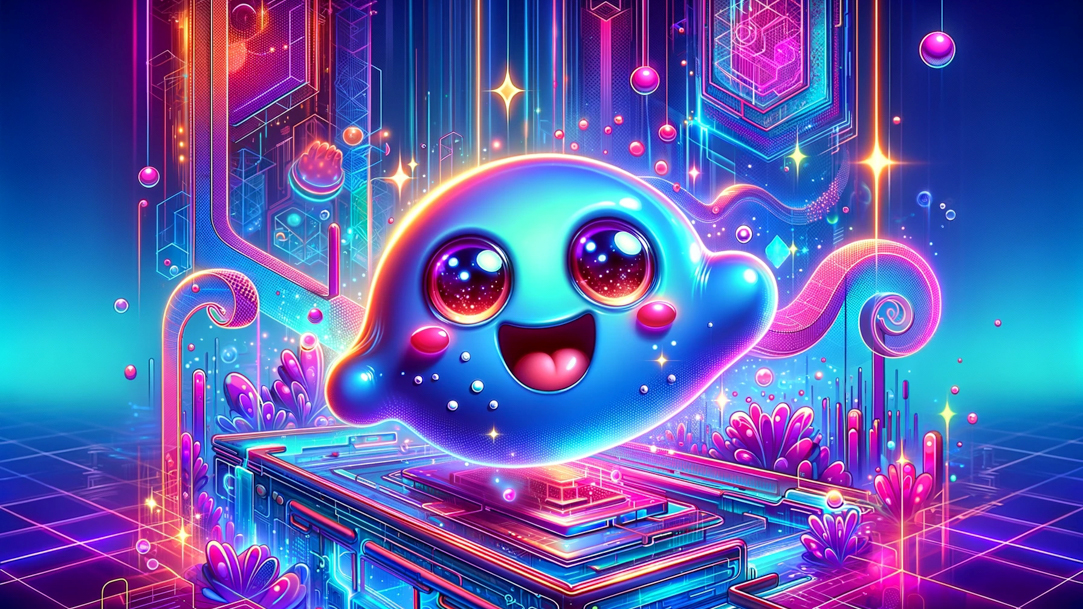
AI art created via Copilot
Prompt: Generate a photo-realistic image set in the 1940s of a middle-aged man at a diner on a rainy day. He is sitting on a stool at a long counter, enjoying coffee.

AI art created via Copilot
AI text generation
For example, here’s what happens when you ask Copilot to write a high school graduation speech:
Prompt: Could you compose a motivational speech for high school graduates?
Result: Dear Graduates, you stand at a pivotal moment, poised for incredible journeys ahead. Embrace each challenge as an opportunity for growth, armed with perseverance and determination. Your future is a canvas of possibilities—paint it with bold strokes of ambition and hope.
Or try asking Copilot to summarize complex scientific concepts, like quantum computing:
Prompt: Simplify the concept of quantum computing for a general audience.
Output: Imagine quantum computing as a turbocharged engine of the vehicle where traditional computing is like a bicycle. Quantum computers operate at astonishing speeds, turning complex problems that would take years to solve into tasks accomplished in mere moments.
Imagine the future with generative AI
We’re living in one of the most exciting chapters of human achievement thanks to the wide availability of generative AI. Use these generative AI examples as a launchpad for whatever AI image and text generation you can imagine with Copilot today.
DISCLAIMER: Features and functionality subject to change. Articles are written specifically for the United States market; features, functionality, and availability may vary by region.
Mentioned in this article

Copilot
Copilot app
Copilot for individuals
You may also like
General AI - 4 MIN READ
What is Copilot, and how can you use it?
Learn how you can use Copilot, your AI-companion.
General AI - 4 MIN READ
Where can you access Copilot?
Learn how to access your AI assistant to its fullest potential in your daily life.

AI art prompting guide - 5 MIN READ
AI art prompting guide
Learn to write the best AI prompts with free text-to-image AI built into Copilot. Turn your ideas into stunning visuals with this easy-to-use AI artwork generator.
