Every organization has valuable business insights hidden in customer feedback, support cases, supplier updates, emails, and other unstructured data. While AI can uncover these insights, they often remain trapped in one-time interactions. The real value comes when those insights become persistent business data that can be searched, reported on, automated, and used by agents to answer questions faster and with greater context.
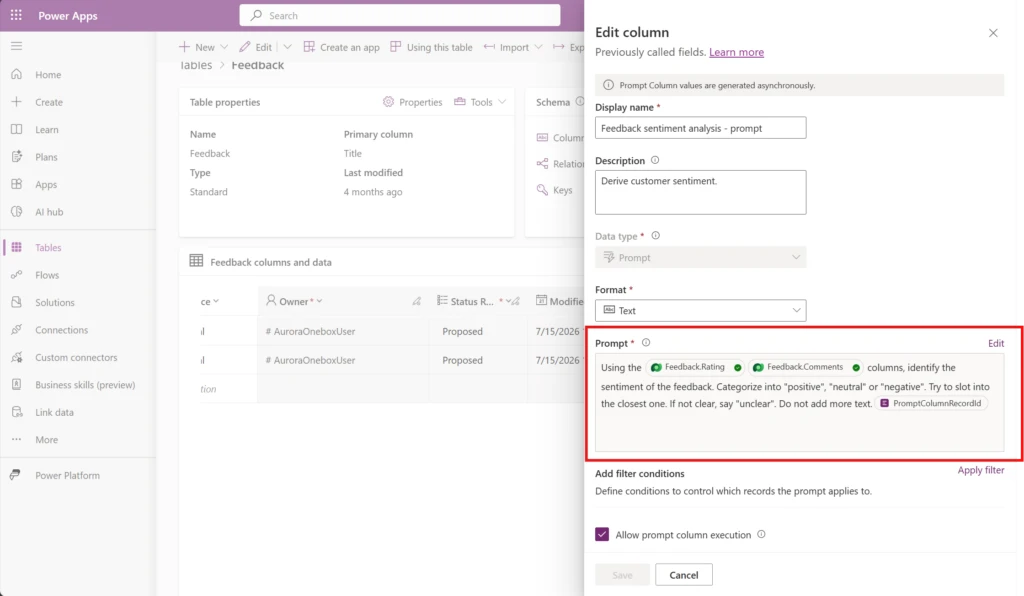
We are announcing that Prompt Columns in Microsoft Dataverse is now Generally Available. Prompt Columns enable makers to use natural language to generate AI-powered classifications, summaries, recommendations, and other insights directly from business data. Unlike traditional AI experiences, the generated insights are persisted within Dataverse tables, making them immediately available to applications, workflows, analytics, and agents across the Power Platform.
From Shipment Delays to Actionable Insights
See how Ashley, a supply chain operations manager, uses Prompt Columns to solve her business challenge.
Here are the key takeaways:
- By leveraging AI’s ability to interpret free-form business data, Ashley uncovers insights that traditional rules and formulas cannot derive. She can then create additional Prompt Columns that build on those results, such as assessing business severity and operational risk based on the root cause, shipment status, and delay duration.
- Insights are persisted directly within her business data and they become reusable across business processes. Ashley can create supplier performance scorecards, track recurring delay patterns by supplier or region, automatically escalate high-risk shipments through workflows, build dashboards that surface operational risks, and enable Copilot agents to answer questions such as “Which suppliers are causing the most critical delays and why?”
- Natural language configuration empowers any maker to apply AI directly to business processes, reducing the expertise and development effort traditionally required to unlock value from AI. Ashley doesn’t need to build machine learning models, write code, or integrate external AI services.
The result is faster identification of operational risks, reduced manual effort, more informed decision-making, and AI-generated intelligence that continuously powers business processes.
Enterprise Impact Across Core Business Scenarios
Here are some common Prompt Column scenarios:
- Sales Effectiveness and Revenue Growth: Analyze lead and opportunity data, classify intent and likelihood to convert, summarize customer needs, and recommend next actions, helping sales teams prioritize high-value opportunities, personalize engagement, and improve conversion rates.
- Risk Management and Compliance: Flag compliance risks, detect escalation signals, and classify interactions by risk level. Regulated industries can potentially transition from manual sampling to AI-assisted monitoring, with the potential to reduce exposure.
- Supply Chain and Operations Optimization: Analyze supplier records, purchase orders, shipment data, inventory exceptions, and quality inspection notes to classify delays, defects, and recurring vendor issues by severity, enabling faster resolution and more proactive supply chain management.
- Customer Experience and Retention: Analyze customer feedback to identify satisfaction trends, churn risks, and product improvement opportunities. AI driven classification, sentiment analysis, and personalized recommendations may help organizations proactively intervene, personalize engagement at scale, and strengthen long‑term customer loyalty.
- Financial Services Fraud Detection and Prevention: Classify risk and identify anomalies, with the expectation of reducing false positives, accelerating investigations, and improving overall regulatory posture. Financial institutions may strengthen fraud prevention by analyzing transactions, communications, and account activities in near real time.

Prompt Columns: Key Capabilities Drive Enterprise Value
Strategic Cost Optimization: Configurable filter logic ensures prompts execute only on high‑value records such as priority customers, critical transactions, or specific risk profiles. Organizations reduce AIB or Copilot credit consumption while maximizing business impact.

Monitor Every Execution: Prompt Column activity is logged in Power Automate’s AI Builder Activity experience, where makers and admins can view execution history, monitor consumption, and review prompt activity. This provides visibility into how Prompt Columns are being used and the credits consumed across your environment.

Execute AI Only When It Matters: A prompt is executed when one or more of its defined input columns change on the entity to which the Prompt column belongs. If relevant data isn’t updated, Prompt Columns doesn’t execute, eliminating unnecessary cost.
Flexible Execution Control: Enable or disable individual prompts without deleting columns or losing historical data. Pause execution during maintenance, testing, or budget cycles, then reactivate instantly.

Extended Data and Context Awareness: Define prompts on lookup fields and activity types such as emails, for a richer understanding of each record.
Scale Without Performance Compromise: Prompt execution runs asynchronously, decoupling AI processing from real-time transactions. Systems remain responsive while thousands of records are processed per hour. This gets rid of the traditional trade-off between intelligence and performance.

Transform Your Enterprise
Start your AI journey with Prompt Columns in Microsoft Dataverse, and turn AI into a permanent business advantage. Learn more:
- See the Public Preview blog for Prompt Columns: https://www.microsoft.com/en-us/power-platform/blog/2025/08/04/prompt-columns/
- Prompt columns learn docs: https://learn.microsoft.com/power-apps/maker/data-platform/prompt-column
- Overview of prompts learn docs: https://learn.microsoft.com/ai-builder/prompts-overview
- Prompt FAQ: https://learn.microsoft.com/ai-builder/faqs-text-generation
- Monitor AI Builder models and prompts learn docs: https://learn.microsoft.com/en-us/ai-builder/activity-monitoring