

At a glance
- Brings rich interactivity to AI-generated charts: Flint-interactive enables agents to create data visualizations that users can explore directly through clicking, filtering, zooming, highlighting, and cross-chart interactions.
- Makes complex interactions easier to build: Instead of requiring low-level visualization code, Flint-interactive lets users and agents define behaviors using high-level semantic events and update operators.
- Improves reliability and reduces development effort: By using Flint’s compiler to handle interaction logic and visual dependencies, the system helps avoid many of the layout, rendering, and debugging challenges common in custom interactive visualizations.
- Connects charts, text, tables, and applications: Flint-interactive supports interactive data stories, dashboards, and connected experiences where actions in one view can update charts, documents, widgets, or application state in another.
AI agents make it easy to analyze data and generate reports with data visualizations. They help users examine patterns more efficiently than by reading verbose text. However, when we’re feeling exploratory, we want to go beyond static visualizations.: We want to interact with charts to zoom in on details, compare data across charts, or even highlight related text in the document from a chart selection, and vice versa. This requires agents to be able to create interactive data visualizations that communicate information while letting readers explore beyond the author’s chosen view, ideally with the quality of interactive stories in sophisticated data journalism. This leaves us wondering:
- (As a user) Can I interact with charts directly in chat to explore the data and ask follow-up questions based on what I select?
- (As a developer) Can I enable the AI agents I build for my customers to generate interactive visualizations that help them explore and understand their data?
Yes, it’s possible, but there is a significant practical gap. Even with capable frontier models, we still face:
- High generation cost. Agents rarely produce a fully satisfactory interactive visualization in one turn. Repeated rounds of reasoning, coding, and debugging consume tokens and time.
- Reliability. Interactive visualizations are challenging enough that expressive interactive charts introduce poor layouts or broken interactions easily, and we risk introducing new problems when trying to fix them.
These challenges help explain why consistently generating high-quality interactive visualizations remain difficult in real-world use. Meanwhile, built-in interactions in some visualization libraries are not expressive enough on their own to create bespoke interactive charts. And these challenges are results of the lack of an expressive yet high-level language to specify visual interactions.
PODCAST SERIES

AI Testing and Evaluation: Learnings from Science and Industry
Discover how Microsoft is learning from other domains to advance evaluation and testing as a pillar of AI governance.
Flint-interactive
Flint-interactive (opens in new tab) is a language for creating interactive data visualizations on top of Flint. It allows users to create dashboards, data stories, and interactive artifacts more easily. The power of Flint-interactive comes from Flint’s compiler, which translates user interactions into semantic events that capture the meaning behind what users select. It then uses high-level operators to update visualizations in response to those events, making sophisticated interactions far easier to create and maintain. This shifts the heavy burden of resolving complex dependencies between interaction and visual logic to the compiler, so the user (or the agent) can easily describe expressive interactions with high-level specifications.

How to use
1. Use Flint in your chat
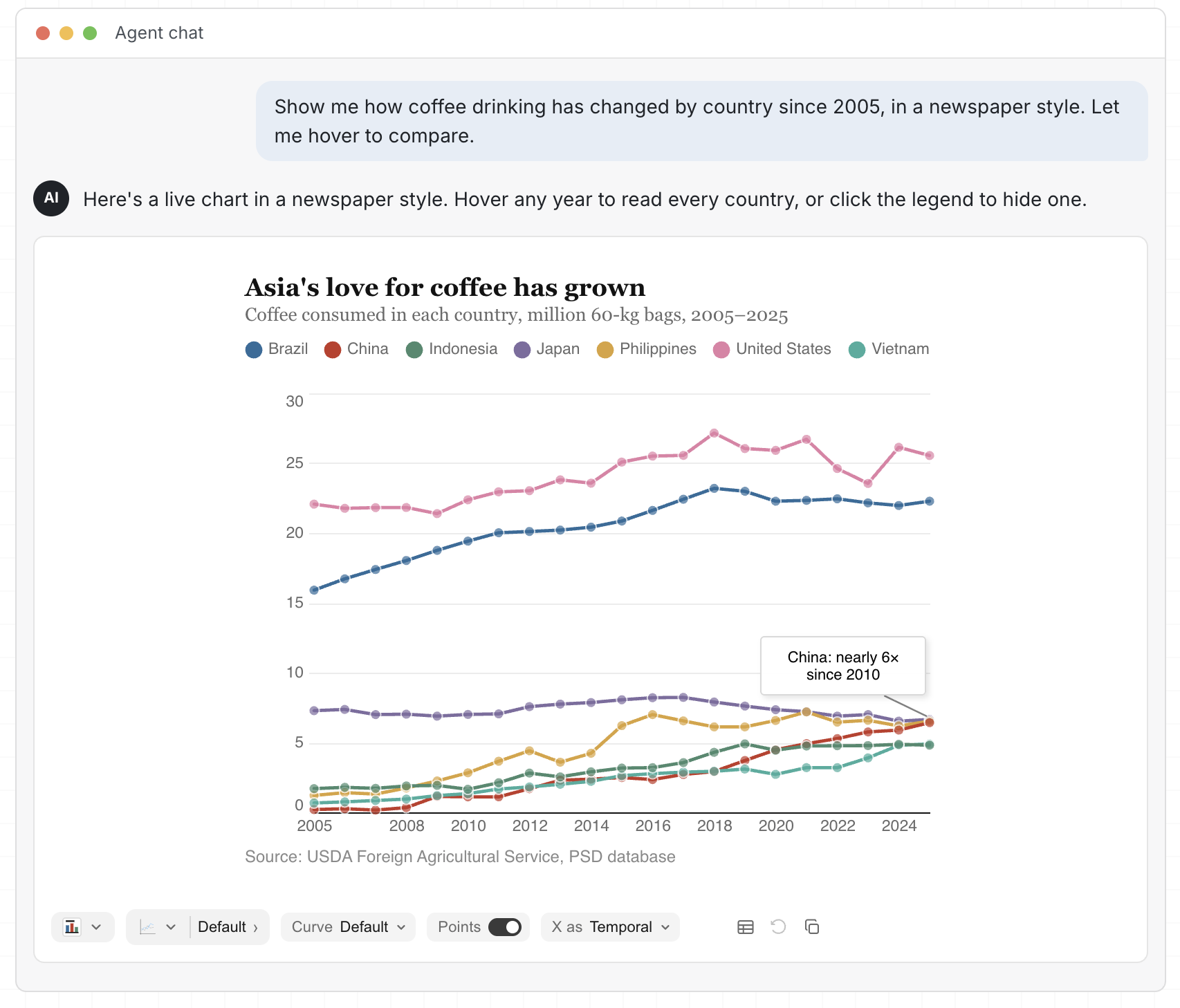
Use Flint Interactive directly in your chat or canvas environment through Flint-MCP and MCP Apps, following the MCP setup guide. With the latest release, tell your agent what to chart and which interactions you want; it can generate an interaction_spec alongside the Flint chart spec and render the interactive chart in your conversation.
2. Build an interactive app with Flint
Build interactive charts in a dashboard, data story, or other application with Flint Interactive Canvas. Your app can use event handlers to process semantic events emitted by Flint Canvas, for example to filter a table, update another chart, or change application state. To let your app’s widgets control how the chart updates, send update operators to Flint Canvas.

3. Create bespoke interactions
To create bespoke interactions beyond Flint’s presets, define a trigger and a custom handle function with the programming API that maps semantic events to custom chart update sequences. For example, a handler can highlight a clicked country and label it by name. It combines set-style and set-annotation without manipulating renderer-specific marks.

How it works
Flint Canvas is a state machine that tracks user interactions on the canvas and manages visual rendering state. Flint makes interaction specification easy by separating visual logic, managed by the compiler, from interaction logic, specified by the user at the semantic level:
- Visual logic: The compiler automatically resolves raw triggers, such as clicks, drags, and key presses, into semantic events that identify chart elements and data. It also translates update operators into rendered canvas changes, handling hit testing, and low-level visual updates.
- Interaction logic: The user specifies interactions by mapping semantic interaction events to chart update operators, such as set style to highlight data, set annotation to label a point, or set viewport to pan or zoom. The user can also use those semantic events to update external tables, widgets, or application states.

This separation means users do not need to reverse-engineer rendering logic or manipulate renderer-specific marks, making interactions easier to specify and maintain. Furthermore, because event generation and visual updates are compositional, the same model also connects Flint with tables, text, other charts, and widgets to build interactive stories and dashboards.
Try it now!
Chart users: Set up Flint in your chat (opens in new tab) and ask your agent to create an interactive chart. Find inspiration in the interaction gallery.
App builders: Build interactive dashboards, data stories, and connected views with the programming API (opens in new tab). Share the interaction-author skill with your coding agent to add presets to your app.
Interaction designers: Explore the bespoke examples (opens in new tab), design a new interaction, and turn it into a reusable preset. Propose a preset on GitHub and share your prototype or implementation to help expand Flint’s interaction vocabulary.




 Artificial intelligence