



As threat actors operationalize AI to accelerate attacks, they are also leveraging the wider global interest around AI itself as a social engineering lure. In recent months, Microsoft Threat Intelligence has observed a growing number of campaigns that impersonate the branding of popular AI platforms such as ChatGPT, Microsoft Copilot, DeepSeek, and Anthropic’s Claude as lures. These campaigns, which don’t represent compromise of services, span phishing, malvertising, and search engine optimization (SEO)-driven attacks that ultimately lead to credential theft, financial fraud, or malware infection.
AI as TRADECRAFT
Threat actors are quick to capitalize on highly anticipated launches or emerging trends, leveraging trusted branding and exploiting user curiosity to improve the success rates of their campaigns. Despite the AI-themed lures, however, these campaigns combine longstanding tactics, such as urgency-driven messaging, abuse of trusted services, and multi-stage redirection chains that require user interaction to evade detection.
While traditional lures like invoices, payment notifications, or delivery alerts remain effective and continue to be widely used, AI-themed lures reflect a shift in social engineering that is likely to persist as a long-term tactic used by threat actors, from cybercriminal groups to nation states. Notably, Microsoft Threat Intelligence has observed the initial access broker Storm-3075 employing AI-themed malvertising to deliver payloads, including malware signed by the malware-signing-as-a-service (MSaaS) offering attributed to the financially motivated threat actor Fox Tempest, on behalf of multiple downstream actors.
FOX TEMPEST
This blog details several of the campaigns observed by Microsoft Threat Intelligence in the past few months that used AI brands and references as lures, and provides guidance to help users and organizations detect, mitigate, and respond to these threats. Importantly, Microsoft believes that the activity noted in this blog is purely abuse of AI brand names as lures, not reflecting a compromise of any referenced vendor. As threat actors scale their operations with AI, organizations should leverage AI-powered security capabilities to enhance visibility, automate detection, and accelerate response across email, identity, and endpoint surfaces.
BROWSER EXTENSION USING AI BRANDING
ChatGPT-themed lure leads to phishing kit collecting credit card data
On May 5, 2026, Microsoft detected a ChatGPT-themed phishing attack that delivered malicious URLs leading to phishing pages that collected credit card and personal information such as names and addresses. This phishing activity, which consisted of 4,500 emails sent to targets in South Africa (97%), was part of a broader campaign using similar themes and infrastructure. We also observed this campaign delivering as much as 100,000 emails on a single day to targets in Switzerland, Austria, and South Africa affecting a broad range of industries, including higher education and professional services.
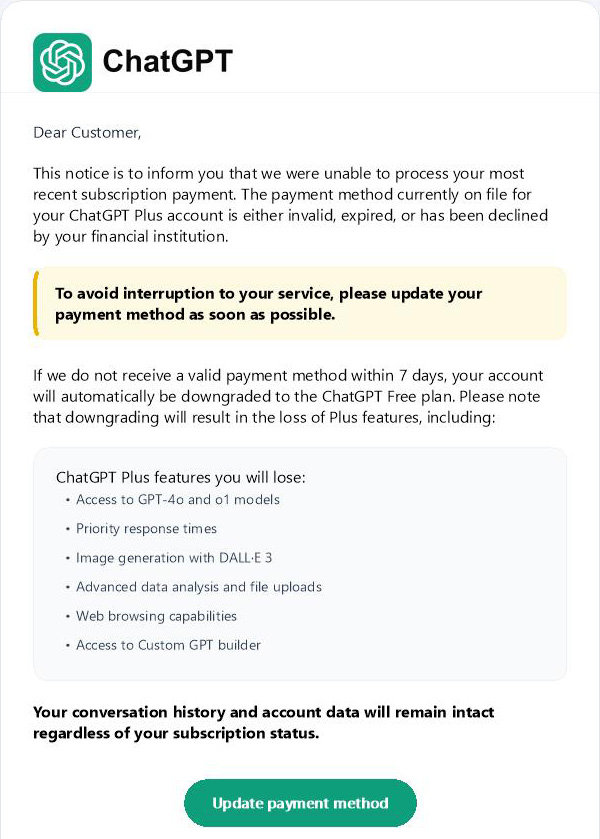
The emails used the sender display name ChatGPT and the subject “To ensure your ChatGPT Plus continues to work – please update your payment method”. The emails posed as an urgent request to update the ChatGPT Plus subscription payment method. They warned the recipient that if a new payment method was not provided within seven days, the account would be downgraded to a free plan. A ChatGPT logo was prominently displayed at the top of the email body.
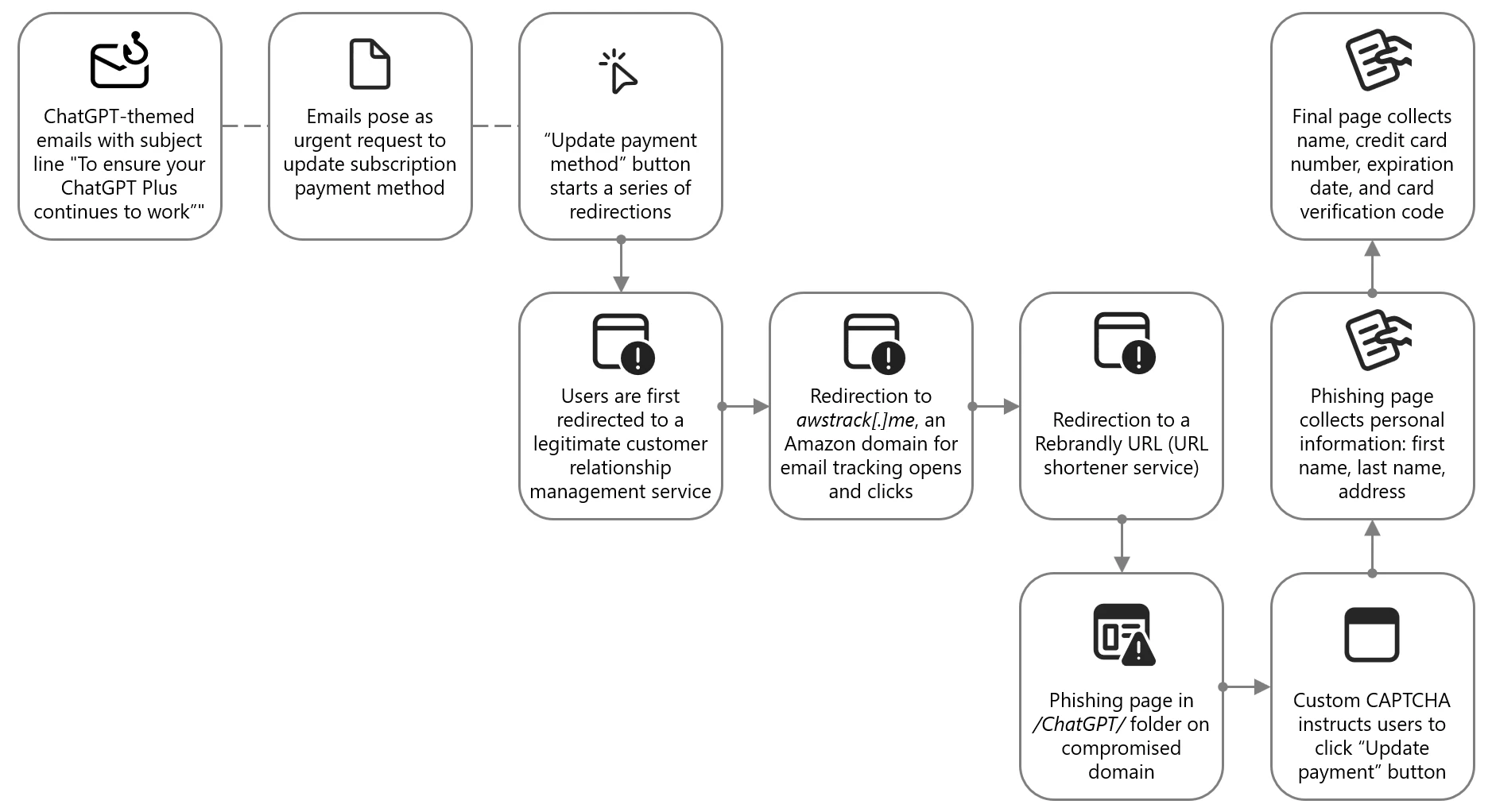
The phishing email contained a clickable Update payment method button, which did not directly send users to the attacker-controlled site. Instead, users were redirected through a series of legitimate and abused redirector hops. This is a common technique used by threat actors to exploit the reputation of trusted domains and bypass email filters, evade detection, and track victim engagement.
Targets were first directed to grupoconstat[.]bitrix24[.]com[.]br (a legitimate customer relationship management (CRM) service), which redirected to awstrack[.]me (an Amazon domain used for tracking email opens and clicks), which in turn redirected to a Rebrandly URL (a legitimate but often abused URL shortener service). Targets were finally sent to a likely legitimate but compromised domain legendarytrendsbay[.]shop where the threat actor had placed the phishing page in the /ChatGPT/ folder.
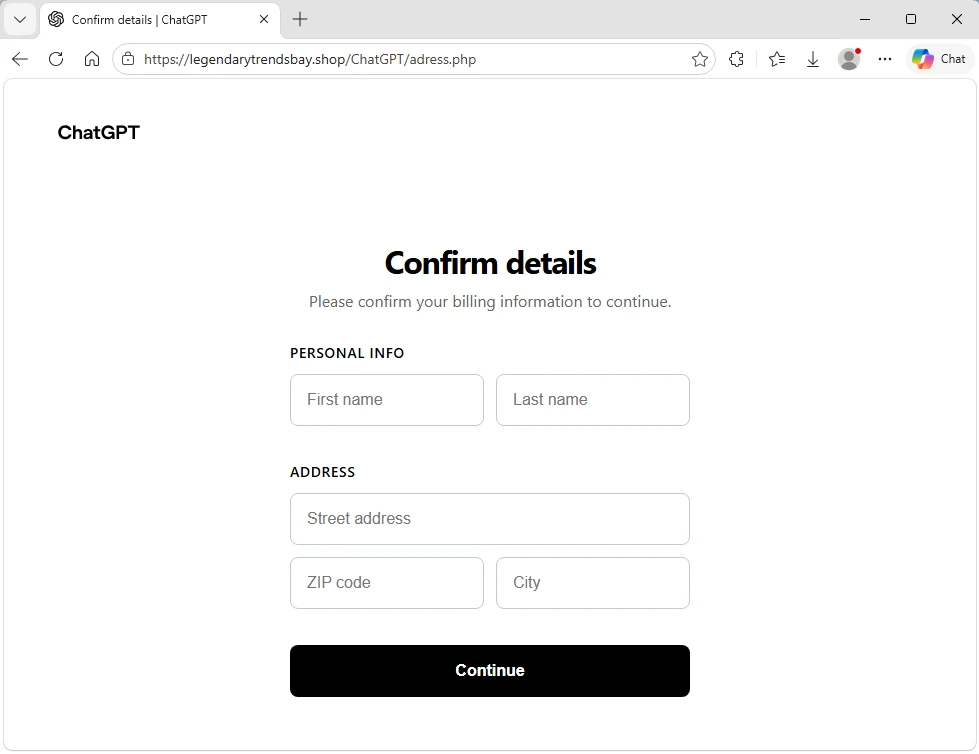
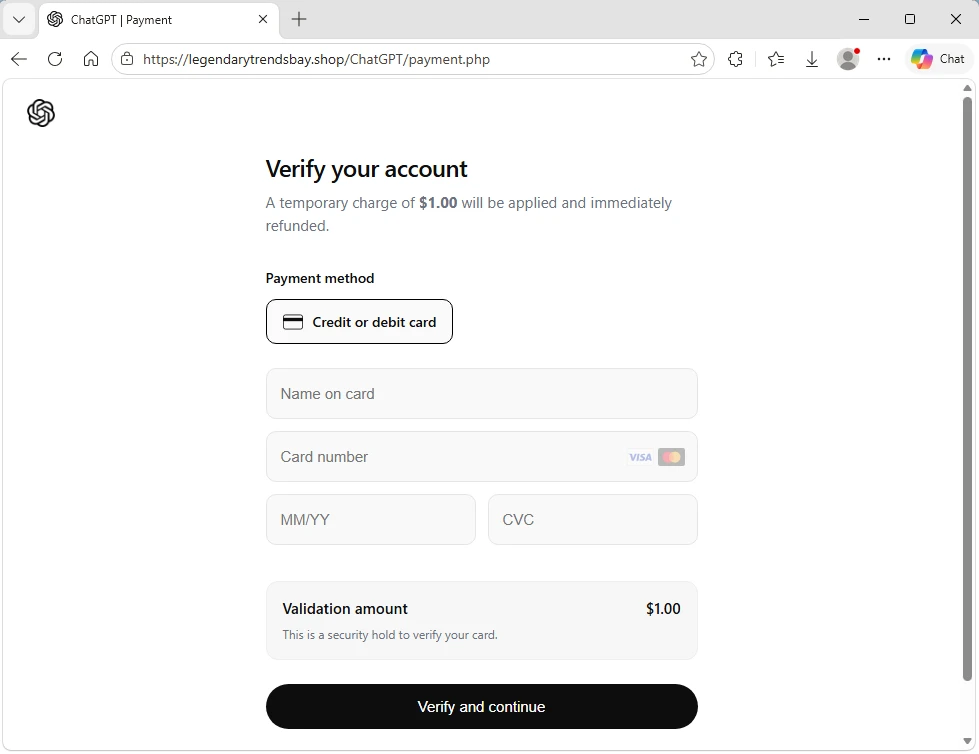
The landing page did not immediately display the phishing content. It first required visitors to pass a custom CAPTCHA, which was a simple Update payment button. If they clicked this button, users were sent to the next page where personal information, including first name, last name, and address was collected. The final page then collected the name, credit card number, expiration date, and card verification code.
Claude-themed phishing campaign collected credentials and access tokens
From April 20 to 22, 2026, Microsoft observed a phishing campaign impersonating Anthropic-branded services to target users with account-related lures tied to the Claude AI platform. The campaign sent phishing emails to targets across more than 2,000 organizations, primarily in the United States (62%), the United Kingdom (18%), and India (9%). While this campaign impacted a broad range of industries, it was most notably focused on information technology (56%), other business entities (21%), and financial services (8%).
The campaign used enforcement-themed messaging claiming that the recipient’s account was in violation of acceptable use policies and required immediate action. The emails impersonated Anthropic’s popular AI service Claude using the display names Anthropic Teams and Anthropic PBC, masquerading as legitimate account-related communications. Subject lines followed a consistent structure of “Claude Appeal Request” combined with date elements.
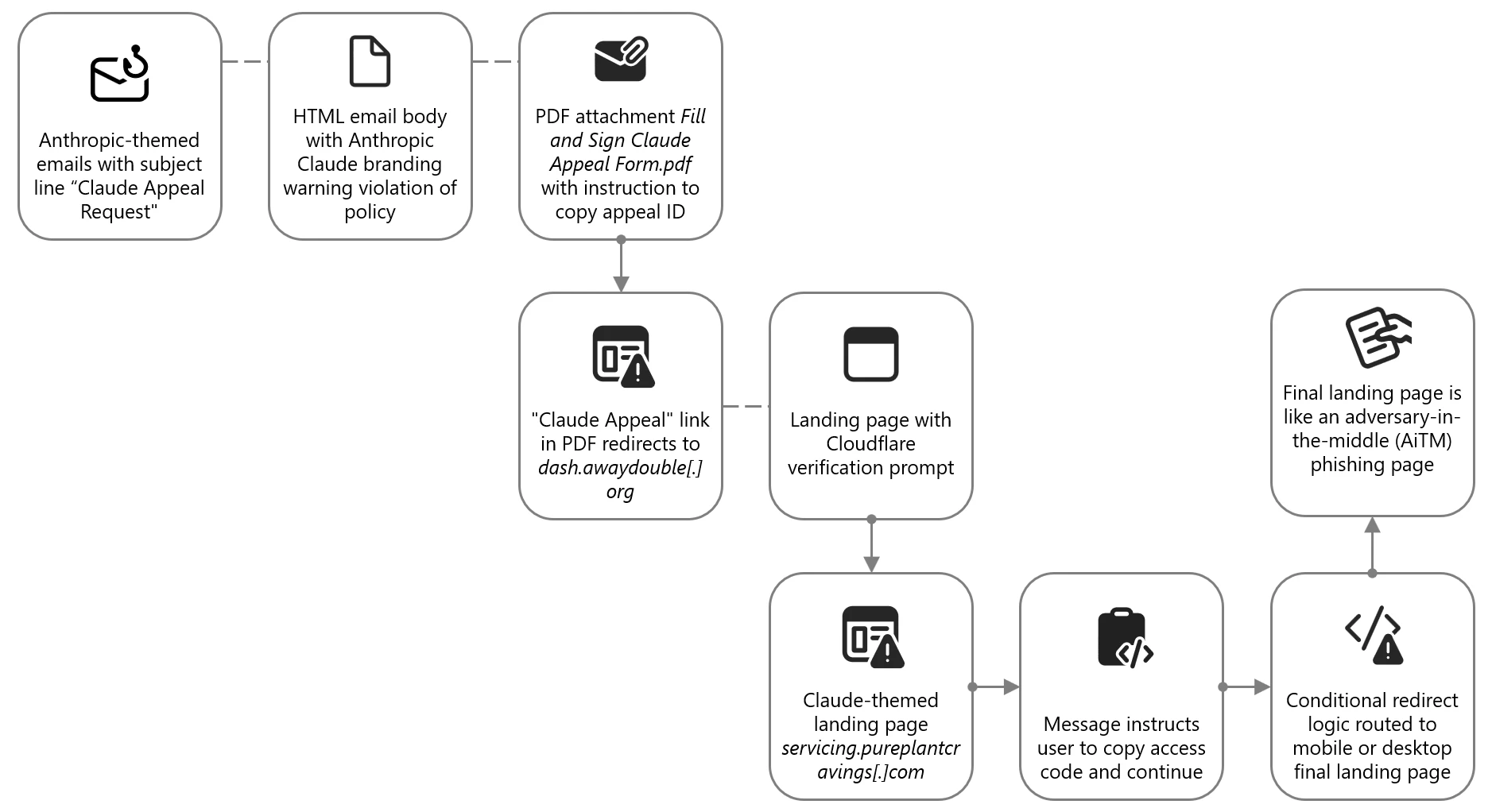
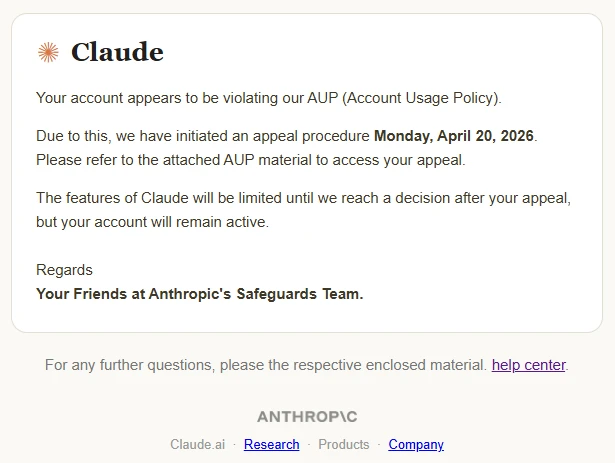
The email body was delivered as HTML and included Anthropic and Claude branding. The message informed recipients that their account was violating “AUP (Account Usage Policy)” and that Anthropic had “initiated an appeal procedure”. The message instructed recipients to review the attached material to access their appeal and indicated that Claude features would be limited pending review.
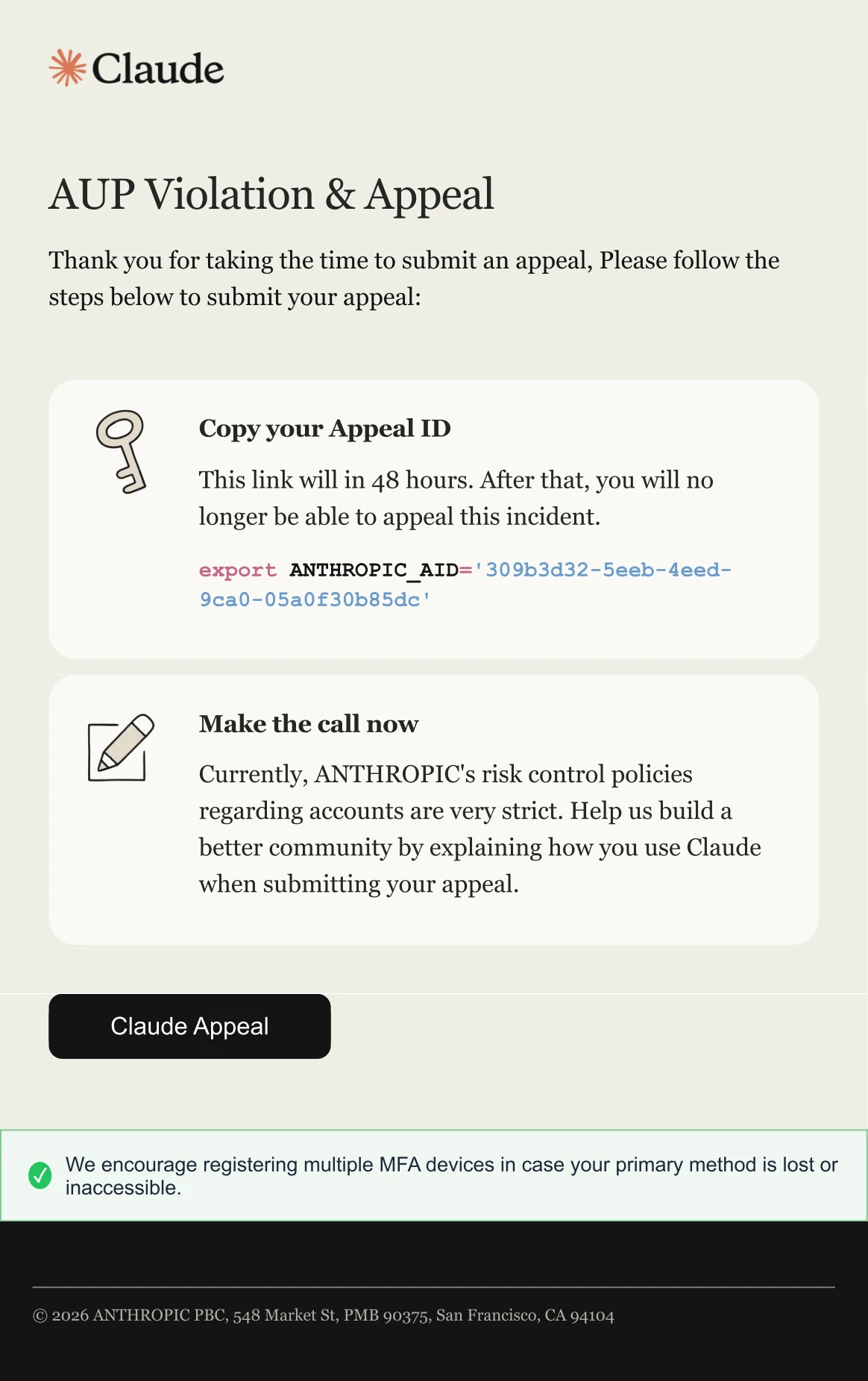
The email attachment was a PDF named Fill and Sign Claude Appeal Form.pdf, which was designed to resemble an official process tied to Claude account enforcement. The document presented an appeal workflow, prompting users to copy an appeal ID and click the “Claude Appeal” link, which initiated the credential harvesting process.
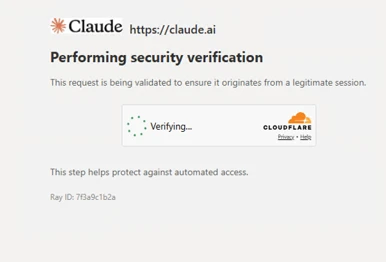
When clicked, the link embedded in the PDF directed users to an attacker-controlled domain, dash.awaydouble[.]org. The initial landing page displayed a Cloudflare verification prompt, presented as confirming the user was arriving from a “legitimate session”. This step likely served as a gating mechanism to impede automated analysis and sandbox detonation.
Users who completed the verification were redirected to another Claude-themed landing page hosted on servicing.pureplantcravings[.]com. This page was named “Account Appeal Notice” and contained “Account Security & Compliance” message informing users that their account had been flagged for repeated violations of usage policies. The page provided a reference date and a one-time access code, prompting users to copy the code and continue.

Clicking “Continue” redirected users to the final page, which was not available at the time of analysis. Source code revealed conditional redirect logic that routed users to one of two final landing pages, depending on whether the site was accessed through mobile device or a desktop system.
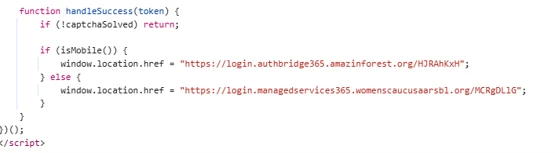
While the final redirect destination was no longer active at the time of analysis, infrastructure overlap, including shared intermediate domains and consistent redirect logic, strongly suggested that users were ultimately presented with a Microsoft sign-in experience. This final stage is consistent with adversary-in-the-middle (AiTM) tactics designed to intercept authentication tokens and facilitate account compromise.
“Awesome AI Windows Plugin” malvertising deploys Vidar stealer
Since at least early 2026, Microsoft Threat Intelligence has observed malvertising campaigns that use AI-themed terms such as “Awesome AI Windows Plugin” and “Flux Pro AI” in social engineering lures in malicious popups, in malware executable names, and GitHub repository and folder names throughout the attack chain. These campaigns are notable for their scale and velocity, moving from launch to mass impact within hours and infecting tens to hundreds of thousands of endpoints. The malware delivered in these campaigns is frequently code-signed, lending an additional layer of perceived trust to both the operating system and the user.
Microsoft attributes this malvertising activity to an initial access broker and malware distributor tracked as Storm-3075. We assess that Storm-3075 delivers final payloads on behalf of multiple downstream actors. While the example campaign described in this section delivered Vidar Stealer, we have also observed this campaign distributing Lumma Stealer, Hijack Loader, and Oyster.

On March 13, 2026, a single campaign run targeted over 66,000 devices. Microsoft has revoked the related signing certificate and GitHub has taken down the associated repository, helping to prevent tens of thousands of additional infections. Given the nature of the attack source, majority of impacted devices were likely consumer rather than enterprise endpoints. Telemetry showed global distribution, with the top affected countries being Japan, South Africa, the United States, and France.
Analysis of the redirection chain determined that the attack likely originated from free movie streaming sites. Infections on such sites typically begin when users interact with embedded movie players or click popups. Malvertising embedded in such sites can redirect users to a range of unwanted content, including malware. In this campaign, users were redirected to a page advertising a download for an “Awesome AI Windows plugin”, a fictitious product name. The plugin purported to help users watch free, high-quality videos, a lure aligned with the context of users already streaming free or pirated content.
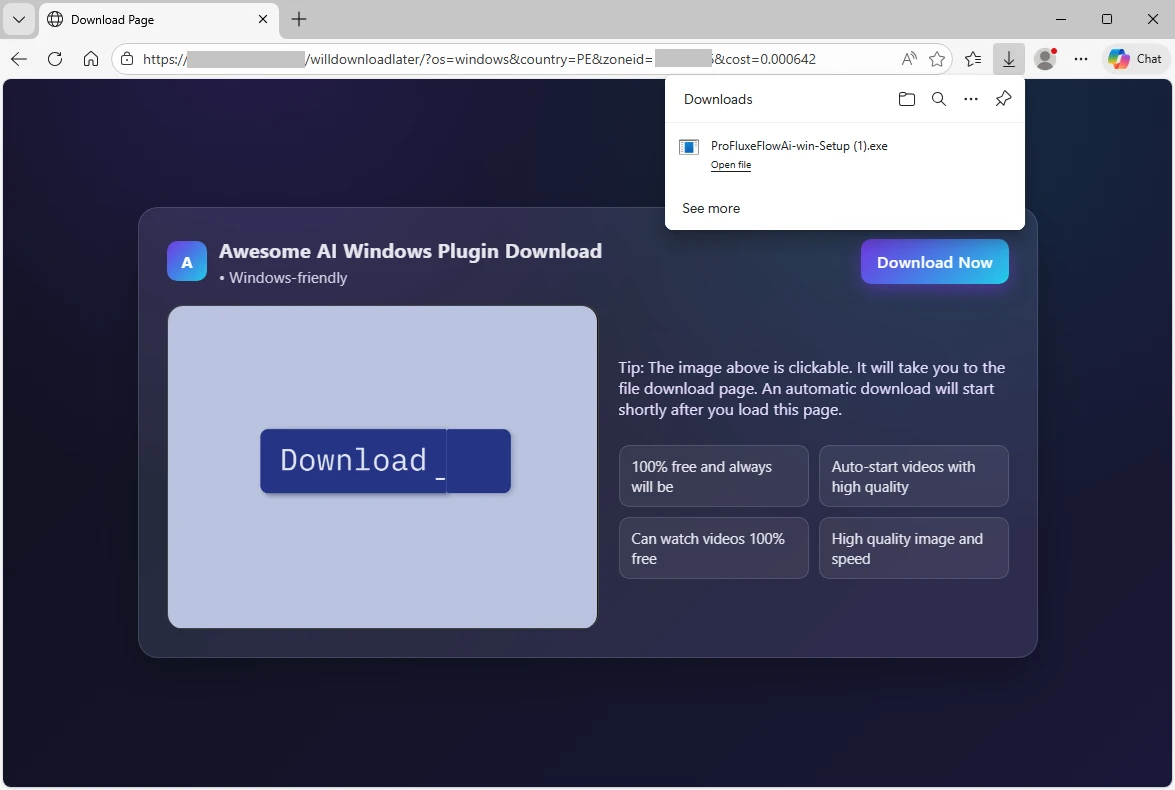
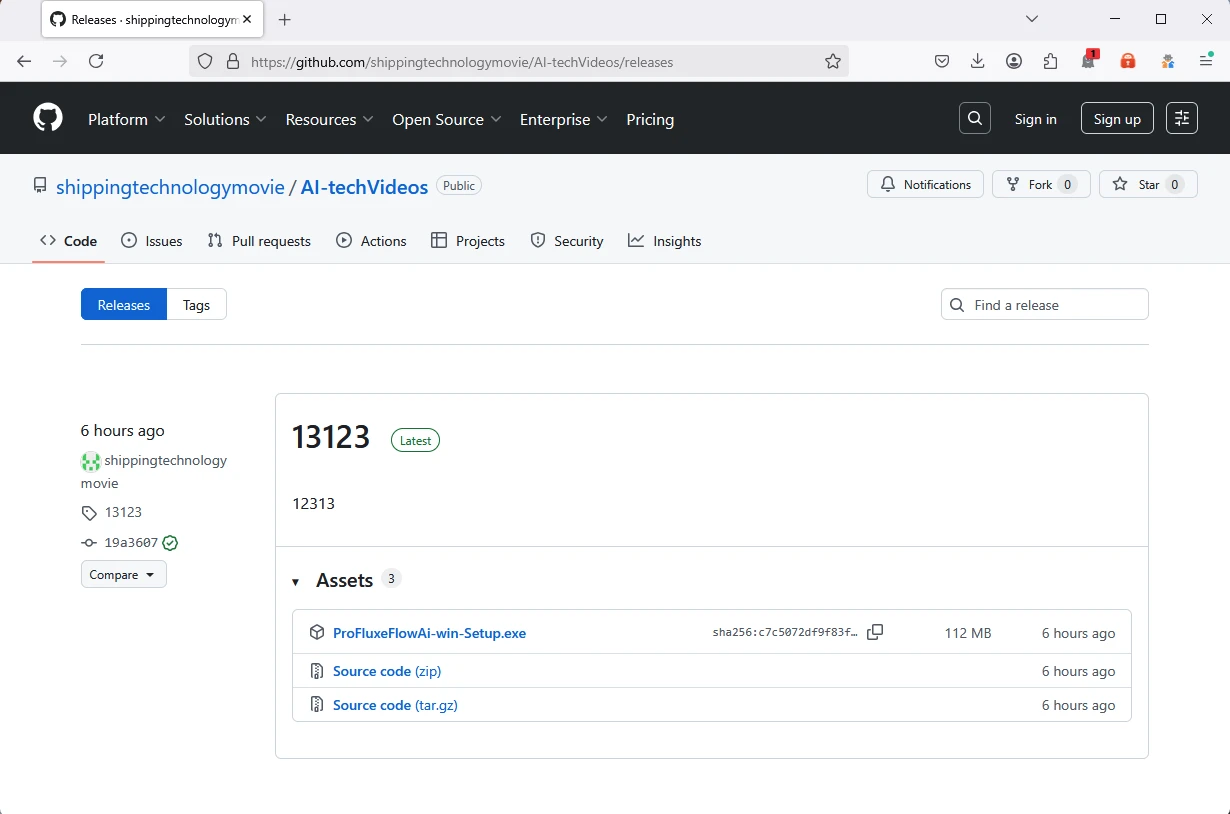
Clicking the download button retrieved an executable named ProFluxeFlowAi-win-Setup.exe, which the user then had to manually launch. The file name mimicked a legitimate product with a similar name, Flux Pro AI, which supports text, image, and video creation. This lure reinforced the perceived legitimacy of the executable within the streaming of free movies context. The executable itself was hosted on GitHub in a repository named shippingtechnologymovie under a folder named AI-techVideos, both tailored to the AI video helper narrative.
The malware executable was signed with a fraudulently obtained Microsoft-issued code-signing certificate obtained through Artifact Signing (certificate thumbprint: 4f5c5b3ef45cfff7721754487a86aeff9a2e6e32). Microsoft attributes the signing service used by the threat actor to Fox Tempest, a financially motivated threat actor operating a malware-signing-as-a-service (MSaaS) offering used by other threat actors. Microsoft has revoked over one thousand code signing certificates attributed to Fox Tempest. In May 2026, Microsoft’s Digital Crimes Unit (DCU), in partnership with Resecurity, facilitated a disruption of Fox Tempest infrastructure and access model.
Signing malware through such a service is expensive; however, for a threat actor targeting tens or hundreds of thousands of infections, the cost can be justified by the additional level of trust signed binaries imply to both the operating system and the user. Signed malware also tends to exhibit lower detection rates early in the infection lifecycle, extending the window of effective distribution.
Another notable feature of the malware is that, immediately after launch, it displays a window with a “Continue” checkmark and does not proceed until the box is clicked. This extra user interaction step is uncommon. We assess that this technique is intended to hide the malicious functionality from sandboxes and automated analysis environments that cannot dynamically perform the click. Until the user clicks “Continue,” the malware performs no suspicious activity on the operating system. This technique is functionally analogous to the CAPTCHAs frequently seen in phishing attacks.

Once the user clicks “Continue”, the executable drops and runs a malicious Python-based downloader. Both the Python interpreter and the downloader script are saved in the \AppData\Local\ folder as pythonw.exe and LICENSE.txt, respectively. The malicious script runs shellcode that loads the next-stage malware from the command-and-control (C2) domain brokeapt[.]com. The final payload observed in this campaign was Vidar infostealer.
Fake DeepSeek V4 installers on GitHub delivered Vidar Stealer
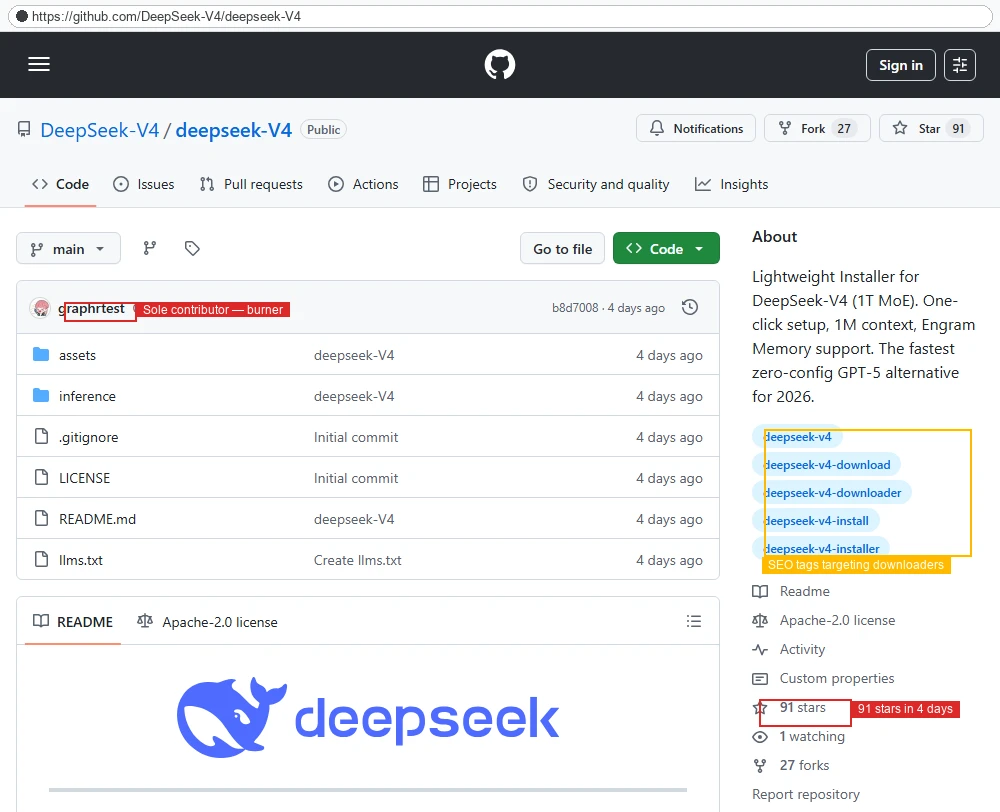
In April 2026, Microsoft identified a social engineering campaignsocial-engineering campaign that leveraged interest in the newly released DeepSeek V4 by impersonating it through a fraudulent GitHub repository and organization. The campaign abused GitHub’s release-asset infrastructure to deliver information-stealing malware such as Vidar stealer. Search engines increased the exposure of the malicious repository, exacerbated by the fact that DeepSeek did not publish an official V4 repository on GitHub.
Our investigation shows the DeepSeek lure is one identity in a broader rotating brand-abuse ecosystem that recycles whichever AI tool is trending into a fresh malware download experience. After discovering this activity, Microsoft shared the details with GitHub, and GitHub has since taken down the malicious organization, repository, and operator account.
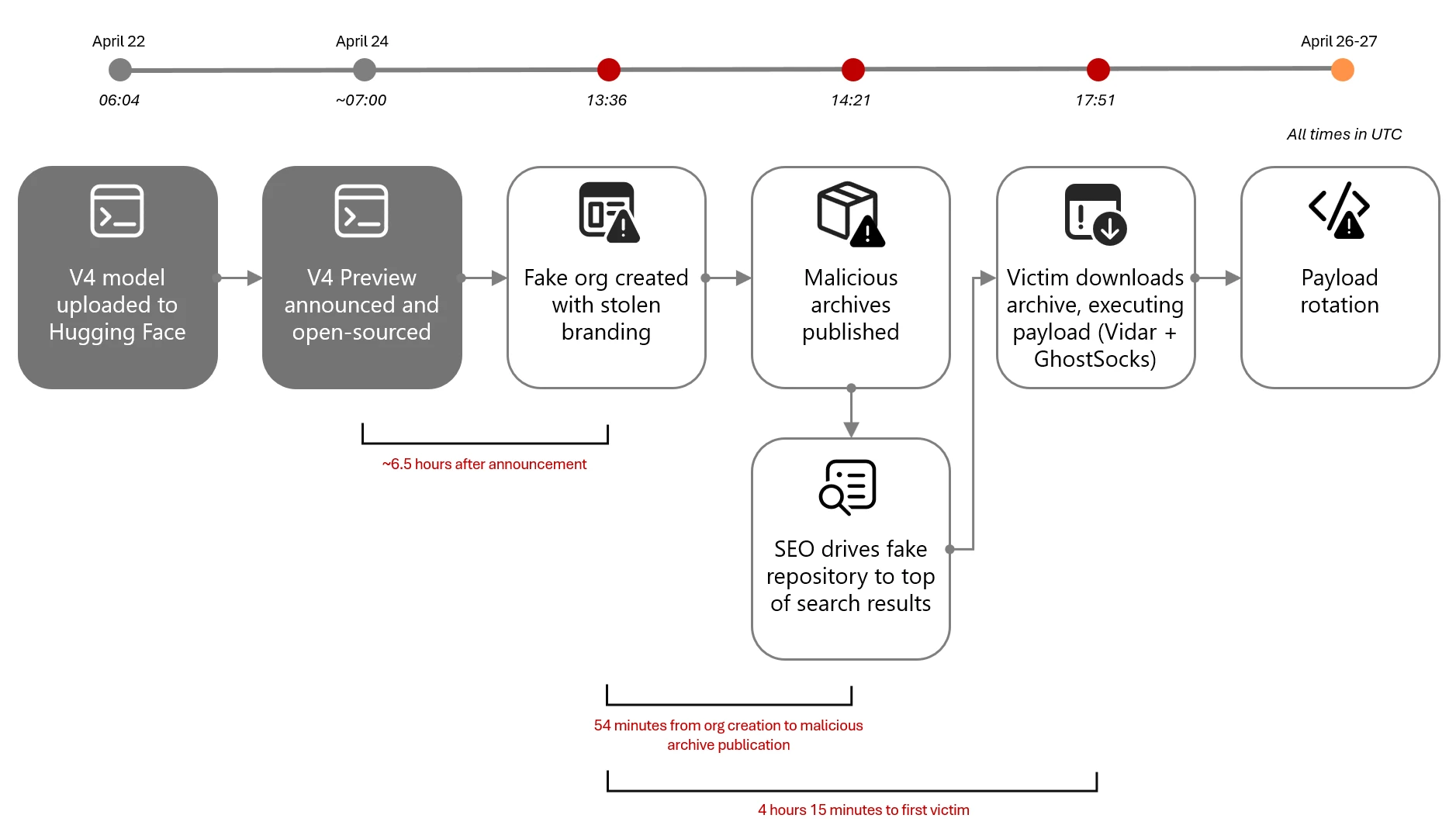
On April 24, 2026, within hours of DeepSeek officially previewing its new V4 frontier model, a threat actor initiated the attack chain that can be summarized as:
- Resource development on GitHub, all within roughly 45 minutes: A new GitHub organization (DeepSeek-V4), a single repository (deepseek-V4), and a release tag (deepseek-V4). The repository was decorated with stolen DeepSeek branding, real benchmark data, and SEO-optimized topics.
- Search-driven discovery: Users found the repository through GitHub repository search, search engines, social sharing, and AI-assisted search results pointing to the lure page. The repository’s llms.txt and topic taxonomy were designed to be discovered by both classical search engines and large-language-model-powered search; observed top-rank results on search engines are consistent with that design, though we did not observe paid advertising and therefore do not assess this as malvertising.
- Archive download from GitHub’s release-asset CDN: The release page hosted two archives, deepseek-v4-pro_x64.7z and deepseek-v4-flash_x64.7z.
- User extraction: Users needed to extract the executable from the archive using common Windows archive tools.
- Payload execution: The archives contained a heavyweight Win32 PE that masqueraded as the DeepSeek installer. At least one confirmed victim endpoint revealed the extracted payload landed at: C:\Users\<user>\Downloads\Programs\IA DeepSeek-V4\deepseek-v4-flash_x64.exe.
- Active payload rotation: The threat actor actively rotated archive content while preserving file names and the release page. We observed at least three distinct archive hash generations in three days.
Microsoft Defender telemetry observed the first victim download approximately four hours later. The threat actor’s operational tempo on April 24, 2026, is consistent with a prepared, rehearsed workflow. The repository was designed to be convincing at a glance. It accumulated 91 stars and 27 forks within four days, though the proportion of organic versus inflated engagement is not independently confirmed. The attacker invested in several credibility-building elements:
- Stolen branding: The repository’s README and assets folder embedded the legitimate DeepSeek whale logo, copied from the real deepseek-ai/DeepSeek-V2 repository.
- Real benchmark data as lure: The release notes displayed authentic DeepSeek V4 benchmark scores against Claude Opus 4.6, GPT-5.4, and Gemini 3.1 Pro, copied from the official release announcement.
- Action-oriented SEO topics: The repository was tagged with deepseek-v4, deepseek-v4-download, deepseek-v4-downloader, deepseek-v4-install, and deepseek-v4-installer, which are queries users are expected to use when intent-shopping for an installer.
- LLM-aware discoverability: A top-level llms.txt file repeated the same SEO copy in a format aimed at AI-assisted search engines.
On closer inspection, the staging gives the operation away: the repository contained only a README, LICENSE, llms.txt, and stub assets/ and inference/ directories with no real model code; all nine commits were made in a single burst on April 24, 2026 by a single author; the README claimed an MIT license while repository metadata specified Apache 2.0.

Once the lure was live, search engines increased the exposure of the malicious repository. We tested the queries an interested user would naturally try when looking for DeepSeek V4 on GitHub or the open web. In a snapshot captured on April 28, 2026, the results were as follows (search results are volatile and may differ at the time of reading):
| Platform | Query | Result |
| GitHub | DeepSeek-V4 installer | 1 result — the malicious repository (only result on GitHub) |
| GitHub | DeepSeek V4 install | 1 result — the malicious repository (only result on GitHub) |
| GitHub | DeepSeek V4 | The malicious repository ranked #2 of 169 results |
| Bing | Deepseek v4 weights github | The malicious repository ranked #1, above the official Hugging Face page |
| DeepSeek v4 weights github | The malicious repository and two of its forks occupied three of the top four positions, including a top result with rich sitelinks |
The 7z archives hosted on GitHub contained a loader executable such as SHA-256: 5455341ed1bbe75a664fca2dd0794c508e1874f75360253a7ff5bc119bc92d80. The loader was observed downloading and installing Vidar stealer and potentially additional malware.
Lastly, Microsoft observed that the DeepSeek-themed payloads share infrastructure with a much larger rotating fake-AI / fake-tool ecosystem. The same shared loader hash (SHA-256 5455341…) appeared under file names impersonating GPT-5.5, Claude Code, Kimi, Seedance, Gemma, GrokCLI, Manus AI, FraudGPT, and others (see table below). Public research from Trend Micro, Zscaler ThreatLabz, and Huntress describe the same broader ecosystem, with TradeAI.exe, OpenClaw_x64.7z, WormGPT_x64.7z, and DeepSeekAI_agent_x64.7z appearing as sibling lures and the downstream payload set documented as Vidar plus GhostSocks.
| Lure name | Fake GitHub organization (observed or sibling pattern) |
| deepseek-v4-pro_x64.exe, deepseek-v4-flash_x64.exe | DeepSeek-V4 |
| Manus_AI_Desktop_x64.exe | ManusAI-agent |
| seedance_x64.exe | bytedance-seedance |
| gpt-5.5-Pro_x64.exe, gpt-5.5-Thinking_x64.exe | Various burner organizations |
| Kimi-Swarm-Station_x64.exe | Various burner organizations |
| fraudGPT_x64.exe | Various burner organizations |
| GrokCLI_x64.exe, gemma-4-omni_x64.exe, LTX-2.3_x64.exe | Various burner organizations |
Mitigation and protection guidance
To defend against social engineering campaigns that leverage AI brands as lures, Microsoft recommends the following mitigation measures:
- Configure automatic attack disruption in Microsoft Defender XDR. Automatic attack disruption is designed to contain attacks in progress, limit the impact on an organization’s assets, and provide more time for security teams to remediate the attack fully.
- Enforce multifactor authentication (MFA) on all accounts, remove users excluded from MFA, and strictly require MFA from all devices in all locations at all times.
- Use the Microsoft Authenticator app for passkeys and MFA, and complement MFA with conditional access policies, where sign-in requests are evaluated using additional identity-driven signals.
- Conditional access policies can also be scoped to strengthen privileged accounts with phishing resistant MFA.
- Enable Zero-hour auto purge (ZAP) in Office 365 to quarantine sent mail in response to newly acquired threat intelligence and retroactively neutralize malicious phishing, spam, or malware messages that have already been delivered to mailboxes.
- Configure Microsoft Defender for Office 365 Safe Links to recheck links on click. Safe Links provides URL scanning and rewriting of inbound email messages in mail flow and time-of-click verification of URLs and links in email messages, other Microsoft Office applications such as Teams, and other locations such as SharePoint Online. Safe Links scanning occurs in addition to the regular anti-spam and anti-malware protection in inbound email messages in Microsoft Exchange Online Protection (EOP). Safe Links scanning can help protect your organization from malicious links that are used in phishing and other attacks.
- Invest in advanced anti-phishing solutions that monitor and scan incoming emails and visited websites. For example, organizations can leverage web browsers like Microsoft Edge that automatically identify and block malicious websites, including those used in this phishing campaign, and solutions that detect and block malicious emails, links, and files.
- Encourage users to use Microsoft Edge and other web browsers that support Microsoft Defender SmartScreen, which identifies and blocks malicious websites, including phishing sites, scam sites, and sites that host malware.
- Enable network protection to prevent applications or users from accessing malicious domains and other malicious content on the internet.
Microsoft Defender detections
Microsoft Defender customers can refer to the list of applicable detections below. Microsoft Defender coordinates detection, prevention, investigation, and response across endpoints, identities, email, apps to provide integrated protection against attacks like the threat discussed in this blog.
| Tactic | Observed activity | Microsoft Defender coverage |
| Initial access | Phishing emails | Microsoft Defender for Office 365 – A potentially malicious URL click was detected – Email messages containing malicious URL removed after delivery – Email messages removed after delivery – A user clicked through to a potentially malicious URL – Suspicious email sending patterns detected Email reported by user as malware or phish |
| Persistence | Threat actors distribute malware Threat actors sign in with stolen valid entities | Microsoft Defender for Antivirus – Trojan:Win32/Vidar – Trojan:Win32/Malgent – Trojan:Win32/Malcert Microsoft Defender for Endpoint – ‘Malcert’ malware was prevented – ‘Vidar’ malware was prevented Microsoft Entra ID Protection – Anomalous Token – Unfamiliar sign-in properties – Unfamiliar sign-in properties for session cookies Microsoft Defender for Cloud Apps – Impossible travel activity |
Microsoft Security Copilot
Microsoft Security Copilot is embedded in Microsoft Defender and provides security teams with AI-powered capabilities to summarize incidents, analyze files and scripts, summarize identities, use guided responses, and generate device summaries, hunting queries, and incident reports.
Customers can also deploy AI agents, including the following Microsoft Security Copilot agents, to perform security tasks efficiently:
- Threat Intelligence Briefing agent
- Phishing Triage agent
- Threat Hunting agent
- Dynamic Threat Detection agent
Security Copilot is also available as a standalone experience where customers can perform specific security-related tasks, such as incident investigation, user analysis, and vulnerability impact assessment. In addition, Security Copilot offers developer scenarios that allow customers to build, test, publish, and integrate AI agents and plugins to meet unique security needs.
Threat intelligence reports
Microsoft Defender XDR customers can use the following threat analytics reports in the Defender portal (requires license for at least one Defender XDR product) to get the most up-to-date information about the threat actor, malicious activity, and techniques discussed in this blog. These reports provide the intelligence, protection information, and recommended actions to prevent, mitigate, or respond to associated threats found in customer environments.
Microsoft Security Copilot customers can also use the Microsoft Security Copilot integration in Microsoft Defender Threat Intelligence, either in the Security Copilot standalone portal or in the embedded experience in the Microsoft Defender portal to get more information about this threat actor.
Indicators of compromise
| Indicator | Type | Description | First seen | Last seen |
| 791efb555eefb7215e96659a1353a97416743b66bdd72705493129c64057d40e | SHA-256 | File hash for attachment Fill and Sign Claude Appeal Form.pdf | 2026-04-20 | 2026-04-20 |
| hxxp://dash.awaydouble[.]org/0v2auth | URL | URL inside the PDF attachment | 2026-04-20 | 2026-04-20 |
| hxxps://github[.]com/shippingtechnologymovie/AI-techVideos/releases/download/13123/ProFluxeFlowAi-win-Setup.exe | URL | Fraudulent GitHub repository (taken down) hosting malware executable | 2026-03-13 | 2026-03-14 |
| c7c5072df9f83f4c440a5c3bb4be1d5f6c67bbf78f196406ca20d27b43b975b8 | SHA-256 | File hash for ProFluxeFlowAi-win-Setup.exe | 2026-03-13 | 2026-03-14 |
| 4f5c5b3ef45cfff7721754487a86aeff9a2e6e32 | SignerSha-1 | Certificate | 2026-03-13 | 2026-03-14 |
| brokeapt[.]com | Domain | Attacker-controlled C2 domain for Python loader | 2026-03-10 | 2026-05-20 |
| pan.ssffaa19[.]xyz | Domain | Vidar C2 | 2026-03-13 | 2026-03-14 |
| pan.rongtv[.]xyz | Domain | Vidar C2 | 2026-03-13 | 2026-03-14 |
| hxxps://github[.]com/DeepSeek-V4/deepseek-V4/releases/download/deepseek-V4/deepseek-v4-pro_x64.7z | URL | Fraudulent GitHub repository (taken down) hosting malware executable | 2026-04-24 | 2026-04-28 |
| 0a26238f6c516de5885457c93042531aa59bc206a9537cebf5267cedc6c68531 | SHA-256 | deepseek-v4-pro_x64.7z (v1) | 2026-04-24 | 2026-05-18 |
| 8610d4fb0ec5b525071c2aaec4df0f8fcbb3673aba58a7e1959fc44e83c0e2ca | SHA-256 | deepseek-v4-flash_x64.7z (v1) | 2026-04-24 | 2026-04-28 |
| 99231deb373997364381d1eb513d2d42231d418c3a2db9007c5af9bd56ab9371 | SHA-256 | deepseek-v4-flash_x64.7z (v2) | 2026-04-26 | 2026-04-28 |
| 25270cc429ada8028b5b33220ed412c47907ecceea7377d608fac5af01bed56a | SHA-256 | deepseek-v4-pro_x64.7z (v2) | 2026-04-26 | 2026-04-28 |
| 56d722b0331bf0aaa86bb37483486c6dff6ad9427fc473ed7c3226c21a9bdd23 | SHA-256 | DeepSeek-specific extracted PE (deepseek-v4-pro_x64.exe, deepseek-v4-flash_x64.exe, VectorEngine.exe) | 2026-04-26 | 2026-04-28 |
| 5455341ed1bbe75a664fca2dd0794c508e1874f75360253a7ff5bc119bc92d80 | SHA-256 | Shared loader, observed under multiple AI-brand lure names | 2026-04-12 | 2026-05-21 |
Learn more
For the latest security research from the Microsoft Threat Intelligence community, check out the Microsoft Threat Intelligence Blog.
To get notified about new publications and to join discussions on social media, follow us on LinkedIn, X (formerly Twitter), and Bluesky.
To hear stories and insights from the Microsoft Threat Intelligence community about the ever-evolving threat landscape, listen to the Microsoft Threat Intelligence podcast.


