Microsoft introduces the cloud web applications threat matrix, a MITRE ATT&CK-aligned framework that helps defenders understand, prioritize, and mitigate threats to cloud-hosted web apps and serverless platforms.
Cloud-hosted web applications and serverless platforms create attack paths that can cross application code, managed runtimes, workload identities, deployment pipelines, and connected cloud resources. Investigating the application and underlying cloud platform separately can leave gaps in how defenders understand those paths.
Microsoft developed the Cloud web applications threat matrix to organize relevant techniques using MITRE ATT&CK tactics. The matrix can help security teams assess visibility gaps, prioritize hardening, and plan investigations across cloud-native environments. This blog introduces the framework, examines selected techniques, and outlines defensive priorities for reducing exposure.
Overview
Cloud-hosted web applications and serverless platforms let teams deploy and scale application logic quickly, but they also create attack paths that cross application code, managed runtimes, identities, deployment pipelines, and connected cloud services. These paths can be difficult to detect when the application layer and underlying cloud platform are investigated separately.
To provide a clear and consistent view of the threat landscape affecting cloud hosted web applications and serverless environments, we organize techniques using the MITRE ATT&CK format. Building on Microsoft’s previously published threat matrices for Kubernetes and storage services, this matrix expands coverage for cloud web applications– applications that execute code in a managed environment, are often tightly integrated with other cloud resources, and are commonly exposed to the internet.
The attack techniques presented in this matrix are divided into the following tactics, aligned with the MITRE ATT&CK framework:
- Resource Development
- Initial Access
- Execution
- Persistence
- Privilege Escalation
- Defense Evasion
- Credential Access
- Discovery
- Lateral Movement
- Collection
- Impact
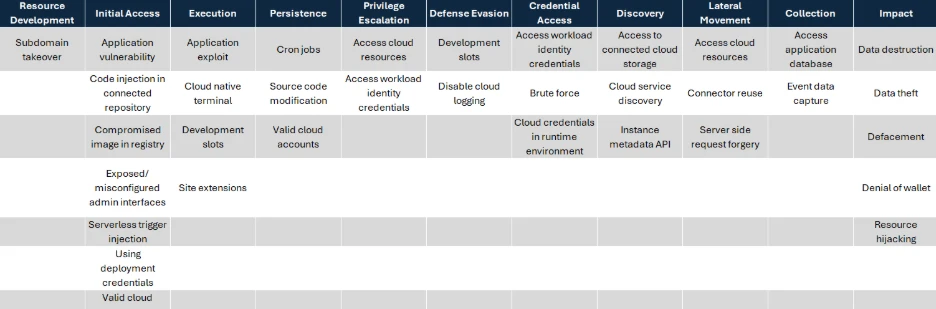
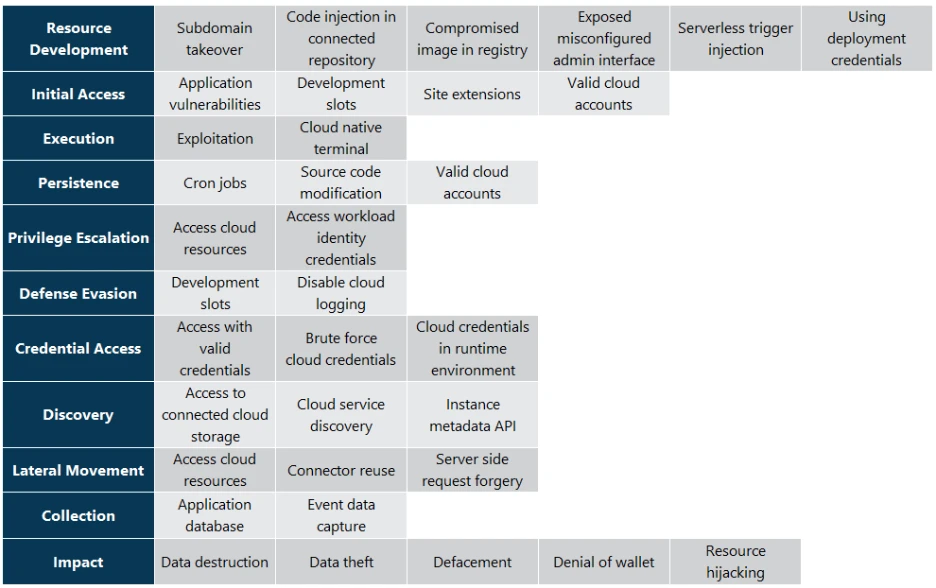
Technique Catalog
Below, we walk through each tactic and describe its techniques in more detail.
Resource Development
The resource development tactic consists of techniques that adversaries use to establish resources they can use to support operations. This may include acquiring infrastructure, developing capabilities, or compromising resources that can later be used during targeting.
Subdomain takeover
Deleting a cloud application or service without removing its associated DNS record pointed to a reusable provider endpoint can create a subdomain takeover risk. Depending on the provider’s behavior, service configuration, and naming constraints, a threat actor may be able to register a resource that claims the same address and intercept traffic intended for the original service, potentially serving malicious content or harvesting credentials.
Initial Access
The initial access tactic consists of techniques that are used for gaining access to cloud web applications and serverless environments. This access can be achieved through compromised credentials, vulnerable applications, misconfigured interfaces, or by exploiting connected resources.
Application vulnerability
Running a public-facing web application that hosts a vulnerable application can enable adversaries to access and execute code in the context of the web application, or to access internal resources and gain a foothold in the cloud environment. Such vulnerabilities could stem from the application’s own code, its underlying framework, or third-party libraries and dependencies it uses.
Code injection in connected repository
Threat actors may inject malicious code into source repositories that are linked to cloud web applications or serverless functions. If these repositories are automatically synced with production environments, the injected code executes under the legitimate workflows.
For example, if a threat actor gains commit permissions to a GitHub repository that is configured to deploy GCP Cloud Functions through Cloud Build triggers, their code may be deployed into the application through the legitimate pipeline.
Compromised image in registry
Some cloud web applications are deployed from a container image pulled from private or public registries. Threat actors who get access to a private registry can plant their own compromised images or update an existing image with malicious code, which will run the next time the web application pulls the container image.
Exposed/misconfigured admin interfaces
Some cloud-based web applications expose administrative interfaces for managing deployments, configurations, or runtime operations. If these interfaces are exposed to the internet or misconfigured, threat actors might be able to access them and view critical data, execute commands, or manipulate application behavior.
For example, if an Azure App Service exposes its Kudu interface to the internet, a threat actor with sufficient credentials could execute commands in the app’s environment.
Serverless trigger injection
In cases where the application executes backend workflows in response to event-driven triggers, an end user who can directly or indirectly influence those triggers may cause unintended activity within the application. By manipulating inputs such as crafted file uploads, queue messages, API calls, or other event sources, a threat actor can force serverless functions to run with their supplied data, which could lead to unintended code execution, data access, or further compromise.
For example, a threat actor might upload a modified image file containing a crafted payload through a legitimate web form. The image is then stored in an S3 bucket, which triggers an AWS Lambda function configured to process new uploads. If the function handles the file without proper validation, the threat actors payload could cause unintended behavior or even lead to remote code execution.
Using deployment credentials
In some cloud web applications, deployment credentials can grant management access beyond publishing new code. Adversaries who obtain such credentials might be able to use them to directly interact with the application without modifying its source code.
Azure App Service, compromised deployment credentials can allow access to deployment and SCM (Source code management) interfaces, which may enable file access, command execution, or application modification depending on the app configuration and credential scope.
Execution
The execution tactic consists of techniques that are used by threat actors to run their code inside cloud web applications and serverless environments.
Application exploit (remote code execution)
Deployed web applications that contain a remote code execution vulnerability, or a vulnerability that could eventually lead to code execution, can enable threat actors to run malicious code in the web application context. If the application has access to any additional resources, then the threat actor could access those as well.
Cloud native terminal
Some cloud platforms provide built-in administrative consoles or SSH-style terminals for running commands directly inside the application’s execution environment. Threat actors who gain access to the terminal may be able to extract data, edit the web app files and execute commands.
For example, Azure App Services expose a Kudu console that acts as a built-in terminal; if threat actors obtain deployment credentials, they can use it to browse files, execute commands, and tamper with application code.
Site extensions
Site extensions are an Azure App Services feature that allows users to install additional tools and utilities onto their web application. These extensions run within the context of the App Service and have the same permissions as the application itself – including requests data, file system access and environment variables. Site extensions are installed from a NuGet-based feed that allows third-party package submissions. If threat actors publish a malicious extension that resembles a legitimate package, or compromise an existing package, users who mistakes the package for a trusted extension may install it, allowing the threat actors code to run in the application context.
Persistence
The persistence tactic consists of techniques that are used by threat actors to maintain access to cloud web applications in case their initial foothold is lost.
Cron jobs
In cases where a cloud application uses scheduled or trigger-based tasks, a threat actor with the ability to create or modify such jobs can cause their malicious code to execute automatically. Because these jobs can run independently of normal request flows and often inherit the application’s privileges, control over a scheduled or event-triggered job allows persistent execution even if the main application code is updated.
For example, if a threat actor is able to create or modify a WebJob in Azure App Service, their code will periodically run on the web application, regardless of changes or updates to the application code itself.
Source code modification
A threat actor with access to a development environment may be able to modify the application’s source – which could reside in a git repository, a container image in a registry, or a deployment package in cloud storage. Because cloud web applications are typically deployed through automated pipelines, a single modification can propagate automatically into production, causing the threat actors code to run every time the application restarts. These changes become part of the application’s canonical source, meaning that even if the runtime environment is rebuilt or scaled, the tainted code is redeployed from the same trusted source, maintaining the threat actor access to the application.
Valid cloud accounts
Adversaries may gain access to cloud web applications and serverless environments by leveraging compromised valid cloud accounts. Using legitimate credentials allows threat actors to interact with such services without raising suspicion. This enables them to deploy or modify application code, configure triggers, and maintain control over workloads.
For example, a threat actor who compromises an Entra ID user with sufficient owner-level permissions on a subscription may be able to read or modify function app resources within that scope, subject to resource and policy controls.
Privilege Escalation
The privilege escalation tactic consists of techniques that are used by threat actors to get higher privileges in the environment than those they currently have. This can include accessing workload identity credentials or leveraging application permissions to access additional cloud resources.
Access cloud resources
Web apps deployed in the cloud often run with identities or service accounts that have permissions over additional cloud resources in the environment such as storage, databases and AI services. Additionally, some applications store connection strings or keys to cloud resources in the app configuration files or environment variables. Therefore, if threat actors compromise the application, they can often extract or leverage these credentials to access additional cloud resources.
Access workload identity credentials
Workload identities are identities that are managed by the cloud provider and can be allocated to cloud resources. The identity’s secret is fully managed by the cloud provider, which eliminates the need to manage the credentials. Web apps can use workload identities to perform actions on other cloud resources by querying Instance Metadata Service (IMDS) or similar endpoints. Threat actors who gain access to a web app can leverage their access to the IMDS endpoint to get the workload identity’s token. With a token, the threat actors can access cloud resources.
For example, in Azure App Services, the managed identity access token can be acquired through a local identity endpoint, which is defined in the environment variables (IDENTITY_ENDPOINT). If a threat actor is able to execute code on such an App Service instance, they would be able to query the endpoint and receive an access token to other Azure resources with the managed identity permissions.
Defense Evasion
The defense evasion tactic consists of techniques that are used by threat actors to avoid detection and hide their activity.
Development slots
Many cloud platforms and serverless environments support staging or preview environments (such as deployment slots in Azure App Services, aliases in AWS Lambda, or revision tags in GCP Cloud Run), which allow developers to test and stage new versions of their applications before swapping them into production. These environments can be swapped or promoted with minimal downtime. If a threat actor gains the ability to modify or promote a non-production environment, they may execute malicious code or gain insights into the application’s structure and behavior. In some cases, these staged environments are directly accessible without a swap, meaning a threat actor could execute code in a staging slot or alternate version and potentially evade detection, since the primary production deployment remains untouched.
For example, in Azure App Service, a threat actor who obtains permissions to manage a staging deployment slot could either swap it into production, thus pushing malicious code live, or exploit the slot’s separate URL to run the malicious app without modifying the production’s code.
Disable cloud logging
Threat actors with appropriate permissions may disable or alter cloud logging to hide their actions and avoid detection. This can include turning off diagnostic logging on a web application, deleting or modifying existing log data, changing log retention policies to accelerate log expiration, or redirecting log output. By suppressing logging, the threat actor reduces the visibility that defenders have into ongoing malicious activity, making it harder to detect the compromise, perform incident response, or reconstruct the attack timeline.
Credential Access
The credential access tactic consists of techniques that are used by threat actors to steal credentials. In cloud web application environments, this includes credentials of the running application, workload identities, secrets stored in configuration, or cloud credentials.
Brute force
Some web applications or interfaces may still use basic authentication, either for user access, administrative functions, or deployment interfaces. A threat actor could try to gain access by repeatedly attempting credential combinations, and upon finding valid credentials, use them to access and use the relevant privileges.
For example, Azure App Service exposes the Kudu management console (the SCM site) and FTP endpoints that support basic authentication. This includes user‑scoped deployment credentials, which are manually set by the user and shared across all App Services within a subscription that the user has access to. If a threat actor is able to successfully guess those credentials, they could gain deployment access to multiple applications in the subscription.
Cloud credentials in runtime environment
Some web applications store secrets such as keys, tokens, and connection strings in environment variables or configuration files. In cloud environments, those secrets are often used to access additional cloud services within the environment. If a threat actor gains access, even read-only, to the running application environment, they would be able to retrieve those credentials and use them to authenticate against those external cloud resources.
For example, an Azure Function configured to authenticate to Azure OpenAI with a resource key may store that key and the service endpoint in application settings exposed as environment variables. a threat actor who accesses those variables could use the key to make authorized data-plane API requests to the associated Azure OpenAI resource.
Discovery
The discovery tactic consists of techniques that are used by threat actors to explore the environment to which they gained access. This exploration helps the threat actors to perform lateral movement and gain access to additional resources.
Access to connected cloud storage
Cloud applications often use external storage services for hosting source code, configuration files or assets. Threat actors may exploit misconfigured or compromised read access to this storage to review the code and configuration to find vulnerabilities or sensitive information that could be exploited to take over the application.
For example, in GCP Cloud Run functions, the function code is saved into a bucket in the project. If a threat actor compromised a user with storage read access, they would be able to view the source code.
Cloud service discovery
Cloud‑hosted applications often contain configuration values or runtime information that reference other cloud services the application interacts with, such as service URLs, API endpoints, database connection strings, or resource identifiers. After gaining access to a web application, threat actors can discover additional cloud resources through environment variables, network connections or application code.
Instance metadata API
Cloud platforms expose metadata services that provide information about the running environment, such as instance details, network configuration, and identity credentials. In some cases, this service is available from within cloud web applications as well. Threat actors who gain access to such an application may query the metadata API service to get information about the underlying VM and the application environment.
Lateral Movement
The lateral movement tactic consists of techniques that are used by threat actors to move through the victim’s environment. In cloud web application environments, this includes gaining access to connected cloud resources, third-party services, or internal network resources.
Connector reuse
Cloud applications may use managed connectors or integration resources to interact with third-party services such as email providers, SaaS platforms, databases, or messaging systems. These connectors sometimes store authentication or authorization details – such as OAuth tokens and access keys, that are separate from the web application’s own identity and thus could be reused across multiple applications. A threat actor who compromises a user or identity with permissions over the connector resource can invoke those stored credentials to access the connected third-party services, enabling lateral movement beyond the cloud environment.
For example, in Azure Logic Apps, API connections are standalone resources that store authenticated sessions to external services, such as Office 365, Slack, or SQL databases. A threat actor with sufficient permissions on the resource group can create a new app that uses existing API connectors, triggering actions on the connected services using the stored credentials without needing to extract the underlying secrets.
Collection
The collection tactic consists of techniques that are used by threat actors to collect data from cloud web applications or connected resources.
Access application database
Many applications rely on a connected database to store application data, user information, configuration values, or state. The application often connects to the database by using the application’s cloud identity, or by using a hardcoded connection string. If a threat actor gains code execution abilities, they can interact with the database – query and extract data or modify entries. In cases where the database is accessible from the internet, threat actors may only need read permissions over the web app to access the database.
Event data capture
Cloud applications often generate logs that include diagnostic data, request metadata, or user input. Due to misconfigured logging levels or insufficient filtering, these logs may inadvertently contain sensitive information such as credentials, personally identifiable information (PII), or details about the application environment, including internal paths, dependency versions, and cloud resource names. This information could assist adversaries in furthering their attacks. Logs may be stored locally, streamed to external services, or accessed through debugging interfaces. Logs may be stored locally, streamed to external services, or accessed via debugging interfaces. If a threat actor gains access to the application or its logging infrastructure, they can collect this data to aid further exploitation or reconnaissance.
For example, AWS Lambda functions automatically send all standard output to CloudWatch Logs. If verbose or debug-level logging is misconfigured and left enabled in production, sensitive data may end up in the log group. A threat actor who gains read access to CloudWatch can then harvest this information.
Impact
The impact tactic consists of techniques that are used by threat actors to destroy, abuse, or disrupt the normal behavior of cloud web applications and their environments.
Data destruction
Threat actors who gain sufficient privileges within a cloud web application may delete or corrupt data stored in the app or in connected cloud resources such as databases and storage.
Data theft
If threat actors gain access to the application, its storage, or connected cloud resources, they may be able to retrieve data stored or processed by the application. This includes application content, user information, configuration files, or proprietary content.
Defacement
Adversaries may attempt to alter the web application’s content or appearance to damage reputation, intimidate victims or spread propaganda. This could be done through access to the application itself, to the source code or any assets it uses.
Denial of wallet
Cloud applications often scale dynamically based on demand, incurring costs for compute, storage, and data transfer. Threat actors may intentionally trigger operations that will cause those resources to scale out to impose financial damage. One such approach is to flood a web application with requests, similar to traditional denial-of-service (DoS) attacks. This will cause the application to allocate more resources, thus causing increased charges.
For example, a threat actor could repeatedly invoke a Cloud Function with high memory allocation, leading to inflated billing due to excessive execution time.
Resource hijacking
Threat actors may leverage the compute, network, or storage resources of the application for unauthorized purposes, such as cryptocurrency mining, mass scanning, or traffic proxying.
Mitigation and protection guidance
As organizations adopt cloud-native and serverless architectures, defending against these threats requires visibility across both application behavior and underlying cloud resources. The cloud web applications threat matrix is intended to support this by mapping techniques to attack stages, helping defenders identify where visibility exists and where gaps remain.
Mitigation strategies for individual techniques are detailed within the matrix. Across the matrix, recurring priorities include requiring multifactor authentication, applying least-privilege permissions to users and workloads, and restricting access to applications, deployment environments, and connected resources.
Organizations should also protect source repositories, build systems, and deployment pipelines from unauthorized changes, and install packages and extensions only from trusted sources. Reusable credentials should not be stored in source code or configuration files. Workload identities and secrets management solutions should be used where supported, while network access to sensitive services should be limited to authorized networks.
To support investigation, organizations should centralize security-relevant logs in protected locations and prevent unauthorized changes to logging configurations. Resource quotas, concurrency limits, cost guardrails, and spending alerts can help reduce the impact of resource hijacking and denial-of-wallet activity. Organizations should also maintain and test backup and recovery plans to prepare for destructive operations.
Microsoft Defender for Cloud and Microsoft Defender XDR can support investigation and response across many related signals, including cloud resource posture, workload activity, identity activity, and cross-domain incidents, depending on customer configuration and available telemetry.
References
Learn more
For the latest security research from the Microsoft Threat Intelligence community, check out the Microsoft Threat Intelligence Blog.
To get notified about new publications and to join discussions on social media, follow us on LinkedIn, X (formerly Twitter), and Bluesky.
To hear stories and insights from the Microsoft Threat Intelligence community about the ever-evolving threat landscape, listen to the Microsoft Threat Intelligence podcast.
Review our documentation to learn more about our real-time protection capabilities and see how to enable them within your organization.
- Evaluate your AI readiness with our latest Zero Trust for AI workshop.
- Microsoft 365 Copilot AI security documentation
- How Microsoft discovers and mitigates evolving attacks against AI guardrails
- Learn more about securing Copilot Studio agents with Microsoft Defender