
Microsoft Threat Intelligence has identified an evolving fake-download campaign targeting users searching for cracked commercial software, free games, activators, plugins, and unofficial utilities. The campaign uses trojanized Inno Setup-style installers to distribute multiple monetized software payloads, referred to by the delivery system as “offers”, during a single installation session.
Our investigation found that the installers use a per-offer callback and status-tracking model to manage delivery and record installation outcomes. We confirmed three downstream monetization branches that transformed affected devices into monetized assets, including by routing third-party internet traffic through the device, enrolling it in a distributed-computing platform, or installing additional utility-style software, often without users’ informed knowledge or consent. These products and components may have legitimate uses, but their silent installation through deceptive software bundles without informed user consent introduces security and privacy risks.
Organizations can reduce their exposure to this activity by preventing the use of untrusted software sources, enabling potentially unwanted application protection, and monitoring for unexpected software installations and persistence mechanisms.
This blog details the campaign’s execution model and confirmed outcomes and provides mitigation guidance, Microsoft Defender protection information, advanced hunting queries, MITRE ATT&CK mappings, and indicators of compromise to help defenders identify, investigate, and respond to related activity.
Attack chain overview
The fake-download campaign follows a four-stage attack chain that progresses from deceptive lures through Inno-based staging, offer-controlled payload delivery, and installation of one or more monetization branches:
- Initial access via fake download lures – Users run fake installers promoted as cracked commercial software, free games, activators, plugins, executors, or unofficial utilities.
- Inno wrapper execution and temporary runner staging – The installer launches an Inno Setup-style temporary runner under %TEMP%\is-*.tmp\, which starts recurring eld*.exe, set_*.exe, or other numbered stages.
- Offer execution callback and payload delivery – The runner contacts rotating infrastructure using a repeatable d=inno and r=offer_execution callback pattern. Offer, affiliate, download-network, placement, and session values coordinate downstream payload selection and correlate activity within the installer session.
- Final payload installation and monetization – Staged payloads use unattended installation switches to install one or more confirmed campaign branches: WorldProxyPool for proxy and network-resource monetization; CharityEngine and Berkeley Open Infrastructure for Network Computing (BOINC) for compute-resource monetization; or Advanced Windows (AW) Manager and Windows Manager for adware-style utility monetization. WorldProxyPool also creates recurring SYSTEM scheduled tasks for agent startup, watchdog execution, and updater activity.
Attack Chain

Initial access via fake download lures
The campaign begins when users download and run fake installers promoted as cracked software, game installers, executors, activators, plugins, utilities, or driver and mobile-unlock tools. Observed lures include cracked audio plugins, PC games, Roblox executors, auto-clickers, driver tools, and fake utility installers.
Example lures: Echo Client; FabFilter Total Bundle; Navicat Premium crack; Cue Club; auto-clicker; Deadpool Apunka Games; Command & Conquer: Red Alert 2; TFT Unlock Tool; and clownfishvoicechanger.

Inno wrapper execution and temporary runner staging
Across the investigated activity, user-launched lures spawned Inno Setup-style temporary runners under %TEMP%\is-*.tmp\ and then launched one or more numbered eld*.exe stages. Arguments such as /SL5, /SPAWNWND, and /FIRSTWND, together with the temporary path and numbered stage names, provide more durable indicators than the original lure filename.
The depth of the execution chain and its downstream outcome varied by installer session. One Echo Client example progressed through multiple numbered stages and reached several monetization branches, while other observed lures exposed fewer numbered stages or downstream components.
The table below uses the Echo Client activity as a representative example of the wrapper-to-stage sequence; individual installer sessions may launch different combinations of numbered stages.
| Step | Process | Command-line / path signal | Role |
| 1 | Echo Client.exe | Launched from %USERPROFILE%\Downloads\Echo Client\ | User-launched lure |
| 2 | Echo Client.tmp | %TEMP%\is-*.tmp\… with /SL5=… | Inno temporary runner |
| 3 | Echo Client.exe | /SPAWNWND=… /FIRSTWND=… | Inno child process / window handoff |
| 4 | Echo Client.tmp | /SL5=… /SPAWNWND=… /FIRSTWND=… | Temporary runner continues execution |
| 5 | eld*.exe | eld0.exe, eld1.exe, eld3.exe, eld4.exe, and eld5.exe under %TEMP%\is-*.tmp\ | Numbered staged payloads |
Table 1. Inno wrapper execution and temporary runner staging.
Offer execution callback and payload delivery
After staging, the Inno temporary runner contacted rotating callback infrastructure using randomized URL paths but a repeatable query-string structure:
http:///?sis=&fz=&d=inno&r=offer_execution&ko=no&o=&a=&dn=&spot=&t=&cr=
Failed or blocked offers used r=offer_execution_fail and sometimes included local error text, including messages that the operation did not complete because the file contained a virus or potentially unwanted software. These callbacks are useful campaign-attribution and sequencing markers, but they are not always the earliest prevention point. In some endpoint detection and response (EDR) traces, child payloads launched before or around the r=offer_execution callback.
The campaign used offer IDs, affiliate IDs, download-network IDs, and placement values to select or report downstream payload attempts. Observed offer and download-network combinations included o=1712 / dn=507, o=1720 / dn=536, o=1727 / dn=564, o=1729 / dn=566, o=331 / dn=244, o=1674 / dn=440, o=1675 / dn=441, o=1681 / dn=447, and o=1730 / dn=567. Different offers could succeed or fail independently within the same installer session, so a failed first offer did not necessarily mean that the full bundle stopped.
| Parameter | Observed use | Assessment |
| d | Often set to inno | Installer or delivery-family marker |
| sis | Stable within an installer session | Session-correlation value |
| a | Stable across related requests | Affiliate, campaign, or distribution-partner identifier |
| o | Changes by offer | Offer identifier |
| dn / on | Changes with the offer or retrieval path | Download-network or offer-network field; exact meaning unconfirmed |
| spot | Increments through the session | Offer placement, slot, or execution order |
| paw | Present across offer requests | Request, package, or session-correlation value; exact meaning unconfirmed |
| fz | Present in outcome callbacks | Delivered package size or file-size field |
| t | Present in outcome callbacks | Timing, token, or request value; exact meaning unconfirmed |
| r | offer_execution or offer_execution_fail | Per-offer execution result |
| msg | Present on failed offers | Error text from the local download or installation attempt |
| ko / cr | Boolean-like or short values | Server-side control or result flags; exact meaning unconfirmed |
Table 2. Assessments are based on observed telemetry correlations, not confirmed server-side definitions.
| Offer / download-network pair | Semantic meaning |
| o=1712 / dn=507 | Primary first-stage offer commonly attempted at the start of the installer flow. |
| o=1720 / dn=536 | Offer branch associated with CharityEngine/BOINC distributed-compute monetization. |
| o=1727 / dn=564 | Offer branch associated with WorldProxyPool proxyware monetization. |
| o=1729 / dn=566 | Recurring follow-on offer branch in the installer flow. |
| o=331 / dn=244 | Secondary offer branch observed in the multi-offer sequence. |
| o=1674 / dn=440 | Later campaign offer branch. |
| o=1675 / dn=441 | Low-volume offer branch. |
| o=1681 / dn=447 | Additional offer branch in the campaign’s installer rotation. |
| o=1730 / dn=567 | Later high-volume offer branch. |
Table 3. Offer and download-network pairs and their semantic roles in the installer flow.
The campaign rotated callback domains frequently while preserving the same d=inno and offer-execution callback structure across recurring lure categories. Individual domains are therefore short-lived infrastructure indicators; the durable hunting signal is the combination of the callback pattern, Inno temporary execution, staged filenames, and related installer-session activity. The full observed domain set is provided in the IOC section.
Final payload installation and monetization
After offer callback and payload delivery, the campaign launched downstream installers or components using unattended installation switches such as /qn, /S, /quiet, and /norestart. This stage converted the fake-download execution chain into installed software and recurring execution across three monetization branches: proxy and network-resource monetization, compute-resource monetization, and adware-style utility monetization.
| Branch | Primary behavior | Representative artifacts |
| A. WorldProxyPool | Proxy agent installation and scheduled-task setup | sdk-agent.exe; sdk-agent.updater.exe; watchdog.ps1; WorldProxyPoolAgent task |
| B. CharityEngine / BOINC | Distributed-compute software installation | boinc.exe; charityengine.exe; ce11.exe; VirtualBox-7.2.8-r173730.msi |
| C. AW Manager / Windows Manager | Utility and updater-style software installation | Windows Manager – Postback Johan.msi; AdvancedWindowsManager.exe; Windows Updater.exe |
Table 4. Summary of the three monetization branches and representative artifacts.
Proxy and network-resource monetization — WorldProxyPool
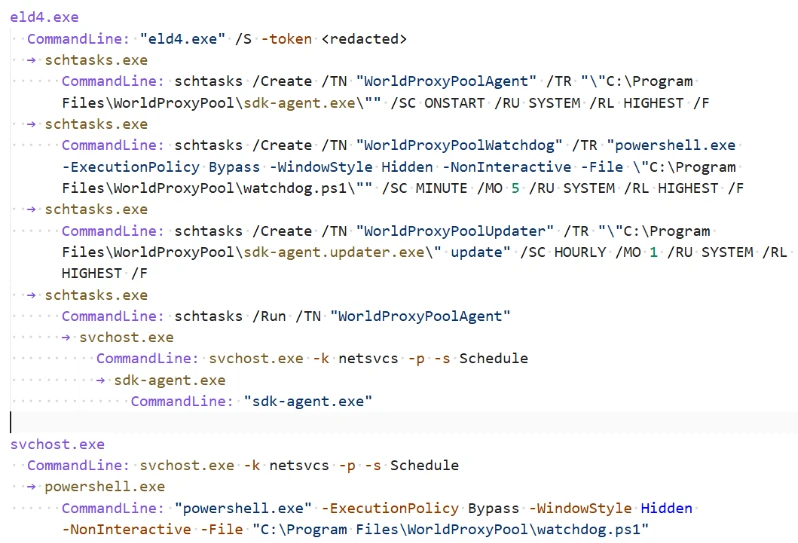
In the WorldProxyPool branch, a staged eld4.exe payload created three SYSTEM-level scheduled tasks for components under C:\Program Files\WorldProxyPool\. WorldProxyPoolAgent configured sdk-agent.exe to run at system startup with highest privileges; WorldProxyPoolWatchdog configured a hidden, noninteractive PowerShell watchdog script to run every five minutes; and WorldProxyPoolUpdater configured sdk-agent.updater.exe update to run hourly. The installer also started the agent task immediately with schtasks.exe /Run. Subsequent task launches were brokered by the Windows Task Scheduler service (svchost.exe -k netsvcs -p -s Schedule), causing sdk-agent.exe and the watchdog script to execute in the service context. This persistence mechanism supports recurring proxy-agent, watchdog, and updater activity, consistent with network-resource monetization.
| Scheduled task | Purpose |
| WorldProxyPoolAgent | Runs sdk-agent.exe at system startup as SYSTEM with highest privileges; the installer also started it immediately with schtasks.exe /Run. |
| WorldProxyPoolWatchdog | Runs a hidden, noninteractive PowerShell watchdog script every five minutes as SYSTEM with highest privileges. |
| WorldProxyPoolUpdater | Runs sdk-agent.updater.exe update hourly as SYSTEM with highest privileges. |
Table 5. WorldProxyPool scheduled tasks created during the proxyware installation chain
Compute-resource monetization — CharityEngine and BOINC
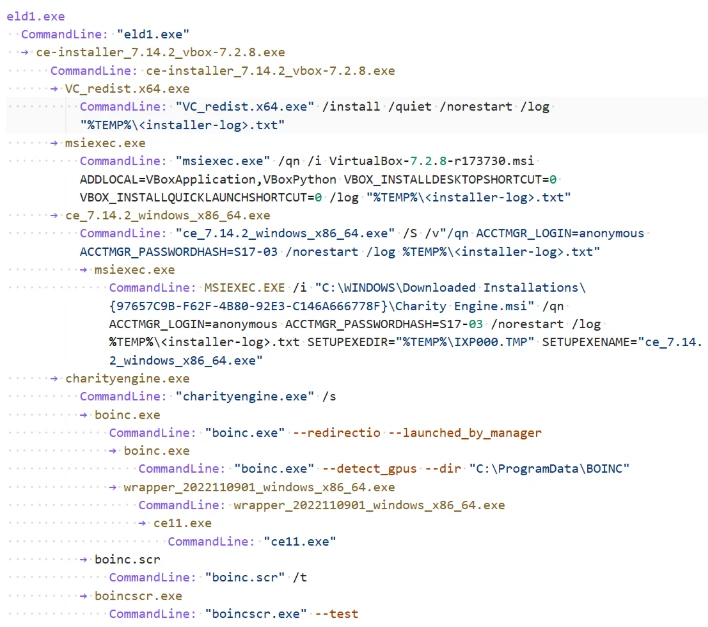
In the CharityEngine and BOINC branch, the offer payload installed distributed-compute software and supporting components under C:\Program Files\BOINC\ and C:\ProgramData\BOINC\. Observed components included ce-installer_7.14.2_vbox-7.2.8.exe, ce_7.14.2_windows_x86_64.exe, charityengine.exe, boinc.exe, boinctray.exe, boinc.scr, boincscr.exe, wrapper_2022110901_windows_x86_64.exe, ce11.exe, and VirtualBox-7.2.8-r173730.msi. They covered BOINC launch, compute-wrapper execution, GPU or compute-capability checks, CharityEngine project communication, and VirtualBox installation.
Adware-style utility monetization: AdvancedWindowsManager / Windows Manager
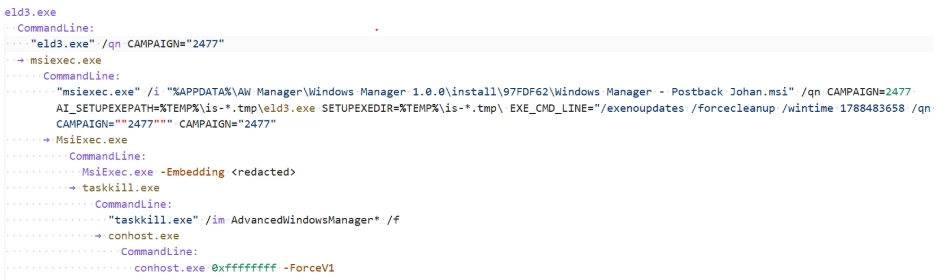
The same Inno offer-execution infrastructure delivered an AW Manager or Windows Manager branch. In one observed process tree, the Inno runner spawned eld3.exe, launched Windows Manager – Postback Johan.msi, and installed AdvancedWindowsManager.exe and Windows Updater.exe under paths resembling %APPDATA%\AW Manager\Windows Manager 1.0.0\ or C:\Program Files (x86)\AW Manager\Windows Manager\.
Mitigation and protection guidance
Microsoft recommends the following actions to reduce exposure to this campaign and detect related activity:
Preventive controls
- Avoid untrusted software sources. Do not download cracked software, key generators, unofficial game installers, or software activation tools, which are common delivery mechanisms for malware, potentially unwanted applications, and monetization campaigns.
- Enable cloud-delivered protection. Verify that Microsoft Defender Antivirus cloud-delivered protection is enabled to improve detection of emerging malware and potentially unwanted applications. See: Configure cloud-delivered protection
- Keep tamper protection enabled. Use tamper protection to help prevent unauthorized changes to Microsoft Defender security settings. See: Learn about tamper protection.
- Enable reputation-based protection. Configure reputation-based protection to help block known malicious and untrusted applications and downloads. See: Configure reputation-based protection.
- Consider Attack Surface Reduction (ASR) protections. Evaluate ASR rules, including rules that block executable files unless they meet prevalence, age, or trusted-list criteria. See: Review Attack Surface Reduction rules.
Investigation actions
- Investigate execution from Inno temporary directories. Review activity from paths such as %TEMP%\is-*.tmp\, particularly when staged executables such as eld*.exe, set_*.exe, FirstFast[1].exe, or SecondRunner[1].exe are observed.
- Correlate Inno callback activity. Monitor outbound requests containing d=inno together with r=offer_execution or r=offer_execution_fail, and review related process, file, and network activity across the complete installer session.
- Review unexpected scheduled tasks. Investigate newly created scheduled tasks, particularly tasks running with SYSTEM privileges or recurring watchdog and updater functions. See: Audit scheduled task creation events.
- Audit software inventory for unexpected installations. Review endpoints for the presence of software such as WorldProxyPool, CharityEngine, BOINC, VirtualBox, or other applications that users did not intentionally install. See: Review software inventory in Defender Vulnerability Management.
Microsoft Defender XDR detections
Microsoft Defender detects and blocks campaign-linked payloads through cloud protection, machine-learning classifications, network inspection, and behavior monitoring. Relevant observed detections include remote-thread injection, scheduled-task launch, and suspicious outbound HTTP activity.
Customers with provisioned access can also use Microsoft Security Copilot in Microsoft Defender to investigate and respond to incidents, hunt for threats, and protect their organization with relevant threat intelligence.
| Tactic | Observed activity | Microsoft Defender coverage |
| Initial access and execution | Users execute fake cracked-software installers, including files presented as Navicat Premium or FabFilter bundles, from Downloads, archive-extraction folders, or Inno extraction paths. The installers launch temporary payloads from %TEMP%\is-*.tmp\. | Microsoft Defender Antivirus – Trojan:Win64/OfferLoader.DA!MTB – Trojan:Win64/OfferLoader.DB!MTB Microsoft Defender for Endpoint – A suspicious file was observed – An active ‘Wacatac’ malware was detected – ‘Kepavll’ malware was prevented |
| Command and control / campaign tracking | Outbound callbacks use a stable Inno offer-execution URL contract: d=inno with r=offer_execution or r=offer_execution_fail. Each callback reports an individual offer result. Correlating these callbacks with process, file, network, persistence, and installation events provides visibility across the multi-offer session. | Microsoft Defender Antivirus – Behavior:Win32/SuspInnoOffer.A!mapsi Microsoft Defender for Endpoint – Suspicious ‘SuspInnoOffer’ behavior was blocked |
| Staging and payload delivery | The installer chain drops multiple staged files from Inno temporary directories, commonly named eld*.exe, set_*.exe, FirstFast[1].exe, and SecondRunner[1].exe. | Microsoft Defender Antivirus – Trojan:Win64/OfferLoader.DA!MTB – Trojan:Win64/OfferLoader.DB!MTB Microsoft Defender for Endpoint – A suspicious file was observed – An active ‘Wacatac’ malware was detected – An active ‘Egairtigado’ malware was blocked – ‘Kepavll’ malware was prevented |
| Persistence | In the investigated Navicat chain, WorldProxyPool created SYSTEM scheduled tasks with highest privileges: WorldProxyPoolAgent at startup, WorldProxyPoolWatchdog every five minutes through hidden noninteractive PowerShell, and WorldProxyPoolUpdater hourly. It also wrote uninstall metadata under the WorldProxyPool registry key. | Microsoft Defender for Endpoint – Suspicious scheduled task activity – Suspicious Scheduled Task Process Launched – Suspicious Task Scheduler activity |
| Resource hijacking / monetization | Two monetization paths were confirmed. The Navicat chain installed WorldProxyPool proxyware. The FabFilter chain silently installed CharityEngine/BOINC, VirtualBox, and Visual C++ components, launched BOINC workloads, and contacted CharityEngine infrastructure. | Microsoft Defender Antivirus – Adware:Win32/Clover – Trojan:Win64/OfferLoader.DA!MTB – Trojan:Win64/OfferLoader.DB!MTB Microsoft Defender for Endpoint – An active ‘Clover’ malware was detected – An active ‘Wacatac’ malware was detected |
| Defense evasion and suspicious behavior | Several staged payloads are associated with defense-evasion, execution, persistence, remote-thread, and other suspicious behaviors. | Microsoft Defender Antivirus – Trojan:Win32/OffLoader.A Microsoft Defender for Endpoint – Suspicious ‘SuspEtherRpcConn’ behavior was blocked – Suspicious ‘SuspSmsScanConn’ behavior was blocked |
Microsoft Security Copilot
Security Copilot customers can use the standalone experience to create their own prompts or run prebuilt promptbooks to automate investigation and response tasks related to this campaign. Useful promptbooks include:
- Incident investigation
- Microsoft User analysis
- Threat actor profile
- Threat Intelligence 360 report based on MDTI intelligence
- Vulnerability impact assessment.
Some promptbooks require access to Microsoft Defender XDR, Microsoft Sentinel, or related Microsoft security plugins.
For this campaign, analysts can prompt Security Copilot to summarize and correlate available incident evidence, subject to connected data and permissions.
Threat intelligence reports
Microsoft customers can use Microsoft Defender XDR Threat analytics and related Microsoft threat intelligence reporting to track this rotating, multi-offer fake-download campaign and review updates on its Inno callbacks, offer outcomes, staged payloads, infrastructure, and proxyware or distributed-compute results.
The reporting helps analysts correlate offer callbacks and endpoint activity from the same installer session, identify devices with associated monetization stages, and assess the overall bundle outcome. It also provides investigation context, protection guidance, relevant indicators, and recommended response actions.
Advanced hunting
Microsoft Defender XDR customers can run the following advanced hunting queries to find related activity in their networks.
Inno offer-execution callbacks
DeviceNetworkEvents
| where RemoteUrl has "d=inno"
| where RemoteUrl has_any ("r=offer_execution", "r=offer_execution_fail")
| project Timestamp, DeviceName, RemoteUrl, InitiatingProcessFileName
Payload execution from Inno temporary directories
DeviceProcessEvents
| where FolderPath has @"\AppData\Local\Temp\is-"
| where FileName matches regex @"(?i)^(eld[0-9]+|set_[0-9]+|FirstFast(?:\[1\])?|SecondRunner(?:\[1\])?)\.exe$"
| project Timestamp, DeviceName, FileName, FolderPath, InitiatingProcessFileName, SHA256
Outbound connections to observed campaign infrastructure
DeviceNetworkEvents
| where RemoteUrl has_any ("orbittrack.cfd", "prairielink.cfd", "willowbox.xyz", "stonestation.cfd", "foldlodge.xyz", "friendsanchor.xyz", "fallport.cfd", "wishcourt.cfd", "cratebase.cfd", "belieftrack.cfd", "beliefdesk.xyz", "companyharbor.xyz", "signalpane.cfd", "inkact.xyz", "wishgrove.cfd")
| project Timestamp, DeviceName, RemoteUrl, RemotePort, InitiatingProcessFileName
Hunting note: Treat each callback as an individual offer result. Group events by device, time window, and available session or affiliate fields, then correlate the callbacks with Inno temporary execution, staged filenames, scheduled-task creation, and monetization-software activity. Domain-only matches are leads, not confirmation. Validate the queries against the current Microsoft Defender XDR schema before publication.
MITRE ATT&CK Techniques observed
The following MITRE ATT&CK mappings reflect behaviors observed in the investigated activity. Mappings are limited to evidence described in this report.
Execution
- T1204.002 User Execution: Malicious File | A user launches an installer presented as cracked software, a game, an activator, a plugin, or an unofficial utility.
Persistence
- T1053.005 Scheduled Task/Job: Scheduled Task | WorldProxyPool creates SYSTEM-level startup, watchdog, and updater tasks; the watchdog runs every five minutes and the updater runs hourly.
Defense evasion
- T1036 Masquerading | Installers are presented with names and branding associated with cracked commercial software or unofficial software bundles to encourage execution.
- T1564.003 Hide Artifacts: Hidden Window | The WorldProxyPool watchdog invokes PowerShell with hidden, noninteractive execution options.
Command and control
- T1071.001 Application Layer Protocol: Web Protocols | The installer sends HTTP callbacks to rotating infrastructure using the durable d=inno and r=offer_execution or r=offer_execution_fail query pattern.
- T1105 Ingress Tool Transfer | The campaign retrieves staged executables and supporting components from threat actor-controlled, cloud-storage, and content delivery network (CDN)-hosted locations.
Impact
- T1496 Resource Hijacking | The campaign installs CharityEngine/BOINC for distributed computing and WorldProxyPool for proxyware monetization, abusing victim compute and network resources through deceptive bundled installation.
For standard industry documentation about these techniques, refer to the MITRE ATT&CK framework.
Indicators of compromise (IOC)
The following indicators of compromise (IOCs) were observed during investigation of this campaign and can assist defenders in identifying related activity and conducting threat-hunting efforts.
| Indicator | Type | Component |
| beliefdesk[.]xyz | Domain | Offer-execution callback infrastructure. |
| companyharbor[.]xyz | Domain | Offer-execution callback infrastructure. |
| signalpane[.]cfd | Domain | Offer-execution callback infrastructure. |
| inkact[.]xyz | Domain | Offer-execution callback infrastructure. |
| wishgrove[.]cfd | Domain | Offer-execution callback infrastructure. |
| %TEMP%\is-*.tmp\eld*.exe | File path | Recurring staged payload naming and path pattern. |
| C:\Program Files\WorldProxyPool\sdk-agent.exe | File path | WorldProxyPool proxyware component. |
| WorldProxyPoolAgent / WorldProxyPoolWatchdog / WorldProxyPoolUpdater | Scheduled task | SYSTEM-level persistence created in the investigated chain. |
| 006510ce1da2b7410376f0788c19e55616eb4bcc30072d25b7d0871dc32aa11c | SHA-256 | Inno second-stage runner |
| 21306fc5716f95e252388f920314b42f1c8bcc7df67cb4d39da30217b96f4044 | SHA-256 | Earlier Inno loader |
| 72750d32b440e9f2b6d05ff3d218a561a75d3d75fb976b461fa59897674a7f70 | SHA-256 | Earlier Inno second-stage runner |
| ab2c2dd37fdcfe1e7620a57f98c80bd063258bea145adc0cc6a0f8b1e24c6a8f | SHA-256 | Inno eld0 / first-stage payload |
| 452a210bba4c8d08f7cb7733a816d7220a7fa570a469aea0a997cfc8b594b6a0 | SHA-256 | Inno eld0 / eld1 first-stage payload |
| 523fb81fae0c7beba7b5171243cc0dee7a4d04ae0483be9172eef2394a5a2152 | SHA-256 | Inno eld0 first-stage payload |
| 55cd3d36fdcc58016a64398357b2c9724a060da9f0d09266e537a61ec9552e4f | SHA-256 | Later Inno eld2-eld5 payload |
Learn More
For the latest security research from the Microsoft Threat Intelligence community, check out the Microsoft Threat Intelligence Blog.
To get notified about new publications and to join discussions on social media, follow us on LinkedIn, X (formerly Twitter), and Bluesky.
To hear stories and insights from the Microsoft Threat Intelligence community about the ever-evolving threat landscape, listen to the Microsoft Threat Intelligence podcast.
Review our documentation to learn more about our real-time protection capabilities and see how to enable them within your organization.
- Learn more about securing Copilot Studio agents with Microsoft Defender
- Evaluate your AI readiness with our latest Zero Trust for AI workshop.
- Microsoft 365 Copilot AI security documentation
- How Microsoft discovers and mitigates evolving attacks against AI guardrails
- Prompt injection protection in Microsoft Defender for Office 365 – official documentation of the prompt injection protection in Microsoft Defender for Office 365.
- How Microsoft discovers and mitigates evolving attacks against AI guardrails | Microsoft Security Blog
- Manipulating AI memory for profit: The rise of AI Recommendation Poisoning | Microsoft Security Blog – a related example of an AI-era technique observed in email traffic
- Defending the inbox against prompt injection attacks | Microsoft Defender for Office 365 Blog – feature announcement introducing prompt injection protection in Microsoft Defender for Office 365.
- Learn how Microsoft is reimagining the SOC for the agentic era with ISOC in Microsoft Defender