Microsoft Threat Intelligence detected approximately 7.3 billion email-based phishing threats from July through September, including a sharp increase to nearly 3 billion in September alone, up 41% from August. Yet the increase did not extend across the techniques that had driven threat actor activity earlier in the year. QR code phishing remained far below its early-year peak, while CAPTCHA-gated phishing reversed several months of decline, driven in part by renewed use of SVG attachments.
Q2 in review

The quarter also highlighted how sender identity and security exceptions can shape the outcome of detected threats. Microsoft detected approximately 129 million malicious messages spoofing the sender domains of tracked business services. Many were delivered because organization- or user-configured exceptions overrode security protections, even after the messages failed authentication checks and were identified as malicious, showing how overly broad exceptions intended to preserve legitimate workflows can also expose them to impersonation. In Microsoft Teams, attackers increasingly used ordinary personal names rather than explicit help desk identities while continuing to use live interactions for social engineering. Across malicious attachment activity more broadly, credential theft remained the dominant objective in Q3.
Two campaigns observed during the quarter illustrate the range of activity behind these trends. An August campaign targeting legal organizations used personalized salary review documents and QR codes to lead recipients into device code phishing, despite the broader decline in QR code attacks. In September, purchase order and payroll lures used disguised archives to deliver Agent Tesla, malware commonly used to collect credentials and other information. Together, the campaigns show how familiar business requests remained effective lures across distinct attack paths.
TYCOON2FA
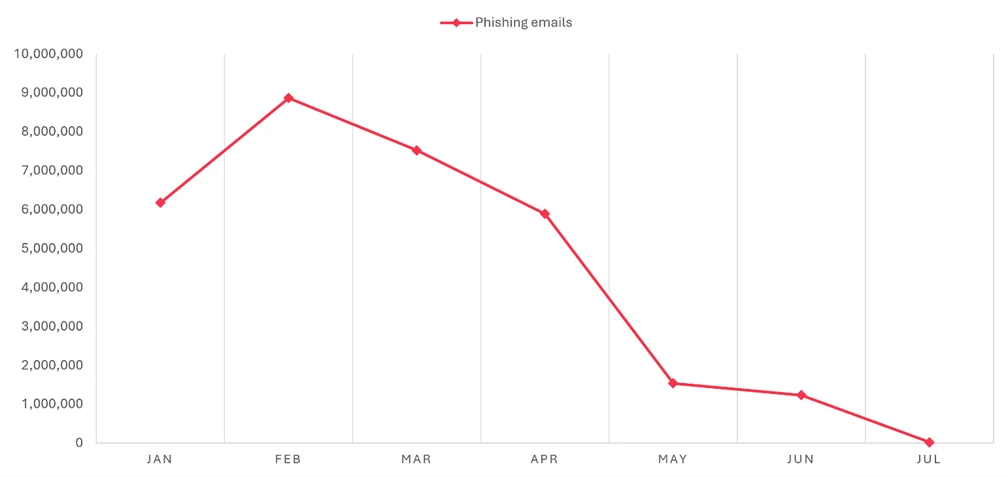
The effects of the March disruption of the Tycoon2FA phishing-as-a-service (PhaaS) platform also remained evident. By July, Microsoft detected approximately 21,000 phishing messages linked to the platform, down 99.8% from 8.9 million in February, the last full month before the operation.
This blog provides a view of email threat activity across Q3 2026, examining shifts in phishing techniques, malicious payloads, business contact impersonation (BCI), and Teams-based threats. We also highlight spoofed business-service sender domains and two campaigns that show how attackers used familiar work requests to make malicious messages appear credible. Together with recommendations, Microsoft Defender detections, and hunting queries, these findings can help defenders assess where existing protections may be weakened and investigate activity across email and collaboration platforms.
Spoofed sender domains
Requests to sign a document, review an invoice, or respond to a survey are routine business communications. Attackers exploit that familiarity by spoofing the sender domains of the legitimate services that deliver them. Rather than relying only on a misleading display name or a lookalike domain, these messages claim the service’s actual domain as their sender identity.
Microsoft detected approximately 129 million malicious messages spoofing the business-service domains tracked in this analysis during Q3. Activity had remained consistently high since at least May, at roughly 41 million to 46 million messages a month. DocuSign was the most frequently spoofed brand in September, accounting for 29% of that month’s total. Adobe, SurveyMonkey, and Barracuda also saw increases toward the end of the quarter, even as overall spoofing volume remained broadly steady.

The more consequential finding was how security exceptions affected these messages after detection. Despite failing email authentication checks and being identified as malicious, many were associated with tenant- or user-level overrides. In September, overrides applied to 63% of messages with a recorded security outcome, with tenant-level overrides accounting for most of them.
The figures do not establish that recipients opened the messages or that accounts were compromised. They do show why exception policies deserve attention alongside detection coverage. An organization may create an exception to avoid interrupting a legitimate business workflow, but an overly broad exception can also weaken protection against messages impersonating that workflow. Familiar branding is not a substitute for an authenticated sender.
QR code phishing attacks
QR code phishing ended Q3 far below the levels seen during its early-year surge. Microsoft detected approximately 12.1 million attacks over the quarter, down 67% from Q2. The decline continued through September despite the broader increase in email threats, leaving monthly QR code volume 86% below its March peak.

Much of the volume reduction came from the attachments that had supported that earlier growth:
- PDF attachments remained the most common delivery format in Q3, accounting for 78% of QR code attacks in July and August before dropping to 61% in September. Nonetheless, the volume of PDFs carrying malicious QR codes fell by roughly 65% by the end of the quarter.
- DOC/DOCX attachments accounted for 14% of QR code attacks in July and August before rising to 20% in September. Word document delivery volume similarly contracted in Q3, falling 39% between July and September following a sharp drop at the start of the quarter.
- Email-embedded QR codes increased from 5% of attacks in July to 12% in September. After dropping to near-zero in Q2, the volume of malicious QR codes embedded in email bodies more than tripled by the end of Q3, although the method remained a smaller delivery category than attachments.

The distinction between delivery methods matters for inspection coverage, but not for the recipient’s experience: either attachment or embedded formats can move a user from a message on a managed device to a phishing page on a personal phone. The reduction in volume has not changed that underlying challenge.
CAPTCHA-gated phishing tactics
CAPTCHA-gated phishing began to recover while QR code attacks continued to fall. By September, Microsoft detected 3.1 million CAPTCHA-gated attacks, nearly twice the volume seen at July’s low. Activity remained well below its March peak, but the recovery ended several months of sustained decline.

The increase in CAPTCHA-gated phishing attacks was not confined to a single attachment format as delivery methods shifted throughout Q3, though SVG attachments were central to the initial recovery.
- SVG attachment volume increased sixfold in August, accounting for almost half of September’s total CAPTCHA-gated phishing attacks. Up from 17% of attacks in July, SVGs represented 65% of CAPTCHA-gated phishing attacks in August, remained elevated at 49% in September, and were the leading delivery method at the quarter end.
- Email-embedded URLs accounted for 49% of attacks in July before falling to 19% in August as SVG activity surged. URL-delivered attacks more than doubled in September, reclaiming 30% of attacks.
- PDF attachments declined from 22% of attacks in July to 12% in August, remaining at 12% in September.
- HTML attachments declined from 9% of attacks in July to 2% in August, then more than tripled in volume in September to account for 6% of attacks.
- DOC/DOCX attachments remained comparatively uncommon throughout Q3, representing only 1% of attacks each month.

Malicious payloads
The dominant risk from malicious attachments continued to be credential theft, not malware installation. Approximately 94-96% of payload-based attacks during Q3 directed recipients toward a phishing site or presented a fraudulent sign-in page locally. An attachment did not need to install software to put an account at risk.
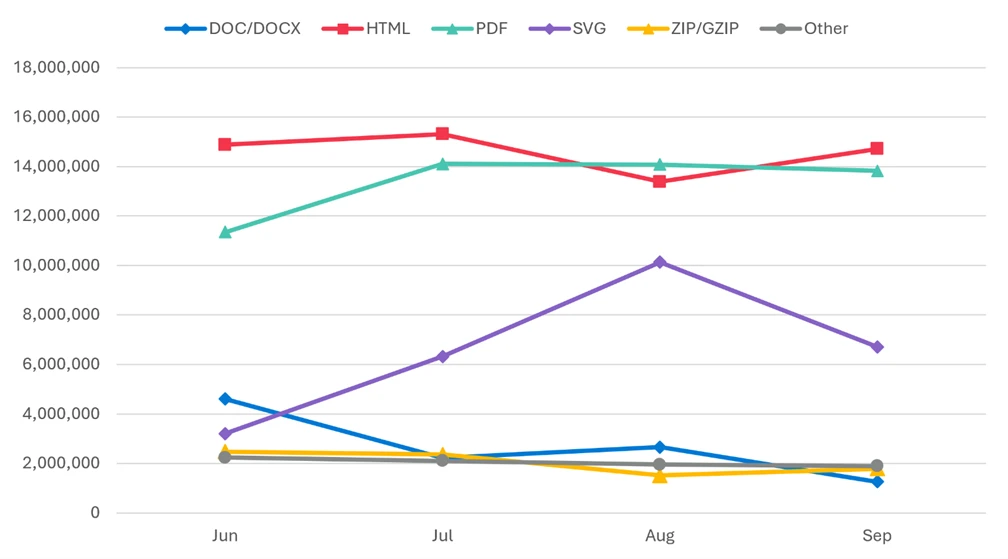
HTML and PDF attachments remained the two most common malicious payload types during Q3, together accounting for approximately 56–62% of payload-based attacks each month, while the more significant change was the return of SVG files:

- HTML attachments accounted for nearly two-thirds of malicious payloads and remained relatively steady across the quarter. HTML files ranked first in July at 32% of attacks before declining to 26% in August and recovering to 29% in September.
- PDF attachments accounted for 27–30% of attacks and were the leading payload type in August and September. Volume remained comparatively stable, declining only 2% between July and September.
- SVG attachments increased from 13% of attacks in July to 20% in August, when volume reached 10.1 million—the highest monthly volume in more than a year. Volume then fell 34% in September, although SVGs still represented 13% of attacks and remained roughly 50% higher than the monthly average for the first half of 2026.
- DOC/DOCX attachments declined from approximately 5% of attacks in July and August to less than 3% in September, falling 76% below its monthly average volume for the first half of 2026.
- ZIP/GZIP attachments declined from 5% of attacks in July to 3% in August before recovering slightly to 4% in September. Raw volume remained 24% below July.
The reduced use of Word documents alongside the renewed use of SVG files left a different mix of attachment threats, though credential theft remained the dominant objective.
CAPTCHA-gated phishing accounted for only part of the malicious SVG activity. The resurgence was therefore broader than the use of SVG files to deliver that particular technique.
Business contact impersonation
Microsoft defines business contact impersonation (BCI) as a text-based attack targeting enterprise users that impersonates a trusted entity for the purpose of persuading a recipient into initiating a fraudulent financial transaction or sending the attacker sensitive documents.
BCI volume declined throughout Q3, totaling approximately 6.2 million attacks. That was substantially below Q2, although the comparison is influenced by the unusually large spike in April. By September, monthly activity had fallen to its lowest level since at least July 2025.

The reduction in overall volume also concealed differences among financial lures. Generic messages continued to dominate initial BCI contact during Q3, but explicit task and financial requests gained share as overall attack volume declined:
- Generic outreach messages, such as “Are you at your desk?”, accounted for 82% of attacks in July and August before declining to 79% in September. Raw volume fell 14% across the quarter, reinforcing that operators still overwhelmingly favored establishing contact before introducing a fraudulent request.
- Generic task requests represented 8–10% of attacks during Q3, increasing from 9% in July to 10% in September despite a 9% decline in raw volume.
Within the smaller subset of explicit financial requests:
- Payroll update requests were the most common financial lure, accounting for 6% of attacks in July and August and 7% in September. Raw volume remained broadly stable at approximately 126,000–130,000 attacks per month.
- Invoice payment requests recovered from June’s low. Volume increased 34% in July, 25% in August, and 89% in September, more than tripling between June and September. Their share reached 3% in September, its highest level since March.
- Gift card requests remained at 2% of attacks each month, while raw volume declined 9% from July to September.

The decline in BCI overall did not extend equally to the requests reaching payment and payroll staff.
Microsoft Teams threats
Microsoft observed approximately 141,000 malicious Teams call attempts during Q3. Activity peaked in July before declining 31% by September, although September volume remained 38% above the monthly average for the first half of 2026. Teams-based attacks continued to use live interactions across chat, voice, screen sharing, and remote-support tools to facilitate remote access, credential theft, and hands-on-keyboard compromise.

Attackers increasingly moved away from display names that explicitly announced an IT- or tech-related support role. Ordinary personal-name display names rose from 46% of the observed July sample to 88% in September, while explicit help desk identities fell from 17% to 2%.

This shift does not necessarily mean attackers abandoned IT support stories. A personal name can accompany a claim to work for the help desk, while the underlying account address retains technical or service-related wording. More targeted attempts also used domains resembling the intended victim organization’s domain, emphasizing that the visible name is only one part of the impersonation.
Voice phishing attempts peaked in July and then receded, but September volume remained above the levels observed early in 2026. Calls were concentrated during recipients’ weekday working hours, when a live response was more likely. These attempts included unanswered, rejected, and short-lived calls, partly reflecting Microsoft’s expanding visibility and ongoing efforts to strengthen protective measures against social engineering abuse. Attemps should not be interpreted as successful attacker interactions.
Notable phishing campaigns
The following campaigns were observed during the quarter and highlight notable credential phishing, BCI, and malware delivery activity. For analysis of a separate Teams-based IT-support impersonation campaign observed in August, see Impersonating IT support: Threat actors turn remote session into enterprise-wide access.
Salary review lure delivers personalized QR code attachment for device code credential capture targeting legal organizations
On August 19, 2026, Microsoft Defender Research observed a phishing campaign targeting more than 10,000 users across more than 4,800 organizations, almost exclusively located in the United States. While most phishing attacks typically don’t focus on a single vertical, this campaign targeted the professional services sector, specifically law firms and legal organizations. Messages in this campaign were sent out over a 13-hour period between 13:27 UTC on August 19, 2026, and 2:59 UTC on August 20, 2026.

Emails in this campaign were sent with the subject line “Salary Review” from smtp[@]wekash[.]net via Amazon Simple Email Service. The email body carried no visible text and the sole payload was a Word document attachment named Your-Q3-Compensation-Summary.docx.

The Word document impersonated the recipient’s own organization, displaying company branding and addressing the recipient by name. The message claimed that the recipient’s compensation had been revised following a Q2 performance review and that updated details were ready for review. A QR code in the document carried an instruction to scan it to access the revised details. This approach moved the phishing URL out of the email body and into an image, bypassing email gateway controls that scan text-based links but do not decode QR code images.
Scanning the QR code would have directed users to an attacker-controlled phishing page impersonating a Microsoft OneDrive sign-in portal hosted on the domain splace[.]co[.]za. The page presented an alphanumeric code and instructed recipients to copy it and proceed to the Microsoft sign-in portal.
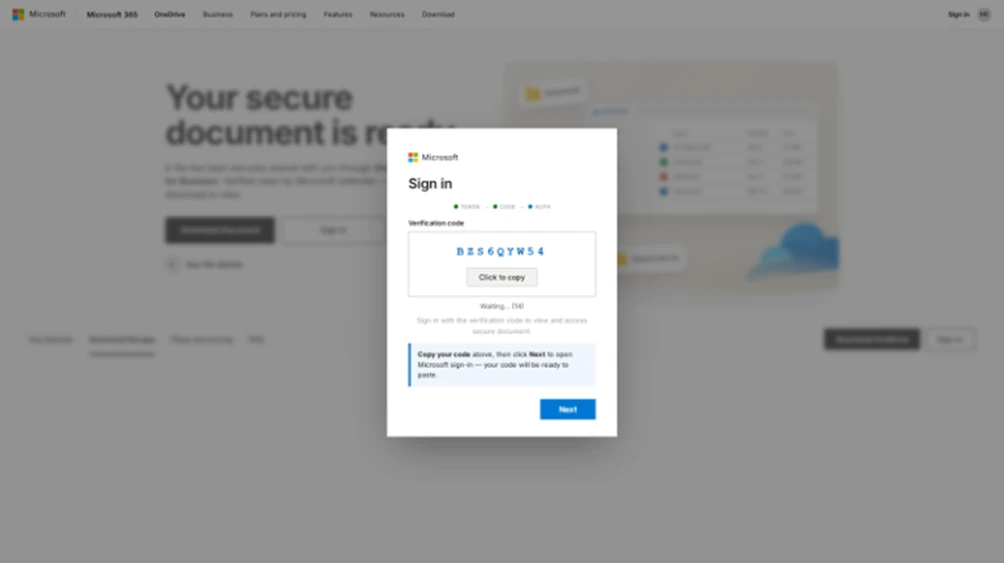
The phishing page used a device code phishing technique, which works by making an authentication request to Microsoft’s device authentication service before the recipient arrived, receiving a user code in return, and embedding that code into the page. When a recipient copied the code and proceeded, the page redirected them to the legitimate Microsoft device authentication portal at microsoft.com/devicelogin, where they entered the code and signed in. Completing that sign in would have transferred a valid session token to the attacker. The token granted persistent access to the recipient’s Microsoft 365 account without ever exposing the password and without re-triggering multifactor authentication (MFA). A countdown timer on the page signaled that each code had a limited validity window, pressing recipients to act quickly.
Spanish-language purchase order and payroll campaign leads to Agent Tesla malware
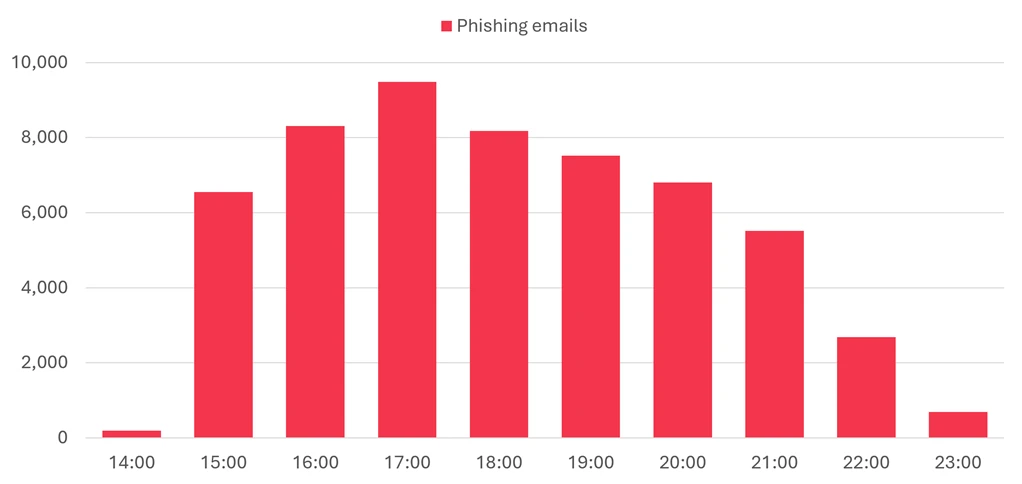
On September 21, 2026, Microsoft Defender Research observed a phishing campaign targeting more than 56,000 users across more than 8,100 organizations. The campaign primarily targeted users in Spanish-speaking countries, with Colombia accounting for the largest share of intended recipients (15%), followed by the United States (12%), Mexico (12%), Chile (11%), and Spain (8%). Like most large-scale phishing attacks, this campaign did not focus on a single vertical, but instead targeted a broad range of industries, most notably retail and consumer goods (27%), manufacturing and agriculture (19%), and financial services (13%). Messages in this campaign were sent out over an almost nine-hour period between 14:57 UTC and 23:35 UTC on September 21, 2026.
Two lure variations were observed throughout the duration of the campaign: a purchase order theme, which was used in 63% of messages, and a payroll theme, which was used in the remaining 37%. Both variations were sent from the address contacto06[@]carloxmextos[.]org. Sender Policy Framework (SPF), DomainKeys Identified Mail (DKIM), and Domain-based Message Authentication, Reporting, and Conformance (DMARC) all passed for that domain, so the messages did not depend on simple address forgery. The actor changed the display name to resemble a sales or human resources identity associated with the recipient’s organization. That combination gave the messages technically valid authentication while using the visible sender identity and familiar business context to support the impersonation.
The purchase order lure variation used the reply-style subject “Re: solicitud de cotización”. Its body said, “Buen Dia”, claimed that a purchase order was attached, and asked the recipient to confirm receipt before closing with the lowercase “saludos”. The abrupt wording, inconsistent capitalization, and copied professional signature made the message look like a short continuation of an existing commercial exchange while avoiding details that a recipient could easily challenge.
The attached file, Nuevo orden de compra – 21092026.pdf.uu, was a RAR archive despite its uncommon .uu ending and PDF-like name. Inside it was Nuevo orden de compra – 21092026.pdf.js, a JavaScript downloader whose second extension exposed the executable script type only after extraction. If run, the script fetched a file named Lincoln.ps1 from a campaign-controlled object in Firebase Storage, and that PowerShell payload led to Agent Tesla malware. The nested archive and misleading extensions separated the visible business document theme from the code that executed, while the cloud-hosted download gave the actor a remotely accessible staging point.

The payroll-themed lure used the subject “Nomina 21.09.2026”. It addressed the recipient by name, said the September 21 payroll list was attached, and signed off as a human resources manager. The date-specific payroll pretext created an immediate work-related reason to open the file, while the personalized greeting made a bulk message appear locally relevant.
The payroll lure’s attachment, Nomina 21.09.2026.xml.001, was also a RAR archive. Extraction produced Nomina 21.09.2026.xml.exe, an Agent Tesla executable disguised with an XML-themed double extension. Unlike the purchase order delivery chain, this branch did not require a separate downloader in the supplied evidence, but both paths used the same sender infrastructure, attachment camouflage, date, and malware family. Agent Tesla is commonly used to collect credentials and other information from an infected host, so the shared final payload suggested that credential and information theft were the campaign’s likely objective.

Defending against email and collaboration threats
Microsoft recommends the following mitigations to reduce the impact of this threat. Check the recommendations card for the deployment status of monitored mitigations.
- Microsoft helps organizations reduce the risk of phishing and social engineering in Teams through user awareness and layered, built-in protections. Users should exercise caution with external connection requests and messages, including verifying a sender’s identity and requests before acting on them. Administrators can also block external Teams users and specify which users in their organization are permitted to chat or meet with people outside the enterprise. These flexible controls help organizations manage risk for employees in sensitive roles and departments. Teams will also be introducing AI-powered phishing detection that uses conversation context to identify phishing and social engineering in higher-risk messaging scenarios, particularly first-contact chats with external users. Together, these measures help organizations collaborate more securely in Teams.
- Review the recommended settings for Exchange Online Protection and Microsoft Defender for Office 365 to ensure your organization has established essential defenses and knows how to monitor and respond to threat activity.
- Invest in user awareness training and phishing simulations. Attack simulation training in Microsoft Defender for Office 365, which also includes simulating phishing messages in Microsoft Teams, is one approach to running realistic attack scenarios in your organization.
- Enable Zero-hour auto purge (ZAP) in Defender for Office 365 to quarantine sent mail in response to newly acquired threat intelligence and retroactively neutralize malicious phishing, spam, or malware messages that have already been delivered to mailboxes.
- Responders can also manually check for and purge unwanted emails containing URLs and/or Subject fields that are similar, but not identical, to those of known bad messages. Investigate malicious email that was delivered in Microsoft 365 and use Threat Explorer to find and delete phishing emails.
- Turn on Safe Links and Safe Attachments in Microsoft Defender for Office 365.
- Enable network protection in Microsoft Defender for Endpoint.
- Encourage users to use Microsoft Edge and other web browsers that support Microsoft Defender SmartScreen, which identifies and blocks malicious websites, including phishing sites, scam sites, and sites that host malware.
- Enable passwordless authentication methods (for example, Windows Hello, FIDO keys, or Microsoft Authenticator) for accounts that support passwordless. For accounts that still require passwords, use authenticator apps like Microsoft Authenticator for MFA. Refer to this article for the different authentication methods and features.
- Conditional access policies can also be scoped to strengthen privileged accounts with phishing-resistant MFA.
- Configure automatic attack disruption in Microsoft Defender XDR. Automatic attack disruption is designed to contain attacks in progress, limit the impact on an organization’s assets, and provide more time for security teams to remediate the attack fully.
Microsoft Defender detections
Microsoft Defender customers can refer to the list of applicable detections below. Microsoft Defender coordinates detection, prevention, investigation, and response across endpoints, identities, email, and apps to provide integrated protection against attacks like the threat discussed in this blog.
Microsoft Defender for Endpoint
The following alert might indicate threat activity associated with this threat. The alert, however, can be triggered by unrelated threat activity.
- Suspicious activity likely indicative of a connection to an adversary-in-the-middle (AiTM) phishing site
Microsoft Defender for Office 365
The following alerts might indicate threat activity associated with this threat. These alerts, however, can be triggered by unrelated threat activity.
- A potentially malicious URL click was detected
- A user clicked through to a potentially malicious URL
- Suspicious email sending patterns detected
- Email messages containing malicious URL removed after delivery
- Email messages removed after delivery
- Email reported by user as malware or phish
Microsoft Security Copilot
Microsoft Security Copilot is embedded in Microsoft Defender and provides security teams with AI-powered capabilities to summarize incidents, analyze files and scripts, summarize identities, use guided responses, and generate device summaries, hunting queries, and incident reports.
Customers can also deploy AI agents, including the following Microsoft Security Copilot agents, to perform security tasks efficiently:
- Threat Intelligence Briefing agent
- Phishing Triage agent
- Threat Hunting agent
- Dynamic Threat Detection agent
Security Copilot is also available as a standalone experience where customers can perform specific security-related tasks, such as incident investigation, user analysis, and vulnerability impact assessment. In addition, Security Copilot offers developer scenarios that allow customers to build, test, publish, and integrate AI agents and plugins to meet unique security needs.
Threat intelligence reports
Microsoft Defender XDR customers can use the following threat analytics reports in the Defender portal (requires license for at least one Defender XDR product) to get the most up-to-date information about the activity and techniques discussed in this blog. These reports provide intelligence, protection information, and recommended actions to prevent, mitigate, or respond to associated threats found in customer environments.
- Activity Profile: Email threat landscape, September 2026
- Activity Profile: Email threat landscape, August 2026
- Activity Profile: Email threat landscape, July 2026
- Tool Profile: Tycoon2FA
- Actor Profile: Storm-1747
- Technique Profile: QR code phishing
- Technique Profile: ClickFix technique leverages clipboard to run malicious commands
- Threat Overview Profile: Business email compromise
- Threat Overview Profile: Adversary-in-the-middle credential phishing
- Activity Profile: Salary review lure delivers personalized QR code attachment for device code credential capture targeting legal organizations
- Activity Profile: Spanish-language purchase-order and payroll campaign leads to Agent Tesla malware
Microsoft Security Copilot customers can also use the Microsoft Security Copilot integration in Microsoft Defender Threat Intelligence, either in the Security Copilot standalone portal or in the embedded experience in the Microsoft Defender portal to get more information about this threat actor.
Hunting queries
Microsoft Defender XDR
Microsoft Defender XDR customers can run the following advanced hunting queries to find related activity in their networks:
Salary review campaign emails by sender address
The following query identifies emails associated with the August 19 campaign using a message’s sending email address.
EmailEvents
| where SenderMailFromAddress == “smtp@wekash.net”
Spanish-language purchase order and payroll campaign emails by sender address
The following query identifies emails associated with the September 21 campaign using a message’s sending email address.
EmailEvents
| where SenderMailFromAddress == "contacto06@carloxmextos.org"
Indicators of compromise (IOCs)
| Indicator | Type | Description | First seen | Last seen |
| wekash[.]net | Domain | Sender domain used to distribute campaign emails via Amazon SES | 2026-08-19 | 2026-08-20 |
| smtp@wekash[.]net | Email address | Sender email address observed in campaign messages | 2026-08-19 | 2026-08-20 |
| Your-Q3-Compensation-Summary.docx | File name | Word document attachment carrying the compensation lure and QR code | 2026-08-19 | 2026-08-20 |
| splace[.]co[.]za | Domain | Domain hosting phishing content | 2026-08-19 | 2026-08-20 |
| https://splace[.]co[.]za/0987643345678908765421234567890987654320987654321223456787654/onedrive/ | URL | URL hosting phishing content | 2026-08-19 | 2026-08-20 |
| carloxmextos[.]org | Domain | Authenticated domain used to send both campaign variations | 2026-09-21 | 2026-09-21 |
| contacto06@carloxmextos[.]org | Email address | Sender address used for both observed lure variations | 2026-09-21 | 2026-09-21 |
| Nuevo orden de compra – 21092026.pdf.uu | File name | RAR attachment used in the purchase order variation | 2026-09-21 | 2026-09-21 |
| Nuevo orden de compra – 21092026.pdf.js | File name | JavaScript downloader contained in the purchase order archive | 2026-09-21 | 2026-09-21 |
| Lincoln.ps1 | File name | PowerShell payload downloaded by the purchase order branch | 2026-09-21 | 2026-09-21 |
| Nomina 21.09.2026.xml.001 | File name | RAR attachment used in the payroll variation | 2026-09-21 | 2026-09-21 |
| Nomina 21.09.2026.xml.exe | File name | Agent Tesla executable contained in the payroll archive | 2026-09-21 | 2026-09-21 |
| BEDD2297739632DA8EE470367295FE976E55BE74D628DCAEE7FA98121EE530F1 | SHA-256 | SHA-256 of the purchase order RAR attachment | 2026-09-21 | 2026-09-21 |
| CE832350C165522DB03DB040CA07917976D1A91F97E7016EA36DCC6B53E0EB13 | SHA-256 | SHA-256 of the JavaScript downloader | 2026-09-21 | 2026-09-21 |
| F8B49891D15A578E4DE28FECF99D0D78DB6B2C3DA81CD51C931B8D128E60C187 | SHA-256 | SHA-256 of the PowerShell payload associated with Agent Tesla delivery | 2026-09-21 | 2026-09-21 |
| C438B9A3BB67E2C10EFF0D01513422DC17DCE7C5508303A680E46F3DCEC886EF | SHA-256 | SHA-256 of the payroll RAR attachment | 2026-09-21 | 2026-09-21 |
| 72966B30BBD87E42C683D2AC7A42BB62021FC14389D508551432FFD70D62F33A | SHA-256 | SHA-256 of the Agent Tesla executable from the payroll variation | 2026-09-21 | 2026-09-21 |
Learn more
For the latest security research from the Microsoft Threat Intelligence community, check out the Microsoft Threat Intelligence Blog.
To get notified about new publications and to join discussions on social media, follow us on LinkedIn, X (formerly Twitter), and Bluesky.
To hear stories and insights from the Microsoft Threat Intelligence community about the ever-evolving threat landscape, listen to the Microsoft Threat Intelligence podcast.